



Создание RAG с помощью Milvus и Gemini
API Gemini и Google AI Studio помогут вам начать работу с новейшими моделями Google и воплотить свои идеи в масштабируемые приложения. Gemini предоставляет доступ к мощным языковым моделям, таким как « Gemini-2.5-Flash » и « Gemini-2.5-Pro », для решения таких задач, как генерация текста, обработка документов, обработка изображений, анализ аудио и многое другое. Он также предлагает « Gemini Embedding 2 » — мультимодальную модель встраивания, поддерживающую текст, изображения, видео, аудио и PDF-документы с гибкими размерами выходных данных благодаря технологии Matryoshka Representation Learning. API позволяет вводить длинный контекст, состоящий из миллионов токенов, настраивать модели под конкретные задачи, генерировать структурированные результаты, такие как JSON, а также использовать такие возможности, как семантический поиск и выполнение кода.
В этом руководстве мы покажем вам, как построить конвейер RAG (Retrieval-Augmented Generation) с использованием Milvus и Gemini. Мы будем использовать модель Gemini для генерации ответов на основе заданного запроса, дополненных релевантной информацией, извлечённой из Milvus.
Подготовка
Зависимости и среда
Сначала установите необходимые пакеты:
$ pip install --upgrade pymilvus milvus-lite google-genai requests tqdm
Если вы используете Google Colab, для активации только что установленных зависимостей может потребоваться перезапустить среду выполнения (щелкните меню «Runtime» в верхней части экрана и выберите «Restart session» в раскрывающемся меню).
Сначала необходимо войти в платформу Google AI Studio и задать ключ API GEMINI_API_KEY в качестве переменной среды.
import os

os.environ["GEMINI_API_KEY"] = "***********"
Подготовка данных
В качестве частного знания в нашей системе RAG мы используем страницы часто задаваемых вопросов (FAQ) из документации Milvus версии 2.4.x, которые являются хорошим источником данных для простого конвейера RAG.
Скачайте zip-файл и распакуйте документы в папку milvus_docs.
$ wget https://github.com/milvus-io/milvus-docs/releases/download/v2.4.6-preview/milvus_docs_2.4.x_en.zip
$ unzip -q milvus_docs_2.4.x_en.zip -d milvus_docs
Мы загружаем все файлы Markdown из папки milvus_docs/en/faq. Для каждого документа мы просто используем символ «# » для разделения содержимого в файле, что позволяет приблизительно разделить содержание каждой основной части файла Markdown.
from glob import glob

text_lines = []

for file_path in glob("milvus_docs/en/faq/*.md", recursive=True):
    with open(file_path, "r") as file:
        file_text = file.read()

    text_lines += file_text.split("# ")
Подготовка LLM и модели встраивания
В качестве LLM мы используем папку gemini-2.5-flash, а в качестве модели встраивания — gemini-embedding-2-preview. gemini-embedding-2-preview — это новейшая мультимодальная модель встраивания от Google, поддерживающая текст, изображения, видео, аудио и PDF-документы с гибкими размерами выходных данных (128–3 072) благодаря методу Matryoshka Representation Learning.
Попробуем сгенерировать тестовый ответ с помощью LLM:
from google import genai

client = genai.Client(api_key=os.environ["GEMINI_API_KEY"])

response = client.models.generate_content(
    model="gemini-2.5-flash", contents="who are you"
)
print(response.text)
I am a large language model, trained by Google.

I'm designed to process and generate human-like text based on the vast amount of data I was trained on. This allows me to:

*   Answer questions
*   Provide summaries
*   Generate creative content
*   Translate languages
*   And much more

I don't have personal experiences, feelings, or consciousness. I'm a tool designed to be helpful and informative.
Сгенерируем тестовое вложение и выведем его размерность и первые несколько элементов.
test_embeddings = client.models.embed_content(
    model="gemini-embedding-2-preview", contents=["This is a test1", "This is a test2"]
)

embedding_dim = len(test_embeddings.embeddings[0].values)
print(embedding_dim)
print(test_embeddings.embeddings[0].values[:10])
3072
[-0.016769307, 0.013630492, 0.020277105, 0.0035285393, 0.003968259, -0.013498845, 0.028525498, 0.025498547, -0.021553498, 0.015233516]
Загрузите данные в Milvus
Создать коллекцию
Инициализируем клиент Milvus и настроим нашу коллекцию:
from pymilvus import MilvusClient

milvus_client = MilvusClient(uri="./milvus_demo.db")

collection_name = "my_rag_collection"
Что касается аргумента ` MilvusClient`:
- Наиболее удобным способом является указание
uriв виде локального файла, например./milvus.db, так как в этом случае Milvus Lite автоматически используется для хранения всех данных в этом файле. - Если у вас большой объем данных, вы можете настроить более производительный сервер Milvus на Docker или Kubernetes. В этой конфигурации в качестве
uriиспользуйте URI сервера, напримерhttp://localhost:19530. - Если вы хотите использовать Zilliz Cloud — полностью управляемый облачный сервис для Milvus, — настройте параметры
uriиtoken, которые соответствуют публичной конечной точке и ключу API в Zilliz Cloud.
Проверьте, существует ли коллекция, и, если да, удалите её.
if milvus_client.has_collection(collection_name):
    milvus_client.drop_collection(collection_name)
Создайте новую коллекцию с указанными параметрами.
Если мы не укажем информацию о полях, Milvus автоматически создаст поле по умолчанию id для первичного ключа и поле vector для хранения векторных данных. Зарезервированное поле JSON используется для хранения полей, не определенных в схеме, и их значений.
milvus_client.create_collection(
    collection_name=collection_name,
    dimension=embedding_dim,
    metric_type="IP",  # Inner product distance
    # Strong consistency waits for all loads to complete, adding latency with large datasets
    # consistency_level="Strong",  # Strong consistency level
)
Вставка данных
Пройдите по строкам текста, создайте вложения, а затем вставьте данные в Milvus.
Здесь представлено новое поле text, которое не определено в схеме коллекции. Оно будет автоматически добавлено в динамическое поле reserved JSON, которое на высоком уровне можно рассматривать как обычное поле.
from tqdm import tqdm

data = []

doc = client.models.embed_content(model="gemini-embedding-2-preview", contents=text_lines)

for i, line in enumerate(tqdm(text_lines, desc="Creating embeddings")):
    data.append({"id": i, "vector": doc.embeddings[i].values, "text": line})

milvus_client.insert(collection_name=collection_name, data=data)
Creating embeddings: 100%|██████████| 72/72 [00:00<00:00, 337796.30it/s]


{'insert_count': 72, 'ids': [0, 1, 2, 3, 4, 5, 6, 7, 8, 9, 10, 11, 12, 13, 14, 15, 16, 17, 18, 19, 20, 21, 22, 23, 24, 25, 26, 27, 28, 29, 30, 31, 32, 33, 34, 35, 36, 37, 38, 39, 40, 41, 42, 43, 44, 45, 46, 47, 48, 49, 50, 51, 52, 53, 54, 55, 56, 57, 58, 59, 60, 61, 62, 63, 64, 65, 66, 67, 68, 69, 70, 71], 'cost': 0}
Построение RAG
Получение данных по запросу
Давайте зададим часто задаваемый вопрос о Milvus.
question = "How is data stored in milvus?"
Найдите этот вопрос в коллекции и получите три лучших семантических совпадения.
quest_embed = client.models.embed_content(model="gemini-embedding-2-preview", contents=question)

search_res = milvus_client.search(
    collection_name=collection_name,
    data=[quest_embed.embeddings[0].values],
    limit=3,  # Return top 3 results
    search_params={"metric_type": "IP", "params": {}},  # Inner product distance
    output_fields=["text"],  # Return the text field
)
Давайте посмотрим на результаты поиска по этому запросу
import json

retrieved_lines_with_distances = [
    (res["entity"]["text"], res["distance"]) for res in search_res[0]
]
print(json.dumps(retrieved_lines_with_distances, indent=4))
[
    [
        " Where does Milvus store data?\n\nMilvus deals with two types of data, inserted data and metadata. \n\nInserted data, including vector data, scalar data, and collection-specific schema, are stored in persistent storage as incremental log. Milvus supports multiple object storage backends, including [MinIO](https://min.io/), [AWS S3](https://aws.amazon.com/s3/?nc1=h_ls), [Google Cloud Storage](https://cloud.google.com/storage?hl=en#object-storage-for-companies-of-all-sizes) (GCS), [Azure Blob Storage](https://azure.microsoft.com/en-us/products/storage/blobs), [Alibaba Cloud OSS](https://www.alibabacloud.com/product/object-storage-service), and [Tencent Cloud Object Storage](https://www.tencentcloud.com/products/cos) (COS).\n\nMetadata are generated within Milvus. Each Milvus module has its own metadata that are stored in etcd.\n\n###",
        0.864
    ],
    [
        "Why is there no vector data in etcd?\n\netcd stores Milvus module metadata; MinIO stores entities.",
        0.7923
    ],
    [
        "What is the maximum dataset size Milvus can handle?\n\n  \nTheoretically, the maximum dataset size Milvus can handle is determined by the hardware it is run on, specifically system memory and storage:\n\n- Milvus loads all specified collections and partitions into memory before running queries. Therefore, memory size determines the maximum amount of data Milvus can query.\n- When new entities and and collection-related schema (currently only MinIO is supported for data persistence) are added to Milvus, system storage determines the maximum allowable size of inserted data.\n\n###",
        0.7857
    ]
]
Используем LLM для получения ответа RAG
Преобразуем найденные документы в строковый формат.
context = "\n".join(
    [line_with_distance[0] for line_with_distance in retrieved_lines_with_distances]
)
Определим системные и пользовательские подсказки для языковой модели. Эта подсказка формируется на основе документов, полученных из Milvus.
from google.genai import types

SYSTEM_PROMPT = """
Human: You are an AI assistant. You are able to find answers to the questions from the contextual passage snippets provided.
"""
USER_PROMPT = f"""
Use the following pieces of information enclosed in <context> tags to provide an answer to the question enclosed in <question> tags.
<context>
{context}
</context>
<question>
{question}
</question>
"""
Используйте Gemini для генерации ответа на основе подсказок.
response = client.models.generate_content(
    model="gemini-2.5-flash",
    config=types.GenerateContentConfig(system_instruction=SYSTEM_PROMPT),
    contents=USER_PROMPT,
)
print(response.text)
Milvus stores data in two main ways:

1.  **Inserted Data:** This includes vector data, scalar data, and collection-specific schema. This type of data is stored in persistent storage as an incremental log. Milvus supports various object storage backends for this, such as MinIO, AWS S3, Google Cloud Storage (GCS), Azure Blob Storage, Alibaba Cloud OSS, and Tencent Cloud Object Storage (COS).
2.  **Metadata:** Metadata is generated within Milvus by its various modules. Each module's metadata is stored in etcd.
Мультимодальный поиск
Поскольку « gemini-embedding-2-preview » отображает текст, изображения и другие модальности в одно и то же пространство вложений, мы можем выполнять кросс-модальный поиск — например, использовать текстовый запрос для поиска наиболее релевантных изображений.
Подготовка данных изображений
Мы загружаем набор диаграмм архитектуры RAG из репозитория Milvus Bootcamp для использования в качестве нашего набора данных изображений.
import urllib.request
from pathlib import Path

image_dir = Path("images")
image_dir.mkdir(exist_ok=True)

image_files = [
    "vanilla_rag.png",
    "hyde.png",
    "query_routing.png",
    "self_reflection.png",
    "hybrid_and_rerank.png",
    "hierarchical_index.png",
]

base_url = "https://raw.githubusercontent.com/milvus-io/bootcamp/master/pics/advanced_rag/"

for fname in image_files:
    path = image_dir / fname
    if not path.exists():
        urllib.request.urlretrieve(base_url + fname, path)
        print(f"Downloaded {fname}")
    else:
        print(f"Already exists {fname}")

print(f"\nTotal images: {len(image_files)}")
Downloaded vanilla_rag.png
Downloaded hyde.png
Downloaded query_routing.png
Downloaded self_reflection.png
Downloaded hybrid_and_rerank.png
Downloaded hierarchical_index.png

Total images: 6
Встраивание изображений и хранение в Milvus
Мы считываем каждое изображение в виде байтов и передаем его в gemini-embedding-2-preview для генерации вложений, а затем сохраняем их в новой коллекции Milvus.
from google.genai import types

image_data = []

for fname in image_files:
    path = image_dir / fname
    with open(path, "rb") as f:
        image_bytes = f.read()

    result = client.models.embed_content(
        model="gemini-embedding-2-preview",
        contents=types.Part.from_bytes(data=image_bytes, mime_type="image/png"),
    )
    image_data.append(
        {
            "id": len(image_data),
            "vector": result.embeddings[0].values,
            "filename": fname,
        }
    )
    print(f"Embedded {fname}")

# Create a new collection for images
image_collection = "image_collection"
if milvus_client.has_collection(image_collection):
    milvus_client.drop_collection(image_collection)

milvus_client.create_collection(
    collection_name=image_collection,
    dimension=len(image_data[0]["vector"]),
    metric_type="IP",
)

milvus_client.insert(collection_name=image_collection, data=image_data)
print(f"\nInserted {len(image_data)} image embeddings (dim={len(image_data[0]['vector'])})")
Embedded vanilla_rag.png
Embedded hyde.png
Embedded query_routing.png
Embedded self_reflection.png
Embedded hybrid_and_rerank.png
Embedded hierarchical_index.png

Inserted 6 image embeddings (dim=3072)
Кросс-модальный поиск: текстовый запрос → результаты в виде изображений
Теперь давайте воспользуемся текстовым запросом для поиска по вложениям изображений. Поскольку и текст, и изображения отображаются в одно и то же пространство вложений, мы можем напрямую сравнивать их.
from IPython.display import display, Image

text_queries = [
    "How does a basic RAG pipeline work?",
    "What is the hypothetical document embedding approach?",
    "How to combine hybrid search with reranking?",
]

for query in text_queries:
    query_embed = client.models.embed_content(
        model="gemini-embedding-2-preview", contents=query
    )

    results = milvus_client.search(
        collection_name=image_collection,
        data=[query_embed.embeddings[0].values],
        limit=1,
        search_params={"metric_type": "IP", "params": {}},
        output_fields=["filename"],
    )

    best = results[0][0]
    print(f"\nQuery: {query}")
    print(f"Match: {best['entity']['filename']} (score: {best['distance']:.4f})")
    display(Image(filename=str(image_dir / best["entity"]["filename"]), width=600))
Query: How does a basic RAG pipeline work?
Match: vanilla_rag.png (score: 0.5132)
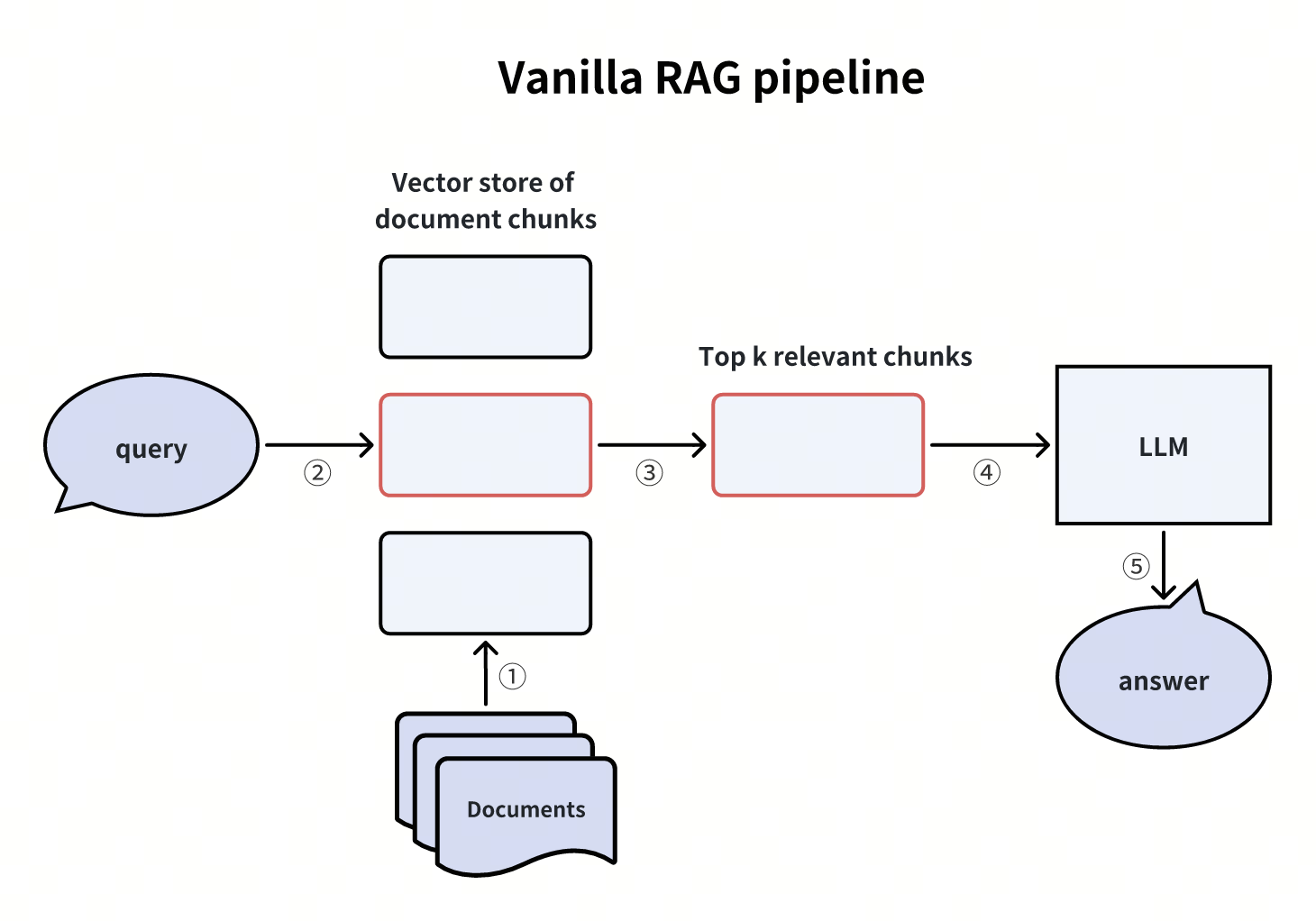 Стандартный конвейер RAG
Query: What is the hypothetical document embedding approach?
Match: hyde.png (score: 0.4756)
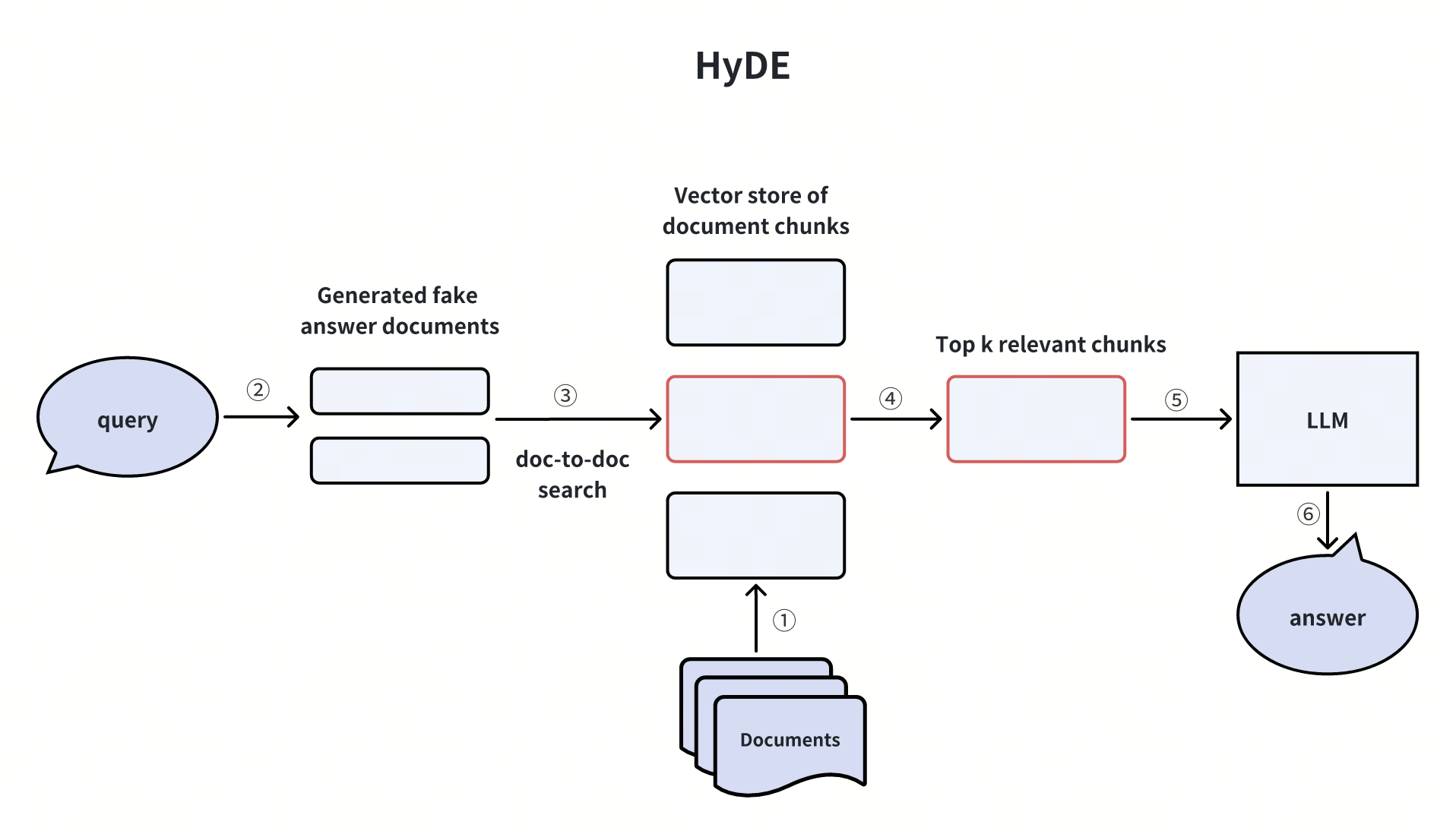 HyDE
HyDE
Query: How to combine hybrid search with reranking?
Match: hybrid_and_rerank.png (score: 0.5271)
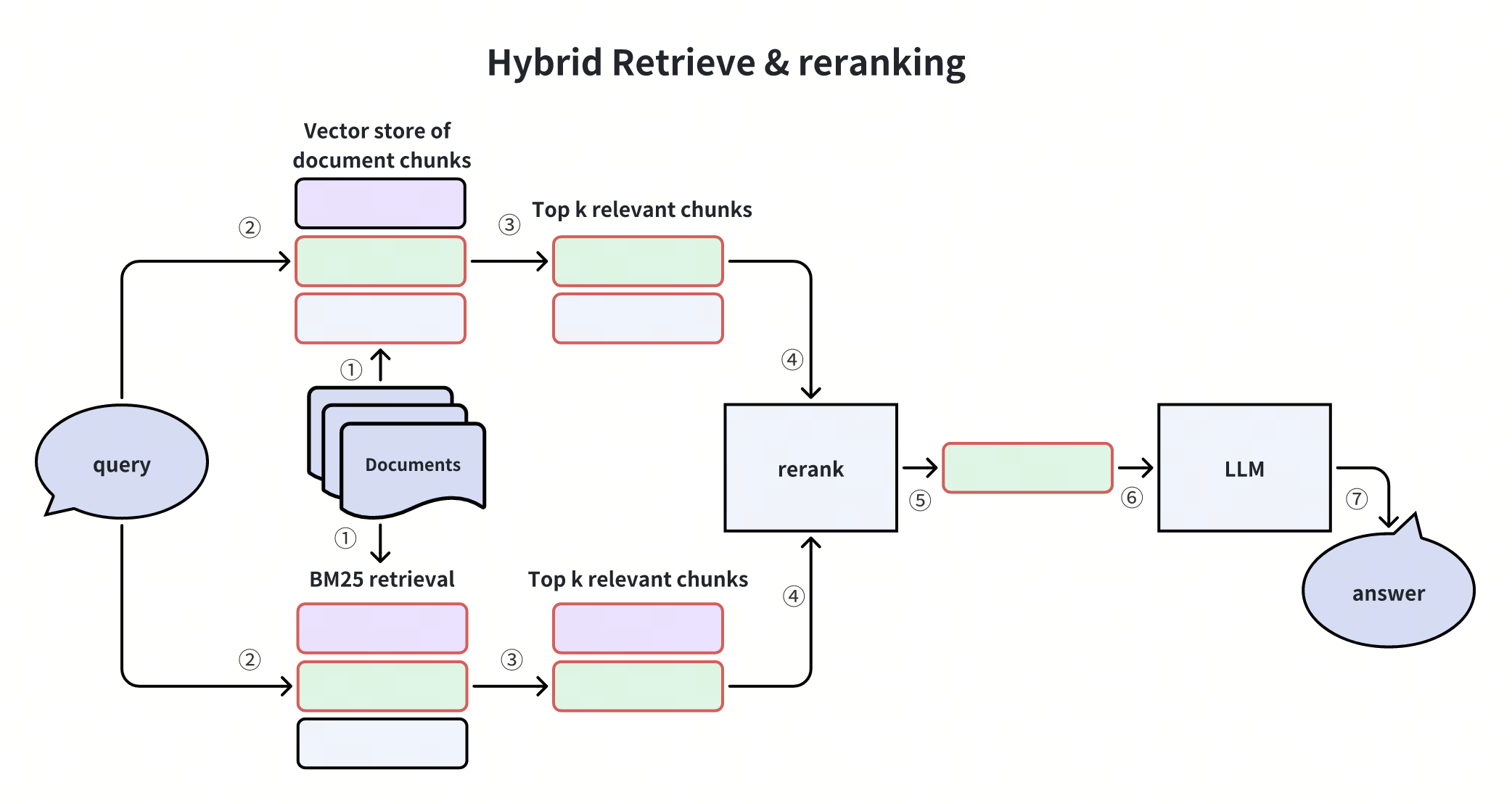 Гибридный поиск и переранжирование
Отлично! Мы успешно построили конвейер RAG с использованием Milvus и Gemini и продемонстрировали кросс-модальный поиск с помощью текстовых запросов для извлечения релевантных изображений — и всё это благодаря единому пространству вложений gemini-embedding-2-preview.
