



Milvus와 Gemini를 활용한 RAG 구축
Gemini API와 Google AI Studio를 활용하면 Google의 최신 모델을 바로 사용해 보고, 여러분의 아이디어를 확장 가능한 애플리케이션으로 구현할 수 있습니다. Gemini는 텍스트 생성, 문서 처리, 비전, 오디오 분석 등의 작업을 위해 Gemini-2.5-Flash 및 Gemini-2.5-Pro 와 같은 강력한 언어 모델에 대한 액세스를 제공합니다. 또한 Matryoshka Representation Learning을 통해 유연한 출력 차원을 지원하는 텍스트, 이미지, 비디오, 오디오 및 PDF 문서를 처리할 수 있는 다중 모달 임베딩 모델인 Gemini Embedding 2 도 제공합니다. 이 API를 사용하면 수백만 개의 토큰으로 구성된 긴 컨텍스트를 입력하고, 특정 작업에 맞게 모델을 미세 조정하며, JSON과 같은 구조화된 출력을 생성하고, 의미적 검색 및 코드 실행과 같은 기능을 활용할 수 있습니다.
이 튜토리얼에서는 Milvus와 Gemini를 사용하여 RAG(Retrieval-Augmented Generation) 파이프라인을 구축하는 방법을 보여드리겠습니다. Gemini 모델을 사용하여 주어진 쿼리에 기반한 응답을 생성하고, Milvus에서 검색한 관련 정보를 이를 보완하는 방식으로 활용할 것입니다.
준비 사항
필수 패키지 및 환경
먼저, 필요한 패키지를 설치합니다:
$ pip install --upgrade pymilvus milvus-lite google-genai requests tqdm
Google Colab을 사용하는 경우, 방금 설치한 종속성을 활성화하려면 런타임을 다시 시작해야 할 수 있습니다(화면 상단의 ‘Runtime’ 메뉴를 클릭하고 드롭다운 메뉴에서 ‘Restart session’을 선택하세요).
먼저 Google AI Studio 플랫폼에 로그인하고 API 키 GEMINI_API_KEY 를 환경 변수로 설정해야 합니다.
import os

os.environ["GEMINI_API_KEY"] = "***********"
데이터 준비
우리는 RAG의 사내 지식으로 Milvus Documentation 2.4.x의 FAQ 페이지를 사용하며, 이는 간단한 RAG 파이프라인을 위한 훌륭한 데이터 소스입니다.
zip 파일을 다운로드하고 문서를 milvus_docs 폴더에 추출합니다.
$ wget https://github.com/milvus-io/milvus-docs/releases/download/v2.4.6-preview/milvus_docs_2.4.x_en.zip
$ unzip -q milvus_docs_2.4.x_en.zip -d milvus_docs
milvus_docs/en/faq 폴더에 있는 모든 마크다운 파일을 불러옵니다. 각 문서에 대해, 파일 내의 내용을 구분하기 위해 단순히 "# "를 사용하며, 이를 통해 마크다운 파일의 각 주요 부분의 내용을 대략적으로 구분할 수 있습니다.
from glob import glob

text_lines = []

for file_path in glob("milvus_docs/en/faq/*.md", recursive=True):
    with open(file_path, "r") as file:
        file_text = file.read()

    text_lines += file_text.split("# ")
LLM 및 임베딩 모델 준비
gemini-2.5-flash 을 LLM으로 사용하고, gemini-embedding-2-preview 을 임베딩 모델로 사용합니다. gemini-embedding-2-preview 는 Google의 최신 멀티모달 임베딩 모델로, Matryoshka Representation Learning을 통해 텍스트, 이미지, 동영상, 오디오 및 PDF 문서를 지원하며 유연한 출력 차원(128–3,072)을 제공합니다.
이제 LLM을 통해 테스트 응답을 생성해 봅시다:
from google import genai

client = genai.Client(api_key=os.environ["GEMINI_API_KEY"])

response = client.models.generate_content(
    model="gemini-2.5-flash", contents="who are you"
)
print(response.text)
I am a large language model, trained by Google.

I'm designed to process and generate human-like text based on the vast amount of data I was trained on. This allows me to:

*   Answer questions
*   Provide summaries
*   Generate creative content
*   Translate languages
*   And much more

I don't have personal experiences, feelings, or consciousness. I'm a tool designed to be helpful and informative.
테스트 임베딩을 생성하고, 그 차원과 처음 몇 개의 요소를 출력해 봅시다.
test_embeddings = client.models.embed_content(
    model="gemini-embedding-2-preview", contents=["This is a test1", "This is a test2"]
)

embedding_dim = len(test_embeddings.embeddings[0].values)
print(embedding_dim)
print(test_embeddings.embeddings[0].values[:10])
3072
[-0.016769307, 0.013630492, 0.020277105, 0.0035285393, 0.003968259, -0.013498845, 0.028525498, 0.025498547, -0.021553498, 0.015233516]
Milvus에 데이터 불러오기
컬렉션 생성
Milvus 클라이언트를 초기화하고 컬렉션을 설정해 봅시다:
from pymilvus import MilvusClient

milvus_client = MilvusClient(uri="./milvus_demo.db")

collection_name = "my_rag_collection"
MilvusClient 의 인자에 대해서는:
uri을 로컬 파일(예:./milvus.db)로 설정하는 것이 가장 편리한 방법입니다. 이렇게 하면 Milvus Lite를 자동으로 활용하여 이 파일에 모든 데이터를 저장할 수 있기 때문입니다.- 대용량 데이터를 다루는 경우, Docker나 Kubernetes에서 더 높은 성능을 발휘하는 Milvus 서버를 구축할 수 있습니다. 이 경우,
uri대신 서버 URI(예:http://localhost:19530)를 로 설정해 주십시오. - Milvus용 완전 관리형 클라우드 서비스인 Zilliz Cloud를 사용하려면, Zilliz Cloud의 공개 엔드포인트(Public Endpoint) 및 API 키 에 해당하는
uri와token를 조정하십시오.
컬렉션이 이미 존재하는지 확인하고, 존재할 경우 삭제하십시오.
if milvus_client.has_collection(collection_name):
    milvus_client.drop_collection(collection_name)
지정된 매개변수로 새 컬렉션을 생성합니다.
필드 정보를 지정하지 않으면 Milvus는 기본 키를 위한 기본 id 필드와 벡터 데이터를 저장하기 위한 vector 필드를 자동으로 생성합니다. 예약된 JSON 필드는 스키마에 정의되지 않은 필드와 해당 값을 저장하는 데 사용됩니다.
milvus_client.create_collection(
    collection_name=collection_name,
    dimension=embedding_dim,
    metric_type="IP",  # Inner product distance
    # Strong consistency waits for all loads to complete, adding latency with large datasets
    # consistency_level="Strong",  # Strong consistency level
)
데이터 삽입
텍스트 줄을 순차적으로 처리하여 임베딩을 생성한 다음, 데이터를 Milvus에 삽입합니다.
여기에는 컬렉션 스키마에 정의되지 않은 새로운 필드 ` text`가 있습니다. 이 필드는 예약된 JSON 동적 필드에 자동으로 추가되며, 높은 수준에서는 일반 필드로 취급될 수 있습니다.
from tqdm import tqdm

data = []

doc = client.models.embed_content(model="gemini-embedding-2-preview", contents=text_lines)

for i, line in enumerate(tqdm(text_lines, desc="Creating embeddings")):
    data.append({"id": i, "vector": doc.embeddings[i].values, "text": line})

milvus_client.insert(collection_name=collection_name, data=data)
Creating embeddings: 100%|██████████| 72/72 [00:00<00:00, 337796.30it/s]


{'insert_count': 72, 'ids': [0, 1, 2, 3, 4, 5, 6, 7, 8, 9, 10, 11, 12, 13, 14, 15, 16, 17, 18, 19, 20, 21, 22, 23, 24, 25, 26, 27, 28, 29, 30, 31, 32, 33, 34, 35, 36, 37, 38, 39, 40, 41, 42, 43, 44, 45, 46, 47, 48, 49, 50, 51, 52, 53, 54, 55, 56, 57, 58, 59, 60, 61, 62, 63, 64, 65, 66, 67, 68, 69, 70, 71], 'cost': 0}
RAG 구축
쿼리에 대한 데이터 검색
Milvus에 대해 자주 묻는 질문을 하나 지정해 봅시다.
question = "How is data stored in milvus?"
컬렉션에서 해당 질문을 검색하고, 의미적으로 가장 관련성이 높은 상위 3개 일치 항목을 가져옵니다.
quest_embed = client.models.embed_content(model="gemini-embedding-2-preview", contents=question)

search_res = milvus_client.search(
    collection_name=collection_name,
    data=[quest_embed.embeddings[0].values],
    limit=3,  # Return top 3 results
    search_params={"metric_type": "IP", "params": {}},  # Inner product distance
    output_fields=["text"],  # Return the text field
)
쿼리의 검색 결과를 살펴보겠습니다.
import json

retrieved_lines_with_distances = [
    (res["entity"]["text"], res["distance"]) for res in search_res[0]
]
print(json.dumps(retrieved_lines_with_distances, indent=4))
[
    [
        " Where does Milvus store data?\n\nMilvus deals with two types of data, inserted data and metadata. \n\nInserted data, including vector data, scalar data, and collection-specific schema, are stored in persistent storage as incremental log. Milvus supports multiple object storage backends, including [MinIO](https://min.io/), [AWS S3](https://aws.amazon.com/s3/?nc1=h_ls), [Google Cloud Storage](https://cloud.google.com/storage?hl=en#object-storage-for-companies-of-all-sizes) (GCS), [Azure Blob Storage](https://azure.microsoft.com/en-us/products/storage/blobs), [Alibaba Cloud OSS](https://www.alibabacloud.com/product/object-storage-service), and [Tencent Cloud Object Storage](https://www.tencentcloud.com/products/cos) (COS).\n\nMetadata are generated within Milvus. Each Milvus module has its own metadata that are stored in etcd.\n\n###",
        0.864
    ],
    [
        "Why is there no vector data in etcd?\n\netcd stores Milvus module metadata; MinIO stores entities.",
        0.7923
    ],
    [
        "What is the maximum dataset size Milvus can handle?\n\n  \nTheoretically, the maximum dataset size Milvus can handle is determined by the hardware it is run on, specifically system memory and storage:\n\n- Milvus loads all specified collections and partitions into memory before running queries. Therefore, memory size determines the maximum amount of data Milvus can query.\n- When new entities and and collection-related schema (currently only MinIO is supported for data persistence) are added to Milvus, system storage determines the maximum allowable size of inserted data.\n\n###",
        0.7857
    ]
]
LLM을 사용하여 RAG 응답을 얻기
검색된 문서를 문자열 형식으로 변환합니다.
context = "\n".join(
    [line_with_distance[0] for line_with_distance in retrieved_lines_with_distances]
)
언어 모델(Language Model)에 대한 시스템 프롬프트와 사용자 프롬프트를 정의합니다. 이 프롬프트는 Milvus에서 검색된 문서를 바탕으로 구성됩니다.
from google.genai import types

SYSTEM_PROMPT = """
Human: You are an AI assistant. You are able to find answers to the questions from the contextual passage snippets provided.
"""
USER_PROMPT = f"""
Use the following pieces of information enclosed in <context> tags to provide an answer to the question enclosed in <question> tags.
<context>
{context}
</context>
<question>
{question}
</question>
"""
Gemini를 사용하여 프롬프트를 기반으로 응답을 생성합니다.
response = client.models.generate_content(
    model="gemini-2.5-flash",
    config=types.GenerateContentConfig(system_instruction=SYSTEM_PROMPT),
    contents=USER_PROMPT,
)
print(response.text)
Milvus stores data in two main ways:

1.  **Inserted Data:** This includes vector data, scalar data, and collection-specific schema. This type of data is stored in persistent storage as an incremental log. Milvus supports various object storage backends for this, such as MinIO, AWS S3, Google Cloud Storage (GCS), Azure Blob Storage, Alibaba Cloud OSS, and Tencent Cloud Object Storage (COS).
2.  **Metadata:** Metadata is generated within Milvus by its various modules. Each module's metadata is stored in etcd.
다중 모달 검색
gemini-embedding-2-preview 는 텍스트, 이미지 및 기타 모달리티를 동일한 임베딩 공간으로 매핑하므로, 예를 들어 텍스트 쿼리를 사용하여 가장 관련성이 높은 이미지를 찾는 등 크로스 모달 검색을 수행할 수 있습니다.
이미지 데이터 준비
이미지 데이터셋으로 사용할 RAG 아키텍처 다이어그램 세트를 Milvus Bootcamp 저장소에서 다운로드합니다.
import urllib.request
from pathlib import Path

image_dir = Path("images")
image_dir.mkdir(exist_ok=True)

image_files = [
    "vanilla_rag.png",
    "hyde.png",
    "query_routing.png",
    "self_reflection.png",
    "hybrid_and_rerank.png",
    "hierarchical_index.png",
]

base_url = "https://raw.githubusercontent.com/milvus-io/bootcamp/master/pics/advanced_rag/"

for fname in image_files:
    path = image_dir / fname
    if not path.exists():
        urllib.request.urlretrieve(base_url + fname, path)
        print(f"Downloaded {fname}")
    else:
        print(f"Already exists {fname}")

print(f"\nTotal images: {len(image_files)}")
Downloaded vanilla_rag.png
Downloaded hyde.png
Downloaded query_routing.png
Downloaded self_reflection.png
Downloaded hybrid_and_rerank.png
Downloaded hierarchical_index.png

Total images: 6
이미지 임베딩 및 Milvus에 저장
각 이미지를 바이트 단위로 읽어 gemini-embedding-2-preview 에 전달하여 임베딩을 생성한 후, 이를 새로운 Milvus 컬렉션에 저장합니다.
from google.genai import types

image_data = []

for fname in image_files:
    path = image_dir / fname
    with open(path, "rb") as f:
        image_bytes = f.read()

    result = client.models.embed_content(
        model="gemini-embedding-2-preview",
        contents=types.Part.from_bytes(data=image_bytes, mime_type="image/png"),
    )
    image_data.append(
        {
            "id": len(image_data),
            "vector": result.embeddings[0].values,
            "filename": fname,
        }
    )
    print(f"Embedded {fname}")

# Create a new collection for images
image_collection = "image_collection"
if milvus_client.has_collection(image_collection):
    milvus_client.drop_collection(image_collection)

milvus_client.create_collection(
    collection_name=image_collection,
    dimension=len(image_data[0]["vector"]),
    metric_type="IP",
)

milvus_client.insert(collection_name=image_collection, data=image_data)
print(f"\nInserted {len(image_data)} image embeddings (dim={len(image_data[0]['vector'])})")
Embedded vanilla_rag.png
Embedded hyde.png
Embedded query_routing.png
Embedded self_reflection.png
Embedded hybrid_and_rerank.png
Embedded hierarchical_index.png

Inserted 6 image embeddings (dim=3072)
크로스 모달 검색: 텍스트 쿼리 → 이미지 결과
이제 텍스트 쿼리를 사용하여 이미지 임베딩을 검색해 보겠습니다. 텍스트와 이미지가 모두 동일한 임베딩 공간에 매핑되므로, 이를 직접 비교할 수 있습니다.
from IPython.display import display, Image

text_queries = [
    "How does a basic RAG pipeline work?",
    "What is the hypothetical document embedding approach?",
    "How to combine hybrid search with reranking?",
]

for query in text_queries:
    query_embed = client.models.embed_content(
        model="gemini-embedding-2-preview", contents=query
    )

    results = milvus_client.search(
        collection_name=image_collection,
        data=[query_embed.embeddings[0].values],
        limit=1,
        search_params={"metric_type": "IP", "params": {}},
        output_fields=["filename"],
    )

    best = results[0][0]
    print(f"\nQuery: {query}")
    print(f"Match: {best['entity']['filename']} (score: {best['distance']:.4f})")
    display(Image(filename=str(image_dir / best["entity"]["filename"]), width=600))
Query: How does a basic RAG pipeline work?
Match: vanilla_rag.png (score: 0.5132)
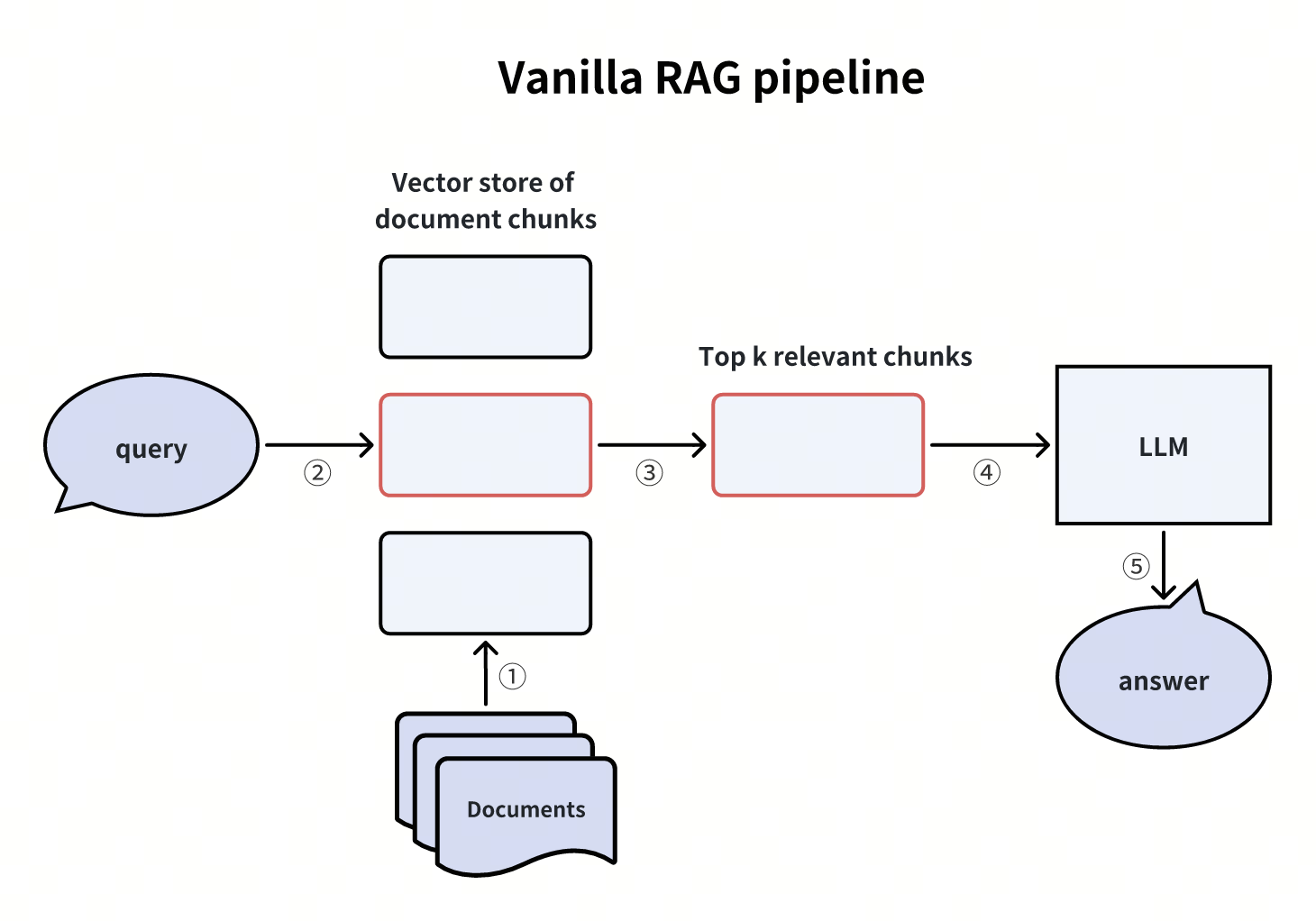 기본 RAG 파이프라인
Query: What is the hypothetical document embedding approach?
Match: hyde.png (score: 0.4756)
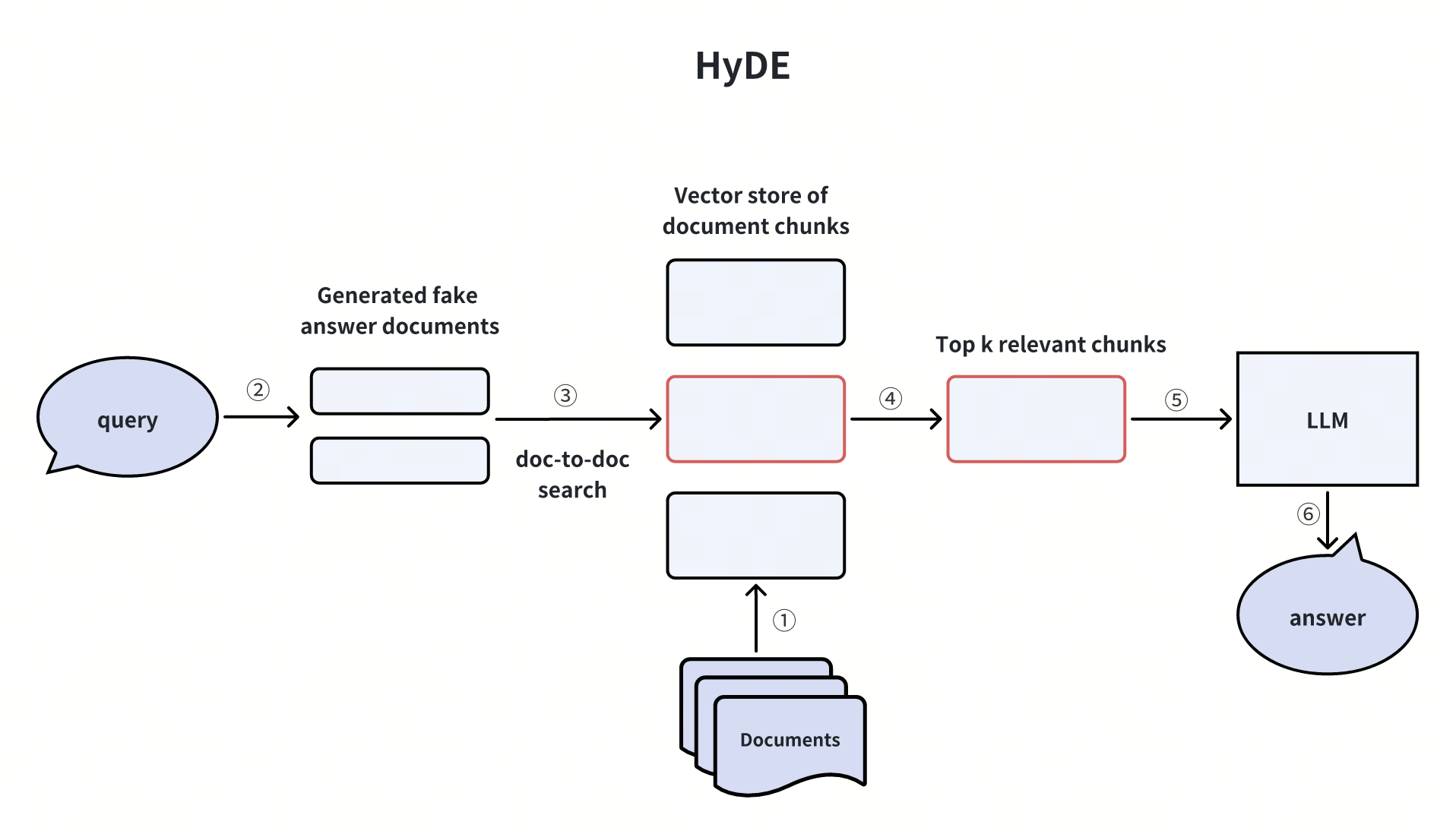 HyDE
HyDE
Query: How to combine hybrid search with reranking?
Match: hybrid_and_rerank.png (score: 0.5271)
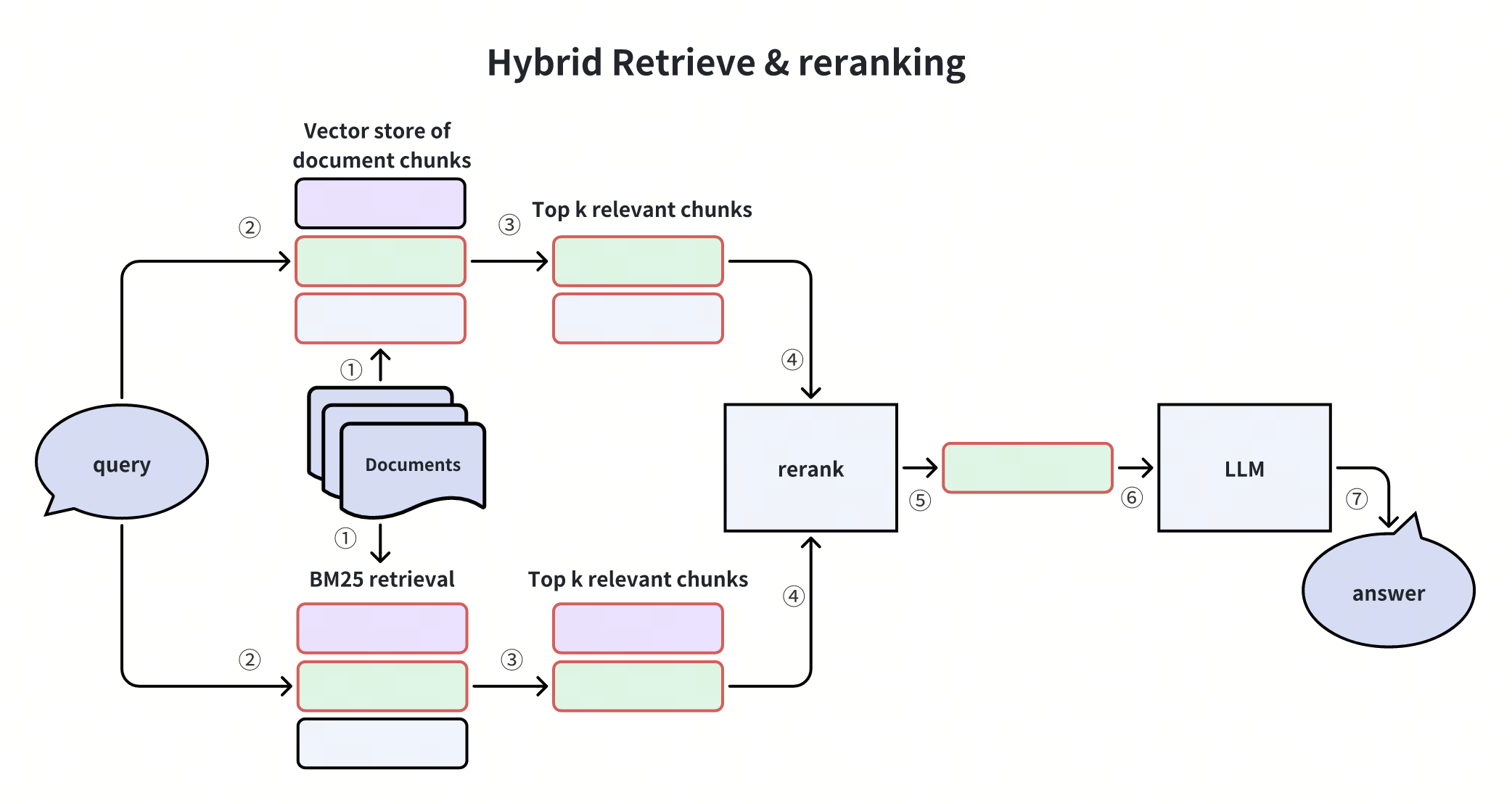 하이브리드 검색 및 재순위 지정
훌륭합니다! Milvus와 Gemini를 활용해 RAG 파이프라인을 성공적으로 구축했으며, 텍스트 쿼리를 사용하여 관련 이미지를 검색하는 크로스 모달 검색을 시연했습니다. 이 모든 과정은 gemini-embedding-2-preview 의 통합 임베딩 공간을 기반으로 이루어졌습니다.
