

BITMAP
비트맵 인덱싱은 낮은 카디널리티를 가진 스칼라 필드에 대한 쿼리 성능을 향상시키기 위해 고안된 효율적인 인덱싱 기법입니다. 카디널리티란 필드 내 고유 값의 수를 의미합니다. 고유 요소의 수가 적은 필드는 낮은 카디널리티를 가진 것으로 간주됩니다.
이 인덱스 유형은 필드 값을 압축된 이진 형식으로 표현하고 이에 대해 효율적인 비트 단위 연산을 수행함으로써 스칼라 쿼리의 검색 시간을 단축하는 데 도움이 됩니다. 다른 유형의 인덱스와 비교할 때, 비트맵 인덱스는 일반적으로 낮은 카디널리티 필드를 처리할 때 공간 효율성이 더 높고 쿼리 속도가 더 빠릅니다.
개요
'비트맵(Bitmap )'이라는 용어는 '비트 ( Bit )'와 '맵( Map)'이라는 두 단어가 결합된 것입니다. 비트는 컴퓨터에서 데이터의 가장 작은 단위를 나타내며, 0 또는 1의 값만 가질 수 있습니다. 이 맥락에서 맵은 0과 1에 어떤 값을 할당해야 하는지에 따라 데이터를 변환하고 구성하는 과정을 의미합니다.
비트맵 인덱스는 비트맵과 키라는 두 가지 주요 구성 요소로 이루어져 있습니다. 키는 인덱싱된 필드의 고유 값을 나타냅니다. 각 고유 값마다 이에 대응하는 비트맵이 하나씩 존재합니다. 이러한 비트맵의 길이는 컬렉션 내 레코드 수와 같습니다. 비트맵의 각 비트는 컬렉션 내의 레코드와 대응됩니다. 레코드의 인덱싱된 필드 값이 키와 일치하면 해당 비트는 1로 설정되고, 그렇지 않으면 0으로 설정됩니다.
Category와 Public 필드를 가진 문서 컬렉션을 생각해 봅시다. Tech 카테고리에 속하고 일반( Public)에게 공개된 문서를 검색하고자 합니다. 이 경우, 비트맵 인덱스의 키는 Tech와 Public이 됩니다.
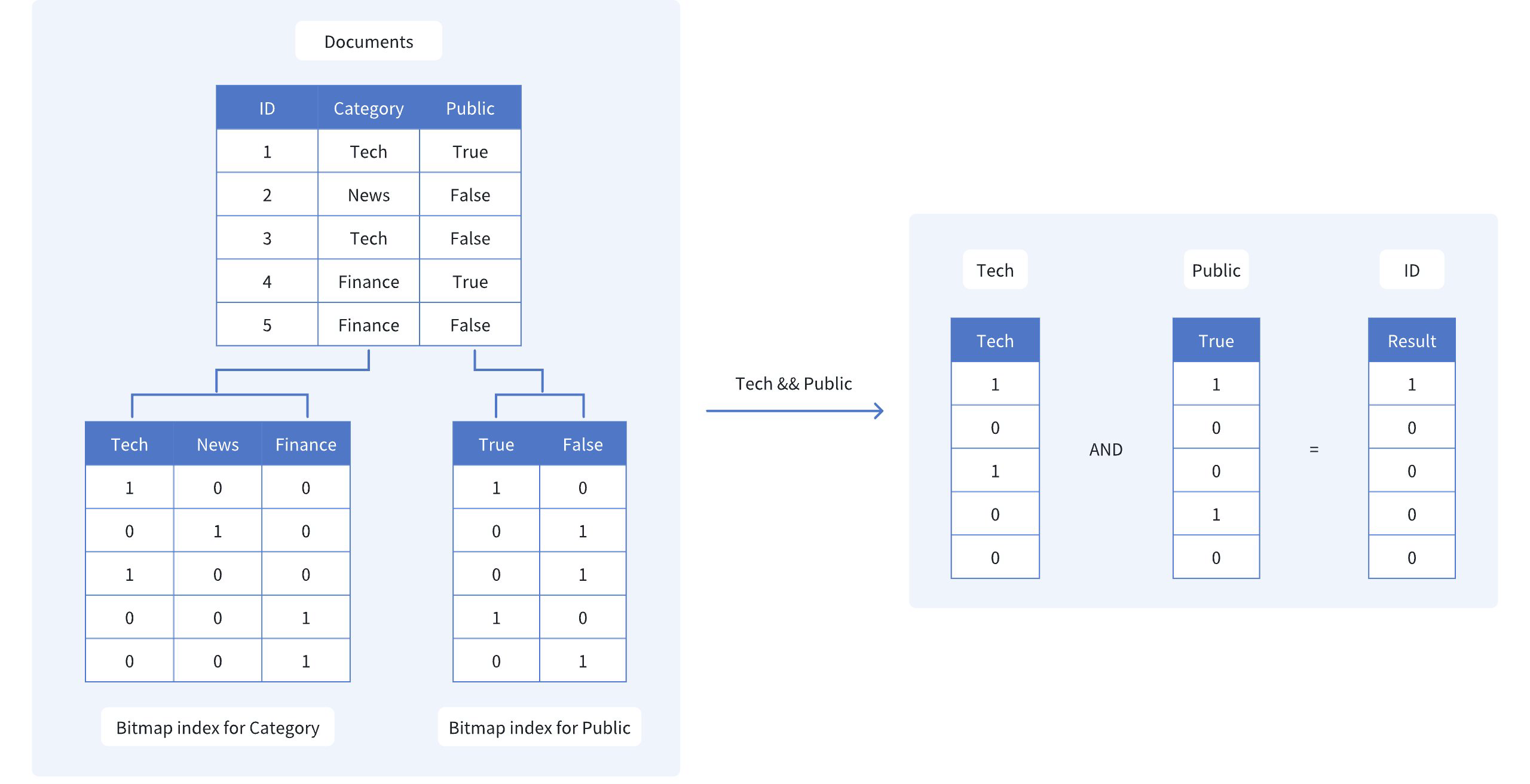 비트맵
그림에서 볼 수 있듯이, Category 와 Public 에 대한 비트맵 인덱스는 다음과 같습니다.
Tech: [1, 0, 1, 0, 0] — 이는 1번째와 3번째 문서만 Tech 범주에 속함을 나타냅니다.
Public: [1, 0, 0, 1, 0]로, 1번째와 4번째 문서만 일반에 공개되어 있음을 나타냅니다.
두 조건 모두에 해당하는 문서를 찾기 위해, 이 두 비트맵에 대해 비트별 AND 연산을 수행합니다:
- Tech AND Public: [1, 0, 0, 0, 0]
결과 비트맵 [1, 0, 0, 0, 0]은 첫 번째 문서(ID 1)만이 두 기준을 모두 충족함을 나타냅니다. 비트맵 인덱스와 효율적인 비트별 연산을 활용하면 검색 범위를 신속하게 좁힐 수 있어, 전체 데이터셋을 스캔할 필요가 없습니다.
비트맵 인덱스 생성
Milvus에서 비트맵 인덱스를 생성하려면 ` create_index() ` 메서드를 사용하고, ` index_type ` 매개변수를 ` "BITMAP"`로 설정합니다.
from pymilvus import MilvusClient

client = MilvusClient(
    uri="http://localhost:19530",
)

index_params = client.prepare_index_params() # Prepare an empty IndexParams object, without having to specify any index parameters
index_params.add_index(
    field_name="category", # Name of the scalar field to be indexed
    index_type="BITMAP", # Type of index to be created
    index_name="category_bitmap_index" # Name of the index to be created
)

client.create_index(
    collection_name="my_collection", # Specify the collection name
    index_params=index_params
)
import io.milvus.v2.client.ConnectConfig;
import io.milvus.v2.client.MilvusClientV2;
import io.milvus.v2.common.IndexParam;
import io.milvus.v2.service.index.request.CreateIndexReq;
import java.util.Collections;

MilvusClientV2 client = new MilvusClientV2(ConnectConfig.builder()
        .uri("http://localhost:19530")
        .build());

client.createIndex(CreateIndexReq.builder()
        .collectionName("my_collection")
        .indexParams(Collections.singletonList(IndexParam.builder()
                .fieldName("category")
                .indexType(IndexParam.IndexType.BITMAP)
                .indexName("category_bitmap_index")
                .build()))
        .build());
import (
    "context"
    "log"

    "github.com/milvus-io/milvus/client/v3/index"
    "github.com/milvus-io/milvus/client/v3/milvusclient"
)

ctx := context.Background()

cli, err := milvusclient.New(ctx, &milvusclient.ClientConfig{
    Address: "http://localhost:19530",
})

if err != nil {
    log.Fatal("failed to connect to milvus server: ", err.Error())
}

_, err = cli.CreateIndex(ctx, milvusclient.NewCreateIndexOption("my_collection", "category", index.NewBitmapIndex()).WithIndexName("category_bitmap_index"))

if err != nil {
    log.Fatal("failed to create index: ", err.Error())
}
use milvus::v2::prelude::*;

let config = ConnectConfig::new().uri("http://localhost:19530");

let client = ClientV2::new(&config).await?;

client
    .create_index(
        CreateIndexRequest::builder()
            .collection_name("my_collection")
            .index_param(
                IndexParam::new()
                    .field_name("category")
                    .index_type(IndexType::Bitmap)
                    .index_name("category_bitmap_index"),
            )
            .build()?,
    )
    .await?;
#include <iostream>
#include "milvus/MilvusClientV2.h"

auto client = milvus::MilvusClientV2::Create();

auto status = client->Connect(milvus::ConnectParam("http://localhost:19530"));

if (!status.IsOk()) {
    std::cout << status.Message() << std::endl;
}

status = client->CreateIndex(milvus::CreateIndexRequest().WithCollectionName("my_collection")
        .AddIndex(milvus::IndexDesc("category", "category_bitmap_index", milvus::IndexType::BITMAP)));

if (!status.IsOk()) {
    std::cout << status.Message() << std::endl;
}
import { MilvusClient } from "@zilliz/milvus2-sdk-node";

const client = new MilvusClient({ address: "http://localhost:19530" });

await client.createIndex({
    collection_name: "my_collection",
    field_name: "category",
    index_type: "BITMAP",
    index_name: "category_bitmap_index",
});
using Milvus.Client.V2;
using Milvus.Client.V2.Requests.Index;
using Milvus.Client.V2.Types;

var config = new ConnectConfig
{
    Uri = "http://localhost:19530"
};
using var client = new MilvusClientV2(config);
await client.ConnectAsync();

// Prepare index building params
var indexParam = new IndexParam(
    fieldName: "category",
    indexType: IndexType.Bitmap,
    indexName: "category_bitmap_index");

await client.CreateIndexAsync(new CreateIndexReq
{
    CollectionName = "my_collection",
    Indexes = [indexParam]
});
export CLUSTER_ENDPOINT="http://localhost:19530"
export TOKEN="root:Milvus"

curl --request POST \
--url "${CLUSTER_ENDPOINT}/v2/vectordb/indexes/create" \
--header "Authorization: Bearer ${TOKEN}" \
--header "Content-Type: application/json" \
--header "Request-Timeout: 10" \
-d '{
    "collectionName": "my_collection",
    "indexParams": [
        {
            "fieldName": "category",
            "indexName": "category_bitmap_index",
            "indexType": "BITMAP"
        }
    ]
}'

# {
#     "code": 0,
#     "data": {}
# }
이 예제에서는 ` my_collection ` 컬렉션의 ` category ` 필드에 비트맵 인덱스를 생성합니다. ` add_index() ` 메서드를 사용하여 필드 이름, 인덱스 유형 및 인덱스 이름을 지정합니다.
비트맵 인덱스가 생성되면 쿼리 작업에서 filter 매개변수를 사용하여 인덱싱된 필드를 기반으로 스칼라 필터링을 수행할 수 있습니다. 이를 통해 비트맵 인덱스를 활용하여 검색 결과를 효율적으로 좁힐 수 있습니다. 자세한 내용은 ‘필터링 설명’을 참조하십시오.
인덱스 삭제
drop_index() 메서드를 사용하여 컬렉션에서 기존 인덱스를 제거할 수 있습니다.
v2.6.3 이하 버전에서는 스칼라 인덱스를 삭제하기 전에 컬렉션을 해제해야 합니다.
v2.6.4부터는 더 이상 필요하지 않은 스칼라 인덱스를 컬렉션을 먼저 해제할 필요 없이 직접 삭제할 수 있습니다.
client.drop_index(
    collection_name="my_collection",   # Name of the collection
    index_name="category_bitmap_index" # Name of the index to drop
)
import io.milvus.v2.client.ConnectConfig;
import io.milvus.v2.client.MilvusClientV2;
import io.milvus.v2.service.index.request.DropIndexReq;

MilvusClientV2 client = new MilvusClientV2(ConnectConfig.builder()
        .uri("http://localhost:19530")
        .build());

client.dropIndex(DropIndexReq.builder()
        .collectionName("my_collection")
        .indexName("category_bitmap_index")
        .build());
import (
    "context"
    "log"

    "github.com/milvus-io/milvus/client/v3/milvusclient"
)

ctx := context.Background()

cli, err := milvusclient.New(ctx, &milvusclient.ClientConfig{
    Address: "http://localhost:19530",
})

if err != nil {
    log.Fatal("failed to connect to milvus server: ", err.Error())
}

err = cli.DropIndex(ctx, milvusclient.NewDropIndexOption("my_collection", "category_bitmap_index"))

if err != nil {
    log.Fatal("failed to drop index: ", err.Error())
}
use milvus::v2::prelude::*;

let config = ConnectConfig::new().uri("http://localhost:19530");

let client = ClientV2::new(&config).await?;

client
    .drop_index(
        DropIndexRequest::builder()
            .collection_name("my_collection")
            .index_name("category_bitmap_index")
            .build()?,
    )
    .await?;
#include <iostream>
#include "milvus/MilvusClientV2.h"

auto client = milvus::MilvusClientV2::Create();

auto status = client->Connect(milvus::ConnectParam("http://localhost:19530"));

if (!status.IsOk()) {
    std::cout << status.Message() << std::endl;
}

status = client->DropIndex(milvus::DropIndexRequest()
        .WithCollectionName("my_collection")
        .WithIndexName("category_bitmap_index"));

if (!status.IsOk()) {
    std::cout << status.Message() << std::endl;
}
import { MilvusClient } from "@zilliz/milvus2-sdk-node";

const client = new MilvusClient({ address: "http://localhost:19530" });

await client.dropIndex({
    collection_name: "my_collection",
    index_name: "category_bitmap_index",
});
using Milvus.Client.V2.Requests.Index;

await client.DropIndexAsync(new DropIndexReq
{
    CollectionName = "my_collection", // Name of the collection
    IndexName = "category_bitmap_index" // Name of the index to drop
});
export CLUSTER_ENDPOINT="http://localhost:19530"
export TOKEN="root:Milvus"

curl --request POST \
--url "${CLUSTER_ENDPOINT}/v2/vectordb/indexes/drop" \
--header "Authorization: Bearer ${TOKEN}" \
--header "Content-Type: application/json" \
--header "Request-Timeout: 10" \
-d '{
    "collectionName": "my_collection",
    "indexName": "category_bitmap_index"
}'

# {
#     "code": 0,
#     "data": {}
# }
제한 사항
비트맵 인덱스는 기본 키가 아닌 스칼라 필드에 대해서만 지원됩니다.
필드의 데이터 유형은 다음 중 하나여야 합니다:
BOOL,INT8,INT16,INT32,INT64,VARCHARARRAY(요소는 다음 중 하나여야 합니다:BOOL,INT8,INT16,INT32,INT64,VARCHAR)
비트맵 인덱스는 다음 데이터 유형을 지원하지 않습니다:
FLOAT,DOUBLE: 부동 소수점 데이터 유형은 비트맵 인덱스의 이진적 특성과 호환되지 않습니다.JSON: JSON 데이터 유형은 복잡한 구조를 가지고 있어 비트맵 인덱스를 사용하여 효율적으로 표현할 수 없습니다.
비트맵 인덱스는 카디널리티가 높은 필드(즉, 고유 값의 수가 많은 필드)에는 적합하지 않습니다.
일반적인 지침으로, 비트맵 인덱스는 필드의 카디널리티가 500 미만일 때 가장 효과적입니다.
카디널리티가 이 임계값을 초과하면 비트맵 인덱스의 성능 이점이 줄어들고 저장소 오버헤드가 커집니다.
카디널리티가 높은 필드의 경우, 구체적인 사용 사례와 쿼리 요구 사항에 따라 역색인과 같은 대체 인덱싱 기법을 사용하는 것을 고려해 보십시오.
