

BITMAP
ビットマップインデックスは、カーディナリティの低いスカラーフィールドに対するクエリのパフォーマンスを向上させるために設計された、効率的なインデックス手法です。カーディナリティとは、フィールド内の異なる値の数を指します。異なる要素の数が少ないフィールドは、カーディナリティが低いと見なされます。
このインデックス型は、フィールドの値をコンパクトなバイナリ形式で表現し、それらに対して効率的なビット演算を実行することで、スカラークエリの検索時間を短縮します。他の種類のインデックスと比較して、ビットマップインデックスは、低カーディナリティのフィールドを扱う場合、一般的にスペース効率が高く、クエリ速度も速くなります。
概要
「ビットマップ(Bitmap)」という用語は、「ビット(Bit)」と「マップ(Map)」という2つの単語を組み合わせたものです。ビットはコンピュータにおけるデータの最小単位を表し、0または1のいずれかの値しか保持できません。この文脈におけるマップとは、0と1にどの値を割り当てるべきかに基づいて、データを変換・整理するプロセスを指します。
ビットマップインデックスは、ビットマップとキーという2つの主要な構成要素から成ります。キーは、インデックスが設定されたフィールド内の一意の値を表します。各一意の値に対して、対応するビットマップが存在します。これらのビットマップの長さは、コレクション内のレコード数と等しくなります。 ビットマップの各ビットは、コレクション内の1つのレコードに対応しています。レコードのインデックス付きフィールドの値がキーと一致する場合、対応するビットは1に設定され、一致しない場合は0に設定されます。
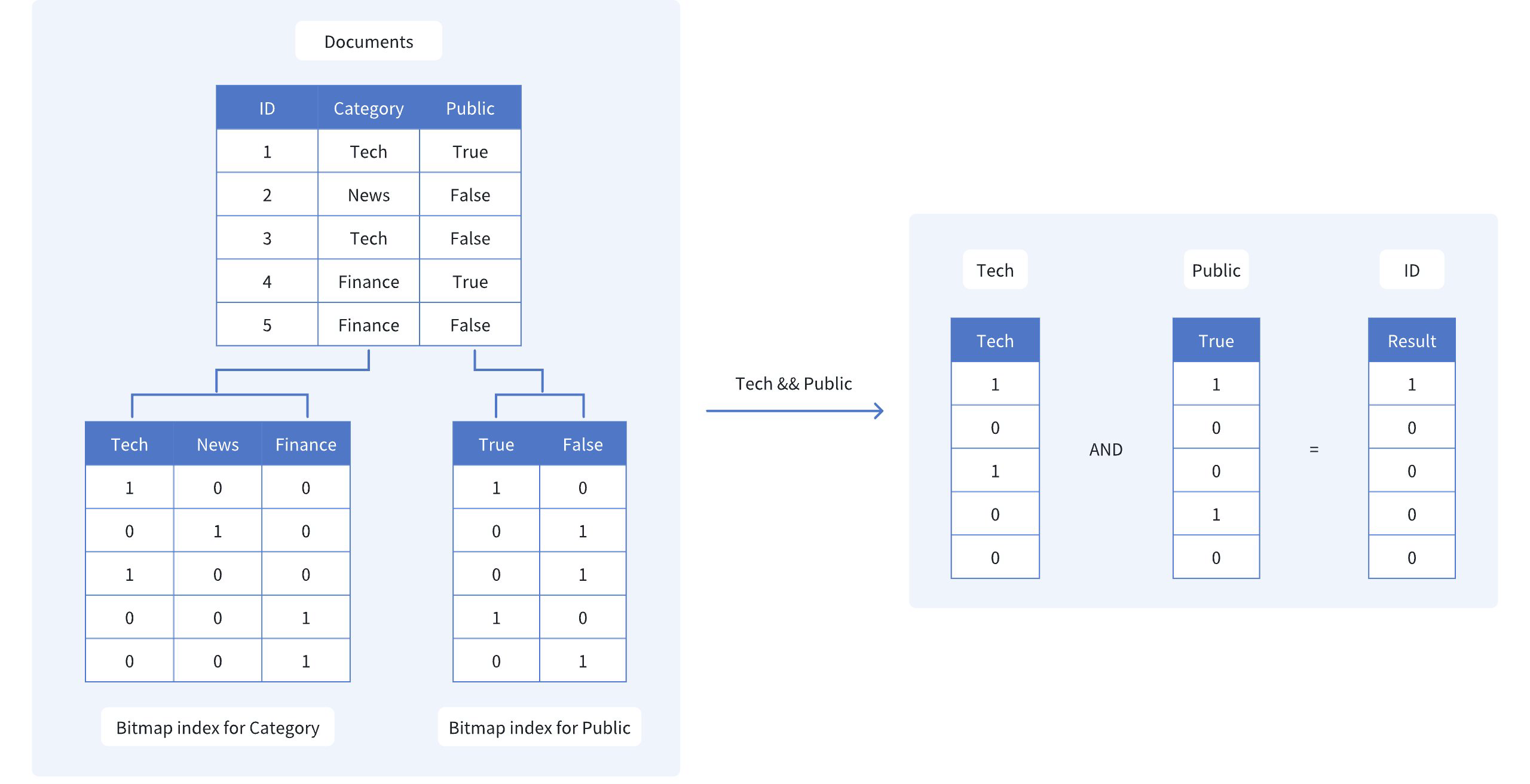
「Category」と「Public」というフィールドを持つドキュメントのコレクションを考えてみましょう。「Tech」カテゴリに属し、かつ「Public」に公開されているドキュメントを取得したいとします。この場合、ビットマップインデックスのキーは「Tech」と「Public」となります。
 ビットマップ
図に示すように、「Category」および「Public」のビットマップインデックスは次のようになります。
Tech: [1, 0, 1, 0, 0]。これは、1番目と3番目のドキュメントのみが「Tech」カテゴリに属していることを示しています。
Public: [1, 0, 0, 1, 0]。これは、1番目と4番目のドキュメントのみが一般公開されていることを示しています。
両方の条件に一致するドキュメントを見つけるために、これら2つのビットマップに対してビット単位のAND演算を行います:
- TechANDPublic: [1, 0, 0, 0, 0]
結果として得られるビットマップ [1, 0, 0, 0, 0] は、最初のドキュメント(ID 1)のみが両方の条件を満たしていることを示しています。ビットマップインデックスと効率的なビット演算を使用することで、検索範囲を迅速に絞り込むことができ、データセット全体をスキャンする必要がなくなります。
ビットマップインデックスの作成
Milvusでビットマップインデックスを作成するには、create_index() メソッドを使用し、index_type パラメータを"BITMAP" に設定します。
from pymilvus import MilvusClient

client = MilvusClient(
    uri="http://localhost:19530",
)

index_params = client.prepare_index_params() # Prepare an empty IndexParams object, without having to specify any index parameters
index_params.add_index(
    field_name="category", # Name of the scalar field to be indexed
    index_type="BITMAP", # Type of index to be created
    index_name="category_bitmap_index" # Name of the index to be created
)

client.create_index(
    collection_name="my_collection", # Specify the collection name
    index_params=index_params
)
import io.milvus.v2.client.ConnectConfig;
import io.milvus.v2.client.MilvusClientV2;
import io.milvus.v2.common.IndexParam;
import io.milvus.v2.service.index.request.CreateIndexReq;
import java.util.Collections;

MilvusClientV2 client = new MilvusClientV2(ConnectConfig.builder()
        .uri("http://localhost:19530")
        .build());

client.createIndex(CreateIndexReq.builder()
        .collectionName("my_collection")
        .indexParams(Collections.singletonList(IndexParam.builder()
                .fieldName("category")
                .indexType(IndexParam.IndexType.BITMAP)
                .indexName("category_bitmap_index")
                .build()))
        .build());
import (
    "context"
    "log"

    "github.com/milvus-io/milvus/client/v3/index"
    "github.com/milvus-io/milvus/client/v3/milvusclient"
)

ctx := context.Background()

cli, err := milvusclient.New(ctx, &milvusclient.ClientConfig{
    Address: "http://localhost:19530",
})

if err != nil {
    log.Fatal("failed to connect to milvus server: ", err.Error())
}

_, err = cli.CreateIndex(ctx, milvusclient.NewCreateIndexOption("my_collection", "category", index.NewBitmapIndex()).WithIndexName("category_bitmap_index"))

if err != nil {
    log.Fatal("failed to create index: ", err.Error())
}
use milvus::v2::prelude::*;

let config = ConnectConfig::new().uri("http://localhost:19530");

let client = ClientV2::new(&config).await?;

client
    .create_index(
        CreateIndexRequest::builder()
            .collection_name("my_collection")
            .index_param(
                IndexParam::new()
                    .field_name("category")
                    .index_type(IndexType::Bitmap)
                    .index_name("category_bitmap_index"),
            )
            .build()?,
    )
    .await?;
#include <iostream>
#include "milvus/MilvusClientV2.h"

auto client = milvus::MilvusClientV2::Create();

auto status = client->Connect(milvus::ConnectParam("http://localhost:19530"));

if (!status.IsOk()) {
    std::cout << status.Message() << std::endl;
}

status = client->CreateIndex(milvus::CreateIndexRequest().WithCollectionName("my_collection")
        .AddIndex(milvus::IndexDesc("category", "category_bitmap_index", milvus::IndexType::BITMAP)));

if (!status.IsOk()) {
    std::cout << status.Message() << std::endl;
}
import { MilvusClient } from "@zilliz/milvus2-sdk-node";

const client = new MilvusClient({ address: "http://localhost:19530" });

await client.createIndex({
    collection_name: "my_collection",
    field_name: "category",
    index_type: "BITMAP",
    index_name: "category_bitmap_index",
});
using Milvus.Client.V2;
using Milvus.Client.V2.Requests.Index;
using Milvus.Client.V2.Types;

var config = new ConnectConfig
{
    Uri = "http://localhost:19530"
};
using var client = new MilvusClientV2(config);
await client.ConnectAsync();

// Prepare index building params
var indexParam = new IndexParam(
    fieldName: "category",
    indexType: IndexType.Bitmap,
    indexName: "category_bitmap_index");

await client.CreateIndexAsync(new CreateIndexReq
{
    CollectionName = "my_collection",
    Indexes = [indexParam]
});
export CLUSTER_ENDPOINT="http://localhost:19530"
export TOKEN="root:Milvus"

curl --request POST \
--url "${CLUSTER_ENDPOINT}/v2/vectordb/indexes/create" \
--header "Authorization: Bearer ${TOKEN}" \
--header "Content-Type: application/json" \
--header "Request-Timeout: 10" \
-d '{
    "collectionName": "my_collection",
    "indexParams": [
        {
            "fieldName": "category",
            "indexName": "category_bitmap_index",
            "indexType": "BITMAP"
        }
    ]
}'

# {
#     "code": 0,
#     "data": {}
# }
この例では、my_collection コレクションのcategory フィールドに対してビットマップインデックスを作成します。add_index() メソッドを使用して、フィールド名、インデックスタイプ、およびインデックス名を指定します。
ビットマップインデックスが作成されると、クエリ操作でfilter パラメータを使用して、インデックス化されたフィールドに基づくスカラーフィルタリングを実行できます。これにより、ビットマップインデックスを使用して検索結果を効率的に絞り込むことができます。詳細については、「フィルタリングの解説」を参照してください。
インデックスの削除
drop_index() メソッドを使用して、コレクションから既存のインデックスを削除します。
v2.6.3以前では、スカラーインデックスを削除する前にコレクションを解放する必要があります。
v2.6.4以降では、スカラーインデックスが不要になった時点で、コレクションを解放することなく直接削除できます。
client.drop_index(
    collection_name="my_collection",   # Name of the collection
    index_name="category_bitmap_index" # Name of the index to drop
)
import io.milvus.v2.client.ConnectConfig;
import io.milvus.v2.client.MilvusClientV2;
import io.milvus.v2.service.index.request.DropIndexReq;

MilvusClientV2 client = new MilvusClientV2(ConnectConfig.builder()
        .uri("http://localhost:19530")
        .build());

client.dropIndex(DropIndexReq.builder()
        .collectionName("my_collection")
        .indexName("category_bitmap_index")
        .build());
import (
    "context"
    "log"

    "github.com/milvus-io/milvus/client/v3/milvusclient"
)

ctx := context.Background()

cli, err := milvusclient.New(ctx, &milvusclient.ClientConfig{
    Address: "http://localhost:19530",
})

if err != nil {
    log.Fatal("failed to connect to milvus server: ", err.Error())
}

err = cli.DropIndex(ctx, milvusclient.NewDropIndexOption("my_collection", "category_bitmap_index"))

if err != nil {
    log.Fatal("failed to drop index: ", err.Error())
}
use milvus::v2::prelude::*;

let config = ConnectConfig::new().uri("http://localhost:19530");

let client = ClientV2::new(&config).await?;

client
    .drop_index(
        DropIndexRequest::builder()
            .collection_name("my_collection")
            .index_name("category_bitmap_index")
            .build()?,
    )
    .await?;
#include <iostream>
#include "milvus/MilvusClientV2.h"

auto client = milvus::MilvusClientV2::Create();

auto status = client->Connect(milvus::ConnectParam("http://localhost:19530"));

if (!status.IsOk()) {
    std::cout << status.Message() << std::endl;
}

status = client->DropIndex(milvus::DropIndexRequest()
        .WithCollectionName("my_collection")
        .WithIndexName("category_bitmap_index"));

if (!status.IsOk()) {
    std::cout << status.Message() << std::endl;
}
import { MilvusClient } from "@zilliz/milvus2-sdk-node";

const client = new MilvusClient({ address: "http://localhost:19530" });

await client.dropIndex({
    collection_name: "my_collection",
    index_name: "category_bitmap_index",
});
using Milvus.Client.V2.Requests.Index;

await client.DropIndexAsync(new DropIndexReq
{
    CollectionName = "my_collection", // Name of the collection
    IndexName = "category_bitmap_index" // Name of the index to drop
});
export CLUSTER_ENDPOINT="http://localhost:19530"
export TOKEN="root:Milvus"

curl --request POST \
--url "${CLUSTER_ENDPOINT}/v2/vectordb/indexes/drop" \
--header "Authorization: Bearer ${TOKEN}" \
--header "Content-Type: application/json" \
--header "Request-Timeout: 10" \
-d '{
    "collectionName": "my_collection",
    "indexName": "category_bitmap_index"
}'

# {
#     "code": 0,
#     "data": {}
# }
制限事項
ビットマップインデックスは、主キーではないスカラーフィールドでのみサポートされています。
フィールドのデータ型は、以下のいずれかでなければなりません:
BOOL,INT8,INT16,INT32,INT64,VARCHARARRAY(要素は、BOOL、INT8、INT16、INT32、INT64、VARCHARのいずれかでなければなりません)
ビットマップインデックスは、以下のデータ型をサポートしていません:
FLOAT,DOUBLE: 浮動小数点型は、ビットマップインデックスのバイナリ特性と互換性がありません。JSON: JSON データ型は構造が複雑であり、ビットマップインデックスを使用して効率的に表現することはできません。
ビットマップインデックスは、カーディナリティが高いフィールド(つまり、異なる値の数が非常に多いフィールド)には適していません。
一般的なガイドラインとして、ビットマップインデックスは、フィールドのカーディナリティが 500 未満の場合に最も効果的です。
カーディナリティがこのしきい値を超えると、ビットマップインデックスのパフォーマンス上の利点は薄れ、ストレージのオーバーヘッドが顕著になります。
カーディナリティの高いフィールドについては、具体的なユースケースやクエリの要件に応じて、逆インデックスなどの代替インデックス手法の使用を検討してください。
