How to Switch Embedding Models in Milvus Without Rebuilding Your Collection
Upgrading an embedding model means regenerating the vectors for your existing documents while search requests continue to arrive. You also need to evaluate the replacement model and keep a way to roll back if its retrieval quality or latency falls short.
Milvus 3.0 lets you add and remove vector fields online. You can keep the current model serving queries while you populate a separate field with the replacement model’s vectors, evaluate the results, and gradually switch traffic. This tutorial follows that process for a document knowledge base, upgrading from BGE-small-en-v1.5 to BGE-base-en-v1.5.
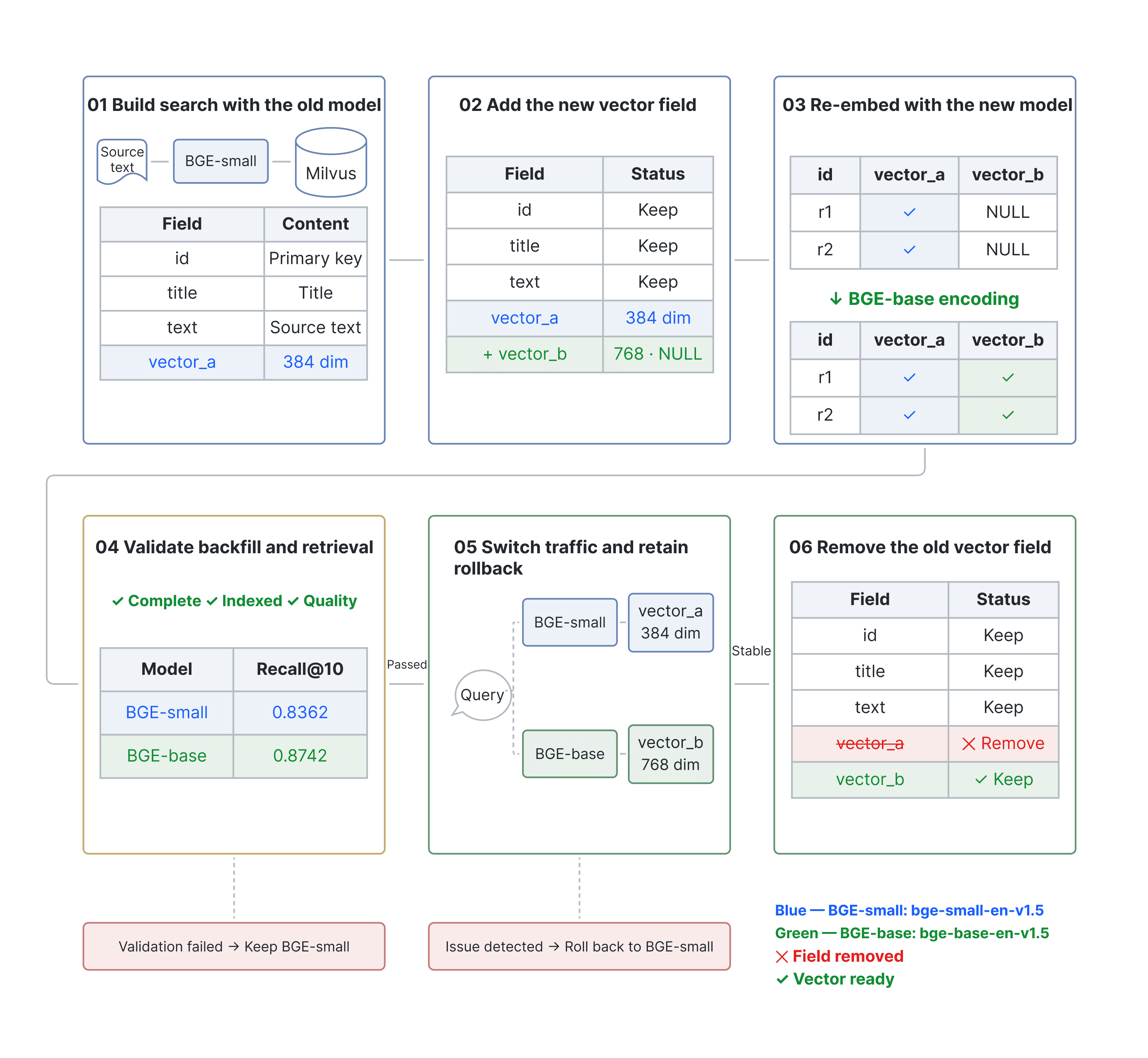
Figure 1. The six stages of an embedding model migration.
Set up the experiment
The example uses BEIR’s SciFact dataset: 5,183 scientific documents and 300 test queries with relevance judgments. Each document’s title and abstract form one text chunk, stored as one entity. Primary keys, chunking, and text preparation stay the same throughout the migration so the evaluation isolates the model change.
Use the following environment to reproduce the supplied experiment:
- Milvus 3.0.2 and PyMilvus 3.0.2.
- Linux x86_64, Python 3.12, and uv. The setup commands install the pinned dependencies.
- CPU inference in FP32 through Sentence Transformers and
pymilvus.model0.3.4. - Network access to download the SciFact dataset and the two BGE models on the first run.
Start with an accessible Milvus 3.0.2 instance. If you need a new instance, follow the Docker Compose setup in the accompanying repository. Then obtain the code and run the experiment:
git clone https://github.com/JackLCL/milvus-embedding-model-migration.git
cd milvus-embedding-model-migration
uv venv --python 3.12 .venv

uv pip install --python .venv/bin/python "torch==2.14.1+cpu" \
  --index-url https://download.pytorch.org/whl/cpu

uv pip install --python .venv/bin/python -r requirements.lock.txt

HF_HUB_DISABLE_XET=1 .venv/bin/python run_public.py \
  --uri http://localhost:19530 --model-cache ./models
Replace --uri with your Milvus endpoint if needed. The script downloads the data and runs the complete migration in a dedicated test collection, including evaluation, traffic switching, rollback checks, and removal of the old field.
A successful run exits with status 0. Check artifacts/LATEST_SUCCESS for the run directory and confirm that its summary.json contains "success": true.
The snippets below explain the stages implemented by the script. You do not need to execute them again after running it. They share the same client, model instances, and collection name. The HTTP examples in Step 5 illustrate the script’s interface; the automated run controls those requests itself.
Step 1 Build retrieval with the current model
| Role | Model | Dimensions |
|---|---|---|
| Current model | BAAI/bge-small-en-v1.5 | 384 |
| Replacement model | BAAI/bge-base-en-v1.5 | 768 |
Table 1. Embedding models and their output dimensions.
Both models accept up to 512 tokens per input; longer inputs are truncated. The reported retrieval metrics use this limit and the text preparation described above.
Initialize the models and client
Load both models with SentenceTransformerEmbeddingFunction. The code pins their revisions through MODEL_REVISIONS in the repository. Throughout the tutorial, model_a, vector_a, and route "A" refer to BGE-small-en-v1.5; their B counterparts refer to BGE-base-en-v1.5.
import torch
from pymilvus import DataType, MilvusClient
from pymilvus.model.dense import SentenceTransformerEmbeddingFunction
from run_public import MODEL_REVISIONS

torch.set_num_threads(2)

client = MilvusClient(uri="http://localhost:19530")
name = "scifact_model_upgrade"
prefix = "Represent this sentence for searching relevant passages: "

options = dict(
    device="cpu",
    batch_size=8,
    normalize_embeddings=True,
    query_instruction=prefix,
    doc_instruction="",
    cache_folder="./models",
)

model_a = SentenceTransformerEmbeddingFunction(
    model_name="BAAI/bge-small-en-v1.5",
    revision=MODEL_REVISIONS["A"],
    **options,
)

model_b = SentenceTransformerEmbeddingFunction(
    model_name="BAAI/bge-base-en-v1.5",
    revision=MODEL_REVISIONS["B"],
    **options,
)

model_a.model.max_seq_length = 512
model_b.model.max_seq_length = 512
The query instruction is configured once through query_instruction. Use encode_queries() for query text and encode_documents() for document text; these methods apply the appropriate instruction settings.
Create the collection and insert documents
The initial collection stores the document ID, title, source text, and the current model’s vector:
| Field | Type | Contents |
|---|---|---|
| id | VARCHAR primary key | SciFact document ID, unchanged during migration |
| title | VARCHAR | Document title returned in search results |
| text | VARCHAR | Title, newline, and abstract used as embedding input |
| vector_a | FLOAT_VECTOR with 384 dimensions | Embedding generated by BGE-small-en-v1.5 |
Table 2. Initial collection fields.
schema = client.create_schema(auto_id=False, enable_dynamic_field=False)
schema.add_field("id", DataType.VARCHAR, max_length=64, is_primary=True)
schema.add_field("title", DataType.VARCHAR, max_length=2048)
schema.add_field("text", DataType.VARCHAR, max_length=65535)
schema.add_field("vector_a", DataType.FLOAT_VECTOR, dim=384)

client.create_collection(name, schema=schema, consistency_level="Strong")
The repository’s load_data() helper downloads the complete corpus from BEIR. Convert each document into an entity, generate its current-model embedding, and insert the records in batches:
from run_public import load_data

docs, queries, qrels = load_data()

rows = [
    {
        "id": d["_id"],
        "title": d["title"],
        "text": d["title"] + "\n" + d["text"],
    }
    for d in docs
]

for start in range(0, len(rows), 32):
    batch = rows[start:start + 32]
    vectors = model_a.encode_documents([r["text"] for r in batch])
    client.insert(
        name,
        data=[
            {**r, "vector_a": v.tolist()}
            for r, v in zip(batch, vectors)
        ],
    )
Create an HNSW index on vector_a and load the collection. The helper will also create the replacement field’s index in Step 2.
def create_vector_index(field):
    params = client.prepare_index_params()
    params.add_index(
        field_name=field,
        index_name=field + "_hnsw",
        index_type="HNSW",
        metric_type="COSINE",
        params={"M": 16, "efConstruction": 100},
    )
    client.create_index(name, index_params=params)

client.flush(name)
create_vector_index("vector_a")
client.load_collection(name)
The collection is ready for searches that encode queries with BGE-small-en-v1.5 and target vector_a. Keep that pair serving requests while preparing the replacement model.
Step 2 Add the replacement vector field
BGE-small-en-v1.5 produces 384-dimensional vectors; BGE-base-en-v1.5 produces 768-dimensional vectors. The replacement model therefore needs its own field and index. Writing its vectors to vector_a would fail dimension validation. Even when dimensions match, different models’ embeddings generally should not share a retrieval space.
Keep vector_a, then add vector_b and create its index:
client.add_collection_field(
    name,
    field_name="vector_b",
    data_type=DataType.FLOAT_VECTOR,
    dim=768,
    nullable=True,
)
create_vector_index("vector_b")
Added fields must use nullable=True. Existing records have no replacement-model vector yet, so Milvus represents that value as NULL. Adding the field does not run embedding inference; the application must compute and write the vectors. Queries still use the current model and vector_a.
Step 3 Backfill the replacement vectors
Read the source text in batches, encode it with BGE-base-en-v1.5, and write the vectors to vector_b using the existing primary keys. Set partial_update=True to preserve the title, source text, and vector_a values omitted from each upsert.
If another system holds the source text, retrieve it there and match it to the Milvus records by primary key.
iterator = client.query_iterator(
    name,
    filter="",
    output_fields=["id", "text"],
    batch_size=32,
    consistency_level="Strong",
)

first_batch = True

try:
    while True:
        batch = iterator.next()
        if not batch:
            break

        vectors = model_b.encode_documents([r["text"] for r in batch])
        client.upsert(
            name,
            data=[
                {"id": r["id"], "vector_b": v.tolist()}
                for r, v in zip(batch, vectors)
            ],
            partial_update=True,
        )

        if first_batch:
            client.flush(name)
            client.load_collection(
                name,
                load_fields=["id", "title", "text", "vector_a", "vector_b"],
            )
            client.refresh_load(name)
            first_batch = False
finally:
    iterator.close()
After the first batch, the example includes vector_b in the loaded fields and refreshes the load. The source experiment verifies that backfilled records can be retrieved through this field while records whose vector_b is still NULL are excluded from searches on it.
The evaluation uses a fixed corpus. In a live application, you must also synchronize documents created or changed during backfill. Keep current-model vectors up to date throughout the rollback window, and confirm that replacement-model vectors have caught up before shifting traffic.
Step 4 Validate the backfill and compare retrieval
Before sending traffic to the replacement model, confirm that all required vectors have been written, incremental synchronization is complete, the new index is ready, and vector_b is loaded. Search the new field to verify retrieval. The complete script also checks the stored text and vectors record by record. Continue using the current model if any check fails.
The following snippet flushes the collection, refreshes the load, and waits up to 180 seconds for the replacement field’s index to finish:
import time

client.flush(name)
client.refresh_load(name)

deadline = time.monotonic() + 180
while True:
    state = client.describe_index(name, "vector_b_hnsw")
    if (
        state.get("state") == "Finished"
        and state.get("pending_index_rows", 0) == 0
    ):
        break
    if time.monotonic() > deadline:
        raise TimeoutError(str(state))
    time.sleep(1)
An index-ready state does not by itself confirm that every document has a replacement vector. Complete the backfill checks before evaluating or switching traffic.
Evaluate both models on the same queries
The experiment compares two metrics across all 300 SciFact test queries:
- Recall@10 measures the proportion of relevant documents retrieved in the top 10 results.
- nDCG@10 accounts for both relevance and ranking position within those results.
Both metrics are averaged across queries. Encode each query with the model that generated the target field’s document vectors. For the replacement model, call encode_queries() with the raw query text; it applies the instruction configured during initialization, so do not prepend the instruction again.
query_ids = sorted(qrels, key=int)
query_vectors_b = model_b.encode_queries([
    queries[qid] for qid in query_ids
])
results_b = client.search(
    name,
    anns_field="vector_b",
    data=[v.tolist() for v in query_vectors_b],
    limit=10,
    search_params={"metric_type": "COSINE", "params": {"ef": 128}},
    consistency_level="Strong",
)
For the baseline, encode the same queries with model_a and search vector_a. The complete script computes the metrics and saves the relevance judgments, retrieved document IDs, and per-query results, allowing you to inspect individual improvements and regressions.
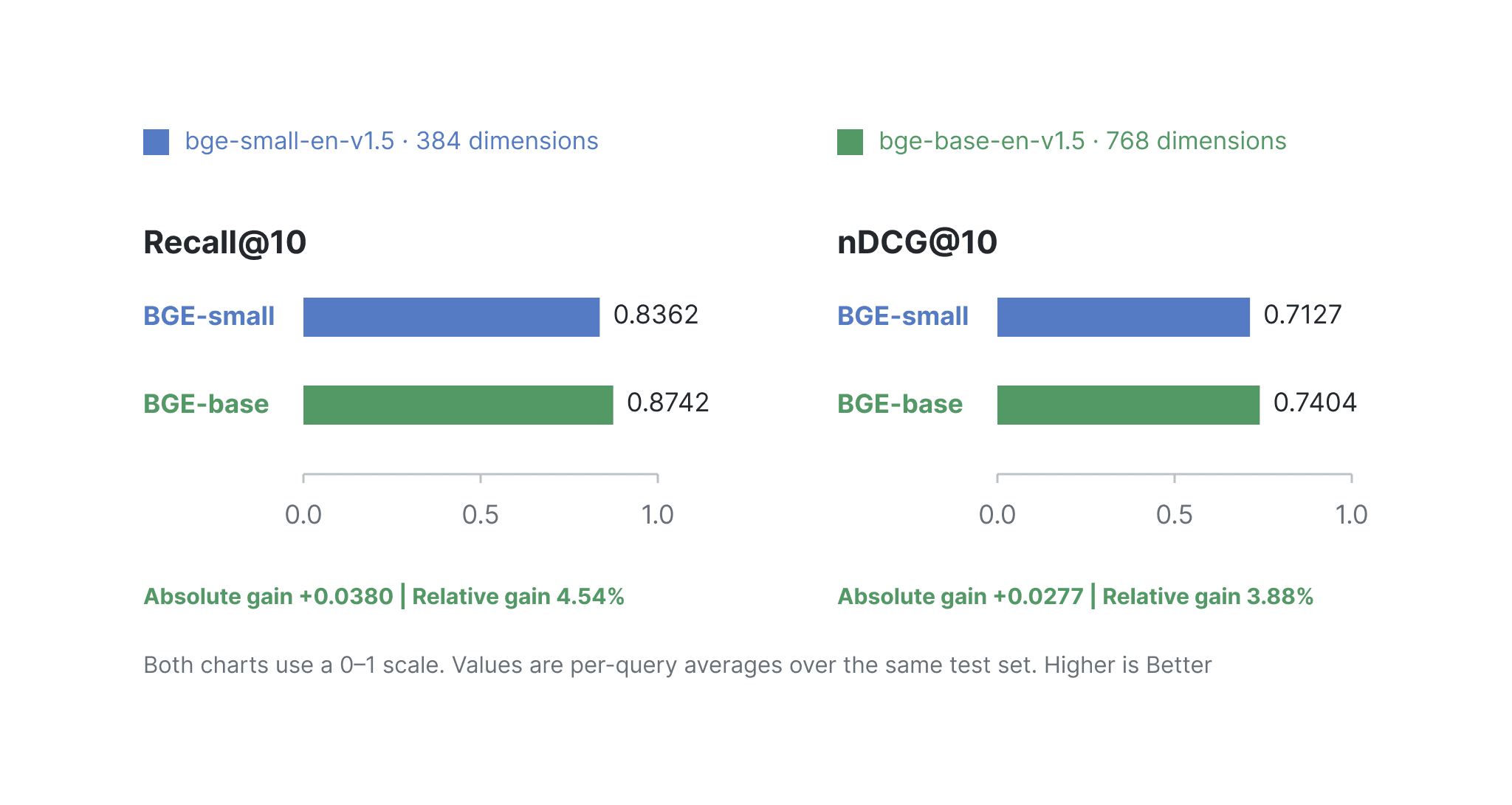
Figure 2. Retrieval quality on SciFact before and after the model upgrade.
In the source experiment, Recall@10 increased from 0.8362 to 0.8742, and nDCG@10 increased from 0.7127 to 0.7404. These results apply to this corpus, query set, and configuration. Evaluate the replacement model on your own workload before moving production traffic.
Step 5 Shift traffic and retain rollback
Once validation passes, send a small share of requests to the replacement model. Monitor retrieval quality, latency, and error rates before increasing that share. During the observation period, keep the current model available for inference and its document vectors up to date.
Bind each model to its target vector field as one retrieval version. Resolve that pair at the start of a request and use it for both query encoding and search, so a change to the default route cannot change a request’s configuration midway through execution.
routes = {
    "A": (model_a, "vector_a"),
    "B": (model_b, "vector_b"),
}

def search(question, version):
    model, field = routes[version]  # Fix the model-field pair at request start.
    vector = model.encode_queries([question])[0].tolist()
    return client.search(
        name,
        data=[vector],
        anns_field=field,
        limit=10,
        output_fields=["title"],
        search_params={"metric_type": "COSINE", "params": {"ef": 128}},
        consistency_level="Strong",
    )
The experiment’s HTTP interface accepts an explicit version. Setting version to "B" selects BGE-base-en-v1.5 and vector_b:
curl http://localhost:8080/search \
  -H 'Content-Type: application/json' \
  -d '{"query":"0-dimensional biomaterials show inductive properties.","version":"B"}'
The HTTP server runs only while the experiment script is active. These commands illustrate its interface; manual routing changes during an automated run can interfere with the experiment.
The experiment checks mixed-version routing with 30 requests: 6 use the replacement model and 24 use the current model. This verifies routing behavior under low concurrency; it does not establish production availability or measure retrieval quality with real users.
In production, assign traffic consistently by user, tenant, or session. When the gradual rollout passes validation, make the replacement retrieval version the default:
curl http://localhost:8080/route \
  -H 'Content-Type: application/json' \
  -d '{"version":"B"}'
If retrieval quality, latency, or error rates fall short during the observation period, route subsequent requests back to the current model:
curl http://localhost:8080/route \
  -H 'Content-Type: application/json' \
  -d '{"version":"A"}'
Retain both vector fields, address the issue, and repeat Step 4’s validation before trying the switch again.
Step 6 Remove the old vector field
After the observation period, confirm that rollback is no longer needed. Route all requests to the replacement model, stop writing current-model vectors, and wait for all in-flight requests using the current model to finish. Then remove vector_a:
client.drop_collection_field(name, field_name="vector_a")
print(client.describe_collection(name))
print(client.list_indexes(name))
Check that describe_collection() no longer lists vector_a and that list_indexes() no longer lists vector_a_hnsw. In the source experiment, the drop removed the field and its associated index while preserving vector_b, document IDs, titles, and source text. New records with only replacement-model vectors remained searchable.
Dropping the field ends the simple rollback path: changing the route alone can no longer restore current-model retrieval. The experiment uses a fixed observation interval under low concurrency; a production deployment needs request counting or a draining mechanism to confirm that old-version requests have completed.
Physical space in object storage is reclaimed later by background processes. During migration, budget for both sets of vectors and indexes, along with the additional embedding inference cost.
Complete the migration
The migration is complete when searches use BGE-base-en-v1.5 with vector_b, new writes populate that field, and the unused field and index have been removed. Keeping both retrieval versions available through backfill, evaluation, and rollout gives you time to validate the replacement before committing to it. Use the same sequence with a representative corpus and query set when planning your own model upgrade.
References
Complete experiment and reproduction instructions
Milvus model integration library
BGE model specifications and query instructions
- Set up the experiment
- Step 1 Build retrieval with the current model
- Step 2 Add the replacement vector field
- Step 3 Backfill the replacement vectors
- Step 4 Validate the backfill and compare retrieval
- Step 5 Shift traffic and retain rollback
- Step 6 Remove the old vector field
- Complete the migration
- References
On This Page
Try Managed Milvus for Free
Zilliz Cloud is hassle-free, powered by Milvus and 10x faster.
Get Started




Like the article? Spread the word