Gemini 3 Pro + Milvus: Building a More Robust RAG With Advanced Reasoning and Multimodal Power
Google’s Gemini 3 Pro landed with the rare kind of release that genuinely shifts developer expectations — not just hype, but capabilities that materially expand what natural-language interfaces can do. It turns “describe the app you want” into an executable workflow: dynamic tool routing, multi-step planning, API orchestration, and interactive UX generation all stitched together seamlessly. This is the closest any model has come to making vibe coding feel production-viable.
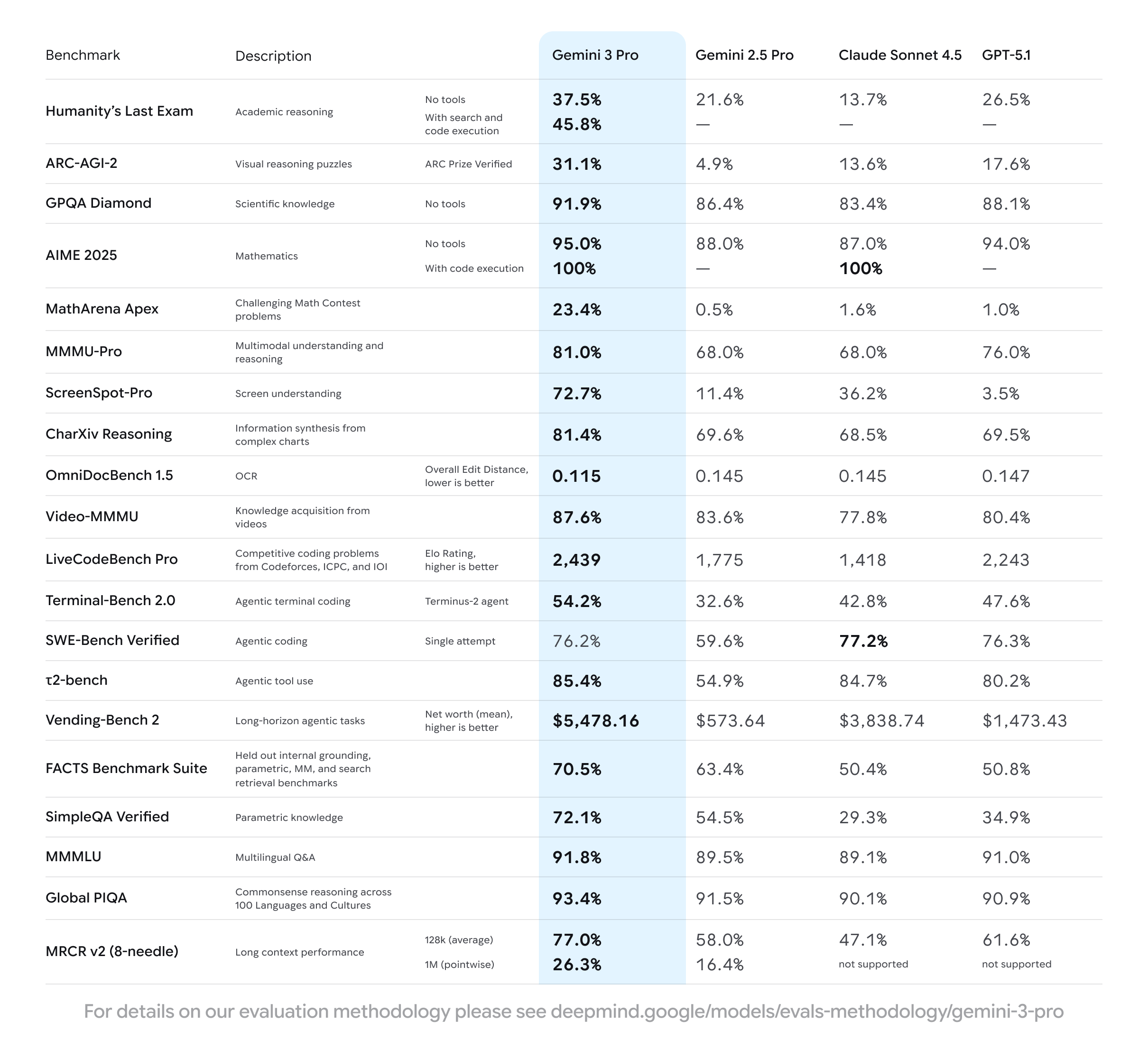
And the numbers back the narrative. Gemini 3 Pro posts standout results across nearly every major benchmark:
Humanity’s Last Exam: 37.5% without tools, 45.8% with tools — the nearest competitor sits at 26.5%.
MathArena Apex: 23.4%, while most models fail to break 2%.
ScreenSpot-Pro: 72.7% accuracy, almost double the next best at 36.2%.
Vending-Bench 2: Average net value of $5,478.16, about 1.4× above second place.
Check out the table below for more benchmark results.
This combination of deep reasoning, strong tool use, and multimodal fluency makes Gemini 3 Pro a natural fit for retrieval-augmented generation (RAG). Pair it with Milvus, the high-performance open-source vector database built for billion-scale semantic search, and you get a retrieval layer that grounds responses, scales cleanly, and stays production-reliable even under heavy workloads.
In this post, we’ll break down what’s new in Gemini 3 Pro, why it elevates RAG workflows, and how to build a clean, efficient RAG pipeline using Milvus as your retrieval backbone.
Major Upgrades in Gemini 3 Pro
Gemini 3 Pro introduces a set of substantial upgrades that reshape how the model reasons, creates, executes tasks, and interacts with users. These improvements fall into four major capability areas:
Multimodal Understanding and Reasoning
Gemini 3 Pro sets new records across important multimodal benchmarks, including ARC-AGI-2 for visual reasoning, MMMU-Pro for cross-modal understanding, and Video-MMMU for video comprehension and knowledge acquisition. The model also introduces Deep Think, an extended reasoning mode that enables structured, multi-step logical processing. This results in significantly higher accuracy on complex problems where traditional chain-of-thought models tend to fail.
Code Generation
The model takes generative coding to a new level. Gemini 3 Pro can produce interactive SVGs, full web applications, 3D scenes, and even functional games — including Minecraft-like environments and browser-based billiards — all from a single natural-language prompt. Front-end development benefits especially: the model can re-create existing UI designs with high fidelity or translate a screenshot directly into production-ready code, making iterative UI work dramatically faster.
AI Agents and Tool Use
With user permission, Gemini 3 Pro can access data from a user’s Google device to perform long-horizon, multi-step tasks such as planning trips or booking rental cars. This agentic capability is reflected in its strong performance on Vending-Bench 2, a benchmark specifically designed to stress-test long-horizon tool use. The model also supports professional-grade agent workflows, including executing terminal commands and interacting with external tools through well-defined APIs.
Generative UI
Gemini 3 Pro moves past the conventional one-question-one-answer model and introduces generative UI, where the model can build entire interactive experiences dynamically. Instead of returning static text, it can generate fully customized interfaces — for example, a rich, adjustable travel planner — directly in response to user instructions. This shifts LLMs from passive responders to active interface generators.
Putting Gemini 3 Pro to the Test
Beyond benchmark results, we ran a series of hands-on tests to understand how Gemini 3 Pro behaves in real workflows. The outcomes highlight how its multimodal reasoning, generative capabilities, and long-horizon planning translate into practical value for developers.
Multimodal understanding
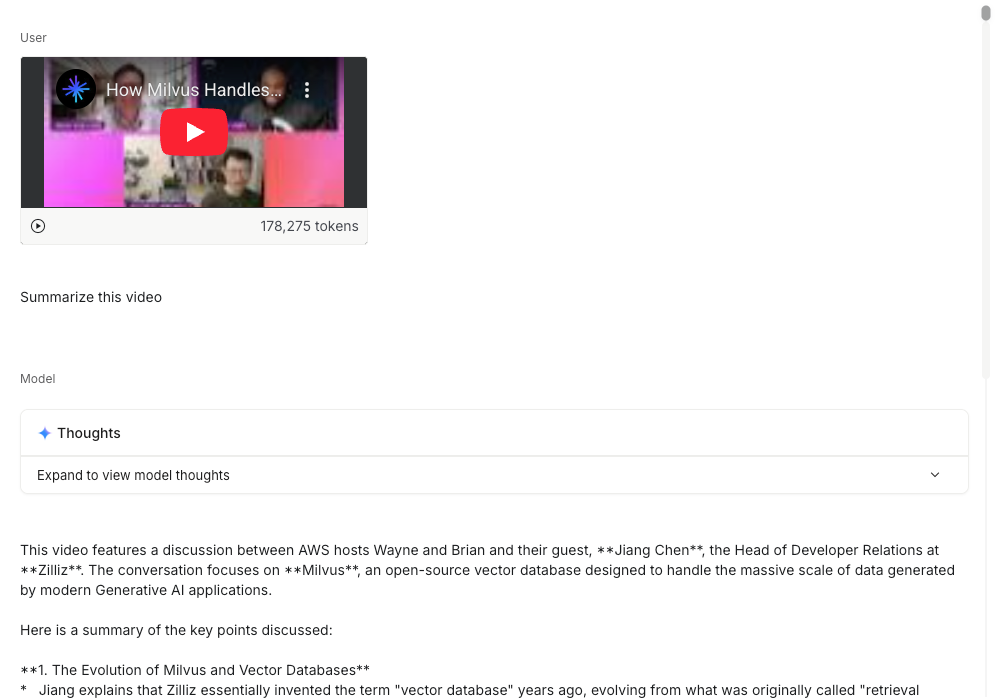
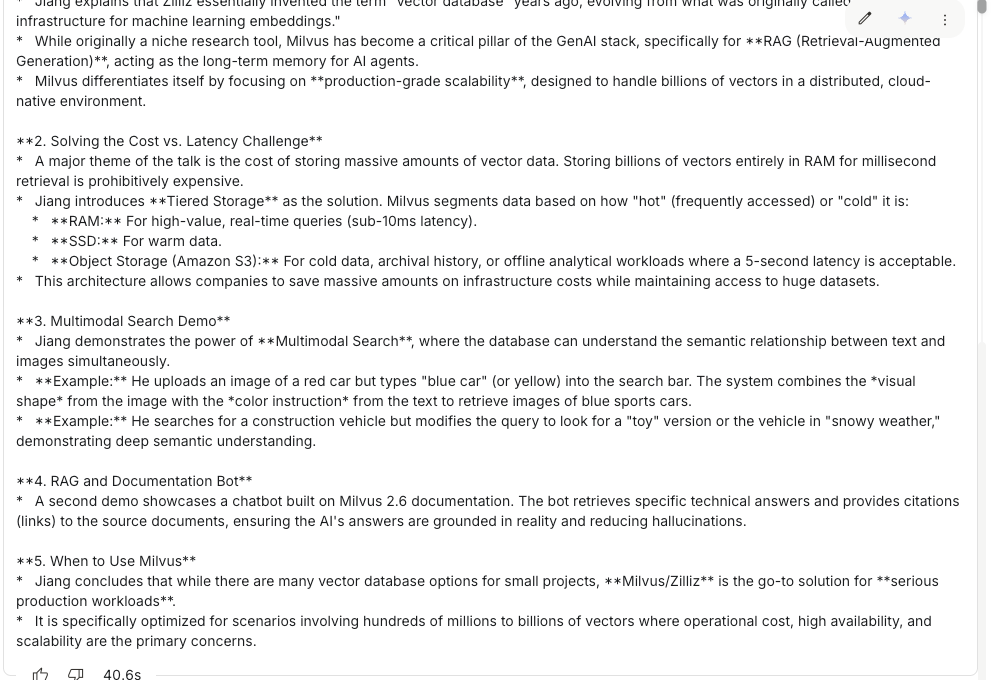
Gemini 3 Pro shows impressive versatility across text, images, video, and code. In our test, we uploaded a Zilliz video directly from YouTube. The model processed the entire clip — including narration, transitions, and on-screen text — in roughly 40 seconds, an unusually fast turnaround for long-form multimodal content.
Google’s internal evaluations show similar behavior: Gemini 3 Pro handled handwritten recipes across multiple languages, transcribed and translated each one, and compiled them into a shareable family recipe book.
Zero-Shot Tasks
Gemini 3 Pro can generate fully interactive web UIs with no prior examples or scaffolding. When prompted to create a polished, retro-futuristic 3D spaceship web game, the model produced a complete interactive scene: a neon-purple grid, cyberpunk-style ships, glowing particle effects, and smooth camera controls — all in a single zero-shot response.
Complex Task Planning
The model also demonstrates stronger long-horizon task planning than many of its peers. In our inbox-organization test, Gemini 3 Pro behaved much like an AI administrative assistant: categorizing messy emails into project buckets, drafting actionable suggestions (reply, follow-up, archive), and presenting a clean, structured summary. With the model’s plan laid out, the entire inbox could be cleared with a single confirmation click.
How to Build a RAG System with Gemini 3 Pro and Milvus
Gemini 3 Pro’s upgraded reasoning, multimodal understanding, and strong tool-use capabilities make it an excellent foundation for high-performance RAG systems.
When paired with Milvus, the high-performance open-source vector database built for large-scale semantic search, you get a clean division of responsibilities: Gemini 3 Pro handles the interpretation, reasoning, and generation, while Milvus provides a fast, scalable retrieval layer that keeps responses grounded in your enterprise data. This pairing is well-suited for production-grade applications such as internal knowledge bases, document assistants, customer-support copilots, and domain-specific expert systems.
Prerequisites
Before building your RAG pipeline, ensure these core Python libraries are installed or upgraded to their latest versions:
pymilvus — the official Milvus Python SDK
google-generativeai — the Gemini 3 Pro client library
requests — for handling HTTP calls where needed
tqdm — for progress bars during dataset ingestion
! pip install --upgrade pymilvus google-generativeai requests tqdm
Next, log in to Google AI Studio to obtain your API key.
import os
os.environ["GEMINI_API_KEY"] = "**********"
Preparing the Dataset
For this tutorial, we’ll use the FAQ section from the Milvus 2.4.x documentation as the private knowledge base for our RAG system.
Download the documentation archive and extract it into a folder named milvus_docs.
! wget https://github.com/milvus-io/milvus-docs/releases/download/v2.4.6-preview/milvus_docs_2.4.x_en.zip
! unzip -q milvus_docs_2.4.x_en.zip -d milvus_docs
Load all Markdown files from the path milvus_docs/en/faq. For each document, we apply a simple split based on # headings to roughly separate the main sections within each Markdown file.
from glob import glob
text_lines = []
for file_path in glob("milvus_docs/en/faq/*.md", recursive=True):
    with open(file_path, "r") as file:
        file_text = file.read()
    text_lines += file_text.split("# ")
LLM and Embedding Model Setup
For this tutorial, we’ll use gemini-3-pro-preview as the LLM and text-embedding-004 as the embedding model.
import google.generativeai as genai
genai.configure(api_key=os.environ["GEMINI_API_KEY"])
gemini_model = genai.GenerativeModel("gemini-3-pro-preview")
response = gemini_model.generate_content("who are you")
print(response.text)
Model response: I am Gemini, a large language model built by Google.
You can run a quick check by generating a test embedding and printing its dimensionality along with the first few values:
test_embeddings = genai.embed_content(
    model="models/text-embedding-004", content=["This is a test1", "This is a test2"]
)["embedding"]
embedding_dim = len(test_embeddings[0])
print(embedding_dim)
print(test_embeddings[0][:10])
Test vector output:
768
[0.013588584, -0.004361838, -0.08481652, -0.039724775, 0.04723794, -0.0051557426, 0.026071774, 0.045514572, -0.016867816, 0.039378334]
Loading Data into Milvus
Create a Collection
from pymilvus import MilvusClient
milvus_client = MilvusClient(uri="./milvus_demo.db")
collection_name = "my_rag_collection"
When creating a MilvusClient, you can choose from three configuration options, depending on your scale and environment:
Local Mode (Milvus Lite): Set the URI to a local file path (e.g.,
./milvus.db). This is the easiest way to get started — Milvus Lite will automatically store all data in that file.Self-Hosted Milvus (Docker or Kubernetes): For larger datasets or production workloads, run Milvus on Docker or Kubernetes. Set the URI to your Milvus server endpoint, such as
http://localhost:19530.Zilliz Cloud (the fully managed Milvus service): If you prefer a managed solution, use Zilliz Cloud. Set the URI to your Public Endpoint and provide your API key as the authentication token.
Before creating a new collection, first check whether it already exists. If it does, drop it and recreate it to ensure a clean setup.
if milvus_client.has_collection(collection_name):
    milvus_client.drop_collection(collection_name)
Create a new collection with the specified parameters.
If no schema is provided, Milvus automatically generates a default ID field as the primary key and a vector field for storing embeddings. It also provides a reserved JSON dynamic field, which captures any additional fields that are not defined in the schema.
milvus_client.create_collection(
    collection_name=collection_name,
    dimension=embedding_dim,
    metric_type="COSINE",
    consistency_level="Strong",  # Strong consistency level
)
Insert Data
Iterate through each text entry, generate its embedding vector, and insert the data into Milvus.
In this example, we include an extra field called text. Because it isn’t pre-defined in the schema, Milvus automatically stores it using the dynamic JSON field under the hood — no additional setup required.
from tqdm import tqdm
data = []
doc_embeddings = genai.embed_content(
    model="models/text-embedding-004", content=text_lines
)["embedding"]
for i, line in enumerate(tqdm(text_lines, desc="Creating embeddings")):
    data.append({"id": i, "vector": doc_embeddings[i], "text": line})
milvus_client.insert(collection_name=collection_name, data=data)
Sample output:
Creating embeddings: 100%|█████████████████████████| 72/72 [00:00<00:00, 431414.13it/s]
{'insert_count': 72, 'ids': [0, 1, 2, 3, 4, 5, 6, 7, 8, 9, 10, 11, 12, 13, 14, 15, 16, 17, 18, 19, 20, 21, 22, 23, 24, 25, 26, 27, 28, 29, 30, 31, 32, 33, 34, 35, 36, 37, 38, 39, 40, 41, 42, 43, 44, 45, 46, 47, 48, 49, 50, 51, 52, 53, 54, 55, 56, 57, 58, 59, 60, 61, 62, 63, 64, 65, 66, 67, 68, 69, 70, 71], 'cost': 0}
Building the RAG Workflow
Retrieve Relevant Data
To test retrieval, we ask a common question about Milvus.
question = "How is data stored in milvus?"
Search the collection for the query and return the top 3 most relevant results.
question_embedding = genai.embed_content(
    model="models/text-embedding-004", content=question
)["embedding"]
search_res = milvus_client.search(
    collection_name=collection_name,
    data=[question_embedding],
    limit=3,  # Return top 3 results
    search_params={"metric_type": "COSINE", "params": {}},  # Inner product distance
    output_fields=["text"],  # Return the text field
)
import json
retrieved_lines_with_distances = [
    (res["entity"]["text"], res["distance"]) for res in search_res[0]
]
print(json.dumps(retrieved_lines_with_distances, indent=4))
The results are returned in order of similarity, from closest to least similar.
[
    [
        " Where does Milvus store data?\n\nMilvus deals with two types of data, inserted data and metadata. \n\nInserted data, including vector data, scalar data, and collection-specific schema, are stored in persistent storage as incremental log. Milvus supports multiple object storage backends, including [MinIO](
https://min.io/
), [AWS S3](
https://aws.amazon.com/s3/?nc1=h_ls
), [Google Cloud Storage](
https://cloud.google.com/storage?hl=en#object-storage-for-companies-of-all-sizes
) (GCS), [Azure Blob Storage](
https://azure.microsoft.com/en-us/products/storage/blobs
), [Alibaba Cloud OSS](
https://www.alibabacloud.com/product/object-storage-service
), and [Tencent Cloud Object Storage](
https://www.tencentcloud.com/products/cos
) (COS).\n\nMetadata are generated within Milvus. Each Milvus module has its own metadata that are stored in etcd.\n\n###",
        0.8048489093780518
    ],
    [
        "Does the query perform in memory? What are incremental data and historical data?\n\nYes. When a query request comes, Milvus searches both incremental data and historical data by loading them into memory. Incremental data are in the growing segments, which are buffered in memory before they reach the threshold to be persisted in storage engine, while historical data are from the sealed segments that are stored in the object storage. Incremental data and historical data together constitute the whole dataset to search.\n\n###",
        0.757495105266571
    ],
    [
        "What is the maximum dataset size Milvus can handle?\n\n  \nTheoretically, the maximum dataset size Milvus can handle is determined by the hardware it is run on, specifically system memory and storage:\n\n- Milvus loads all specified collections and partitions into memory before running queries. Therefore, memory size determines the maximum amount of data Milvus can query.\n- When new entities and and collection-related schema (currently only MinIO is supported for data persistence) are added to Milvus, system storage determines the maximum allowable size of inserted data.\n\n###",
        0.7453694343566895
    ]
]
Generate a RAG Response with the LLM
After retrieving the documents, convert them into a string format
context = "\n".join(
    [line_with_distance[0] for line_with_distance in retrieved_lines_with_distances]
)
Provide the LLM with a system prompt and a user prompt, both constructed from the documents retrieved from Milvus.
SYSTEM_PROMPT = """
Human: You are an AI assistant. You are able to find answers to the questions from the contextual passage snippets provided.
"""
USER_PROMPT = f"""
Use the following pieces of information enclosed in <context> tags to provide an answer to the question enclosed in <question> tags.
<context>
{context}
</context>
<question>
{question}
</question>
"""
Use the gemini-3-pro-preview model along with these prompts to generate the final response.
gemini_model = genai.GenerativeModel(
    "gemini-3-pro-preview", system_instruction=SYSTEM_PROMPT
)
response = gemini_model.generate_content(USER_PROMPT)
print(response.text)
From the output, you can see that Gemini 3 Pro produces a clear, well-structured answer based on the retrieved information.
Based on the provided documents, Milvus stores data in the following ways:
*   **Inserted Data:** Vector data, scalar data, and collection-specific schema are stored in persistent storage as an incremental log. Milvus supports multiple object storage backends for this purpose, including:
    *   MinIO
    *   AWS S3
    *   Google Cloud Storage (GCS)
    *   Azure Blob Storage
    *   Alibaba Cloud OSS
    *   Tencent Cloud Object Storage (COS)
*   **Metadata:** Metadata generated within Milvus modules is stored in **etcd**.
*   **Memory Buffering:** Incremental data (growing segments) are buffered in memory before being persisted, while historical data (sealed segments) resides in object storage but is loaded into memory for querying.
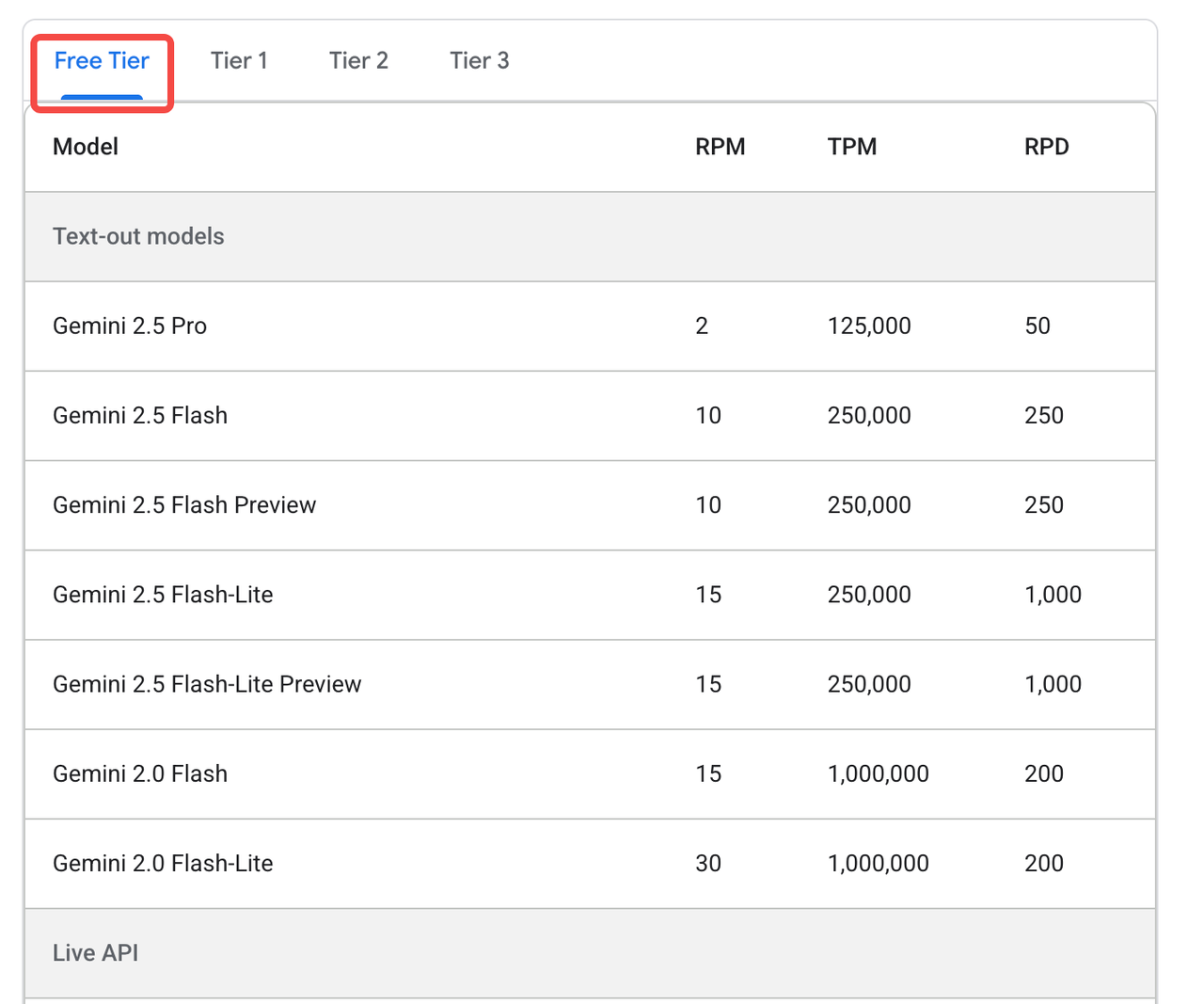
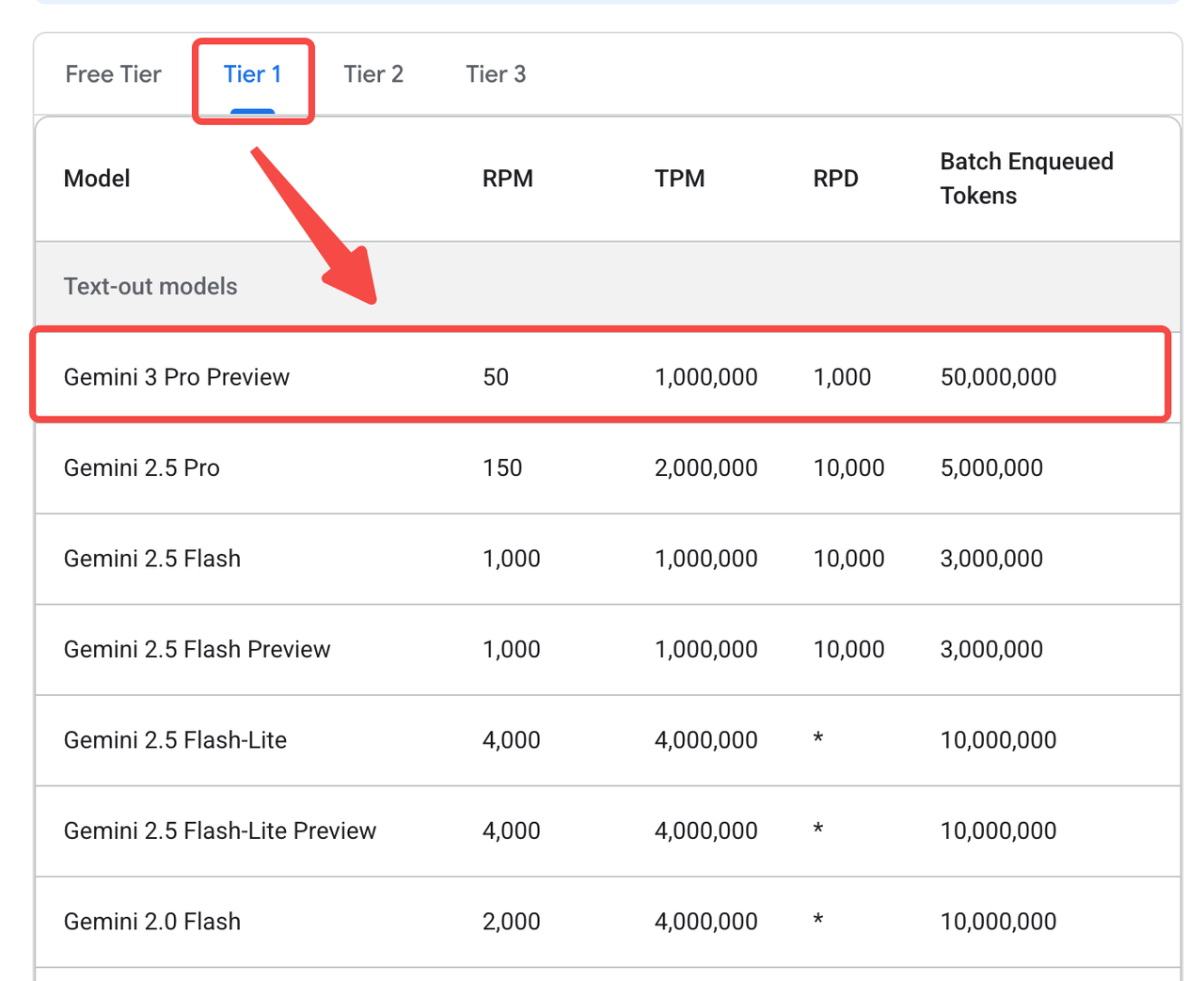
Note: Gemini 3 Pro is not currently available to free-tier users. Click here for more details.
You can access it through OpenRouter instead:
from openai import OpenAI
client = OpenAI(
  base_url="https://openrouter.ai/api/v1",
  api_key="<OPENROUTER_API_KEY>",
)
response2 = client.chat.completions.create(
  model="google/gemini-3-pro-preview",
  messages=[
        {
            "role": "system",
            "content": SYSTEM_PROMPT
        },
        {
            "role": "user",
            "content": USER_PROMPT
        }
    ],
  extra_body={"reasoning": {"enabled": True}}
)
response_message = response2.choices[0].message
print(response_message.content)
One More Thing: Vibe Coding with Google Antigravity
Alongside Gemini 3 Pro, Google introduced Google Antigravity, a vide coding platform that autonomously interacts with your editor, terminal, and browser. Unlike earlier AI-assisted tools that handled one-off instructions, Antigravity operates at a task-oriented level — allowing developers to specify what they want built while the system manages the how, orchestrating the complete workflow end-to-end.
Traditional AI coding workflows typically generated isolated snippets that developers still had to review, integrate, debug, and run manually. Antigravity changes that dynamic. You can simply describe a task — for example, “Create a simple pet-interaction game” — and the system will decompose the request, generate the code, execute terminal commands, open a browser to test the result, and iterate until it works. It elevates AI from a passive autocomplete engine to an active engineering partner — one that learns your preferences and adapts to your personal development style over time.
Looking ahead, the idea of an agent coordinating directly with a database is not far-fetched. With tool calling via MCP, an AI could eventually read from a Milvus database, assemble a knowledge base, and even maintain its own retrieval pipeline autonomously. In many ways, this shift is even more significant than the model upgrade itself: once an AI can take a product-level description and convert it into a sequence of executable tasks, human effort naturally shifts toward defining objectives, constraints, and what “correctness” looks like — the higher-level thinking that truly drives product development.
Ready to Build?
If you’re ready to try it out, follow our step-by-step tutorial and build a RAG system with Gemini 3 Pro + Milvus today.
Have questions or want a deep dive on any feature? Join our Discord channel or file issues on GitHub. You can also book a 20-minute one-on-one session to get insights, guidance, and answers to your questions through Milvus Office Hours.
- Major Upgrades in Gemini 3 Pro
- Multimodal Understanding and Reasoning
- Code Generation
- AI Agents and Tool Use
- Generative UI
- Putting Gemini 3 Pro to the Test
- Multimodal understanding
- Zero-Shot Tasks
- Complex Task Planning
- How to Build a RAG System with Gemini 3 Pro and Milvus
- Prerequisites
- Preparing the Dataset
- LLM and Embedding Model Setup
- Loading Data into Milvus
- Building the RAG Workflow
- One More Thing: Vibe Coding with Google Antigravity
- Ready to Build?
On This Page
Try Managed Milvus for Free
Zilliz Cloud is hassle-free, powered by Milvus and 10x faster.
Get StartedLike the article? Spread the word