

LangGraph models an agent as a graph. State is a typed object that every node reads and updates. Nodes are functions or model calls, and edges, including conditional ones, decide what runs next. A checkpointer saves the state after each step so a run can pause, resume, or be inspected later. Milvus sits inside that graph as the knowledge layer: a retrieval tool or node queries a Milvus collection, and the results come back into the graph state as messages or fields. The two do different jobs. LangGraph remembers where the workflow is, and Milvus remembers what the agent can look up.
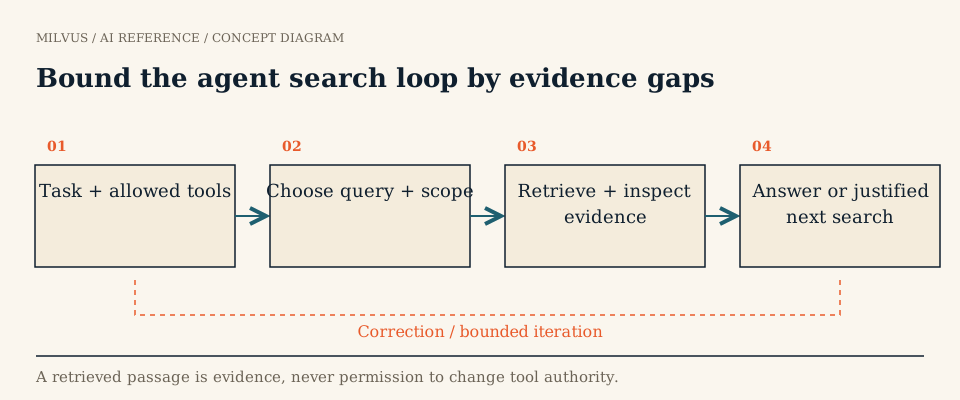 Bound the agent search loop by evidence gaps
Execution state vs. searchable knowledge
It helps to name three kinds of data an agent carries:
| Data | Where it lives | Lifetime |
|---|---|---|
| Workflow state: messages, current step, pending tool calls | LangGraph state, persisted by a checkpointer per thread_id | One conversation or task |
| Knowledge: documents, chunks, product data | Milvus collection, searched by vector, BM25, or hybrid queries | Long-lived, shared across threads |
| Long-term memory: facts or summaries saved for future tasks | A store you choose, often a Milvus collection keyed by user or agent | Long-lived, per user or agent |
Checkpoints are exact snapshots. Resuming a thread restores the same messages and step. Vector search is approximate and ranked. It finds relevant material but cannot reconstruct an interrupted run. Keep IDs that link the two, for example the Milvus primary keys a step retrieved, saved in state. Don’t use one as a substitute for the other.
Agentic RAG: the standard LangGraph + Milvus pattern
In agentic RAG, the model decides whether to retrieve, the graph grades what came back, and a bad result loops to a query rewrite instead of going straight to an answer. A compact version, with Milvus behind a tool:
from langchain_core.tools import tool
from langchain_milvus import Milvus
from langchain_openai import ChatOpenAI, OpenAIEmbeddings
from langgraph.checkpoint.memory import InMemorySaver
from langgraph.graph import END, START, MessagesState, StateGraph
from langgraph.prebuilt import ToolNode, tools_condition

vector_store = Milvus(
    embedding_function=OpenAIEmbeddings(model="text-embedding-3-small"),
    collection_name="support_docs",
    connection_args={"uri": "http://localhost:19530", "token": "root:Milvus"},
)

@tool
def search_docs(query: str, product: str) -> str:
    """Search product documentation. `product` must be one of: billing, analytics."""
    hits = vector_store.similarity_search(query, k=4, expr=f'product == "{product}"')
    return "\n\n".join(f"[{d.metadata['pk']}] {d.page_content}" for d in hits)

llm = ChatOpenAI(model="gpt-4o-mini", temperature=0)

def agent(state: MessagesState):
    return {"messages": [llm.bind_tools([search_docs]).invoke(state["messages"])]}

builder = StateGraph(MessagesState)
builder.add_node("agent", agent)
builder.add_node("tools", ToolNode([search_docs]))
builder.add_edge(START, "agent")
builder.add_conditional_edges("agent", tools_condition)   # tool call -> "tools", else END
builder.add_edge("tools", "agent")

graph = builder.compile(checkpointer=InMemorySaver())
config = {"configurable": {"thread_id": "ticket-4821"}}
graph.invoke({"messages": [{"role": "user", "content": "How do I export last month's report?"}]}, config)
The loop agent → tools → agent lets the model search again with a refined query. tools_condition ends the run once the model answers without calling a tool. The Milvus agentic RAG tutorial extends this with a grading node that sends irrelevant results to a rewrite node before generation. That pattern is worth copying when your corpus has many near-miss chunks. You can also wrap a retriever with create_retriever_tool from langchain_core.tools instead of writing the @tool function by hand.
Why the tool takes explicit arguments
Writing the tool by hand, instead of exposing a bare retriever, lets you control what the model may and may not choose. In the example the model picks product, which is fine because it is a relevance hint. Tenant and permission scope are different. They should come from the authenticated session, not from the prompt. Inject them inside the tool, for example from a value you put in config["configurable"], and AND them into the Milvus expr. A model that hallucinates a different tenant name should still get nothing back. See how authentication, RBAC, and tenant filters protect Milvus applications.
Bounding the loop
An agent that can retrieve repeatedly can also retrieve forever. Put limits in the graph rather than in the prompt:
- Set
recursion_limitin the run config so a runaway loop stops with an error instead of burning tokens. - Keep a retrieval counter in state and route to an answer-or-abstain node after N searches. A second search is often useful, and a fifth rarely is.
- Use timeouts on the Milvus call, and decide what the node returns when the store is unavailable or returns nothing.
- Log each search’s query, filter, and returned primary keys, so a bad answer can be traced to planning, retrieval, or generation.
These are the controls that agentic search needs in production, whatever framework you use.
Checkpointers, threads, and long-term memory
InMemorySaver is for development. State disappears when the process exits. Production deployments use a durable checkpointer, such as the Postgres or SQLite savers, so a thread can resume after a restart or a human-in-the-loop pause. Every invoke with the same thread_id continues that conversation.
Checkpoints do not freeze Milvus. If documents change between a pause and a resume, the resumed run searches the current collection. If you need reproducibility, store the retrieved IDs (and, if necessary, a collection version) in state.
LangGraph also has a store interface for memories shared across threads. When that memory needs semantic search at scale, with millions of facts, per-user filtering, and deletion, it is a natural fit for a Milvus collection with a user_id partition key. See how to structure agent memory in Milvus and how to correct, expire, and delete agent memory.
Testing the combination
Test recovery and retrieval quality separately, because one passing says nothing about the other. Pause a thread mid-run, restart the process, and confirm that the resumed run uses the same permission scope. Then run a fixed question set through the retrieval tool alone and measure whether the right document IDs come back. A graph that resumes perfectly can still retrieve the wrong chunk.
Next steps
Build the full version with the Agentic RAG with Milvus and LangGraph tutorial, and get a server from the Milvus Quickstart or Zilliz Cloud. For a production example of retrieval behind AI assistants, see the Read AI story.
Related reading
- What does LangChain do, and how does it use Milvus?
- How should an agent choose between vector, keyword, and structured search?
- What does a Milvus MCP server expose to an AI agent?
- How do you choose an AI framework for a Milvus application?



