

Embeddings make document clustering work by turning each document into a vector whose position reflects its meaning, so documents about the same subject land near each other even when they share few words. A clustering algorithm such as k-means, HDBSCAN, or agglomerative clustering then groups those vectors, and the groups become topics, duplicates-to-review, or sampling strata. In a Milvus-backed system the embeddings already live in a collection, so clustering is mostly a question of how you pull vectors out, where you run the algorithm, and how you write the cluster labels back so search and filtering can use them.
Why embeddings beat TF-IDF for clustering
Classic document clustering represented each document as a sparse TF-IDF vector over its vocabulary. That works when documents in a group reuse the same terms, but it splits “laptop won’t power on” and “notebook fails to boot” into different clusters because they share no tokens. A sentence or document embedding model maps both to nearby points in a dense space of a few hundred to a few thousand dimensions, so the distance between vectors tracks semantic similarity rather than term overlap.
Two practical consequences follow. First, the similarity metric matters: most text embedding models are trained for cosine similarity, so normalize vectors (or use the COSINE metric in Milvus) before running a Euclidean algorithm like k-means, otherwise vector length leaks into the grouping. Second, the embedding model defines what “similar” means. A general-purpose model clusters by topic; a model fine-tuned on support tickets may cluster by root cause. If the clusters look wrong, the model is often a better lever than the algorithm. See what embeddings are in vector search for the underlying idea and how cosine, IP, and L2 differ for metric choice.
Which clustering algorithm should you use on embeddings?
| Algorithm | You choose | Strengths | Watch out for |
|---|---|---|---|
| k-means | Number of clusters k | Fast, scales to millions of vectors, roughly equal-sized groups | Forces every point into a cluster; poor k hides or merges topics |
| HDBSCAN | Minimum cluster size | Finds clusters of varying density, labels outliers as noise | Can mark a large share of high-dimensional points as noise; usually needs dimensionality reduction (UMAP) first |
| Agglomerative (hierarchical) | Distance threshold or k | Produces a tree you can cut at any granularity | Quadratic memory on large corpora |
| Threshold / community detection | Similarity threshold, minimum community size | Finds tight groups of near-identical items; good for duplicates | Leaves most documents unclustered by design |
A common topic-discovery pipeline is embed → reduce with UMAP → cluster with HDBSCAN → describe each cluster with its most representative terms, which is the recipe popularized by BERTopic. For very large corpora, mini-batch k-means on the raw normalized vectors is the pragmatic default because it is predictable and parallelizes well. The Sentence Transformers documentation shows the “fast clustering” community-detection approach handling tens of thousands of sentences in seconds, which is the right tool when you want tight near-duplicate groups rather than broad topics.
How do you cluster vectors stored in Milvus?
Milvus is a retrieval engine, not a clustering library, so the workflow has three stages.
1. Export the vectors. Read the embedding field and primary key in batches, for example with a query iterator over the collection or by exporting through the Spark-Milvus connector for corpus-scale jobs. Keep the primary key with every vector so labels can be written back.
2. Cluster outside the database. Run scikit-learn, cuML, FAISS k-means, or Spark MLlib on the exported matrix. Record the embedding model, normalization, algorithm, and parameters with the run, because a model change reshapes the geometry and therefore the clusters.
3. Write cluster labels back as scalar fields. Add a cluster_id (INT64) field, plus optional cluster_run (VARCHAR) and cluster_distance (FLOAT) fields, and apply labels with upsert. On Milvus 2.6.2 and later, partial_update=True lets you update only those fields without resending the vector:
client.upsert(
    collection_name="docs",
    data=[{"id": 1042, "cluster_id": 17, "cluster_run": "2026-10-kmeans-k200"}],
    partial_update=True,
)
Build a scalar index (for example INVERTED or BITMAP) on cluster_id, and the labels become usable at query time: filter='cluster_id == 17' restricts a semantic search to one topic, a grouping search with group_by_field="cluster_id" returns the best hit per topic so one theme cannot flood the results, and query(filter='cluster_id == 17', limit=20) pulls a sample for a reviewer.
Assigning new documents without re-clustering
Once clusters exist, store each cluster’s centroid as a row in a small companion collection (centroid_id, vector, label). When a new document arrives, search that collection with the new document’s embedding and limit=1; the nearest centroid is its cluster, and the distance tells you how well it fits. A document far from every centroid is a signal that a new topic is forming, which connects clustering to anomaly and novelty discovery. Re-run full clustering on a schedule rather than letting incremental assignment drift forever.
Application clusters are not IVF clusters
Milvus IVF indexes also run k-means: IVF_FLAT partitions vectors into nlist clusters (default 128) and searches only the nprobe closest ones (default 8). Those centroids exist to make search fast. Their count is chosen for recall and latency, they are trained per segment, and they are not exposed as labels you can filter on. Your document clusters exist to mean something to people, so compute them separately and store them as fields. Read how IVF uses centroids for the index side.
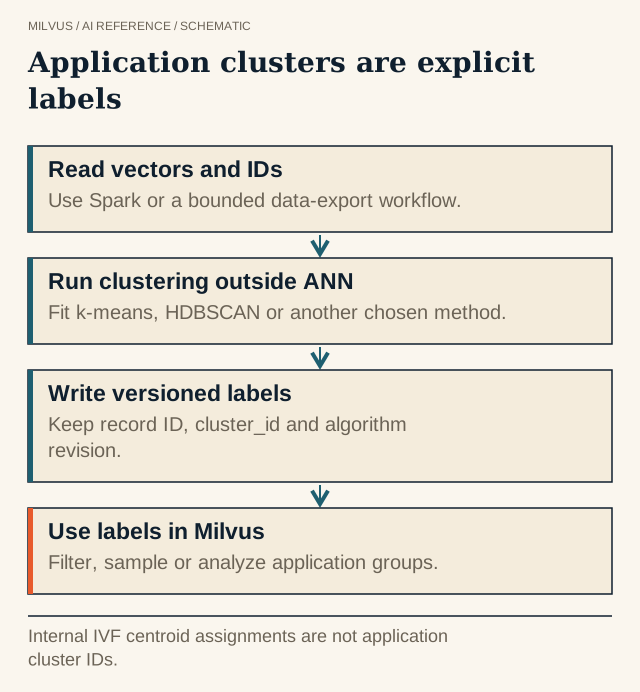 Application clusters are explicit labels. Internal IVF centroid assignments are not application cluster IDs.
How do you know the clusters are good?
Silhouette score and Davies-Bouldin index measure geometric separation, and they are useful for comparing k values on the same embeddings. They do not tell you whether a cluster is a coherent topic. Pair them with inspection: for each cluster, look at the documents nearest the centroid (search the cluster’s own centroid with a cluster_id filter), at a few boundary members, and at outliers. If you have any labels, adjusted Rand index or normalized mutual information against those labels is a stronger check. Track stability too: re-cluster a fresh sample and see whether the same groups reappear.
The test that matters is downstream. If clusters drive navigation, measure whether users find documents faster. If they drive diversity sampling or deduplication, measure the coverage or duplicate rate they produce.
Common use cases
- Topic discovery over support tickets, research papers, or logs, with cluster labels feeding dashboards.
- Search result organization, using grouping search on
cluster_idto show one result per theme. - Training-data balancing, capping samples per cluster so a dominant topic does not crowd out rare ones.
- Duplicate and entity review, using tight similarity-threshold clusters as candidate sets for entity resolution.
Next step
Load a sample corpus into Milvus with the Quickstart, cluster an exported batch, write cluster_id back with upsert, and try a grouping search on it. The Milvus Bootcamp has end-to-end notebooks for embedding pipelines you can adapt.


