GEO Content at Scale: How to Rank in AI Search Without Poisoning Your Brand
Your organic search traffic is declining, and it’s not because your SEO got worse. Roughly 70% of Google queries now end in zero clicks according to SparkToro — users get their answers from AI-generated summaries instead of clicking through to your page. Perplexity, ChatGPT Search, Google AI Overview — these aren’t future threats. They’re already eating your traffic.
Generative Engine Optimization (GEO) is how you fight back. Where traditional SEO optimizes for ranking algorithms (keywords, backlinks, page speed), GEO optimizes for AI models that compose answers by pulling from multiple sources. The goal: structure your content so that AI search engines cite your brand in their responses.
The problem is that GEO requires content at a scale most marketing teams can’t produce manually. AI models don’t rely on a single source — they synthesize across dozens. To show up consistently, you need coverage across hundreds of long-tail queries, each targeting a specific question a user might ask an AI assistant.
The obvious shortcut — having an LLM batch-generate articles — creates a worse problem. Ask GPT-4 to produce 50 articles and you’ll get 50 articles full of fabricated statistics, recycled phrasing, and claims your brand never made. That’s not GEO. That’s AI content spam with your brand name on it.
The fix is grounding every generation call in verified source documents — real product specs, approved brand messaging, and actual data that the LLM draws on instead of inventing. This tutorial walks through a production pipeline that does exactly that, built on three components:
- OpenClaw — an open-source AI agent framework that orchestrates the workflow and connects to messaging platforms like Telegram, WhatsApp, and Slack
- Milvus — a vector database that handles knowledge storage, semantic deduplication, and RAG retrieval
- LLMs (GPT-4o, Claude, Gemini) — the generation and evaluation engines
By the end, you’ll have a working system that ingests brand documents into a Milvus-backed knowledge base, expands seed topics into long-tail queries, deduplicates them semantically, and batch-generates articles with built-in quality scoring.
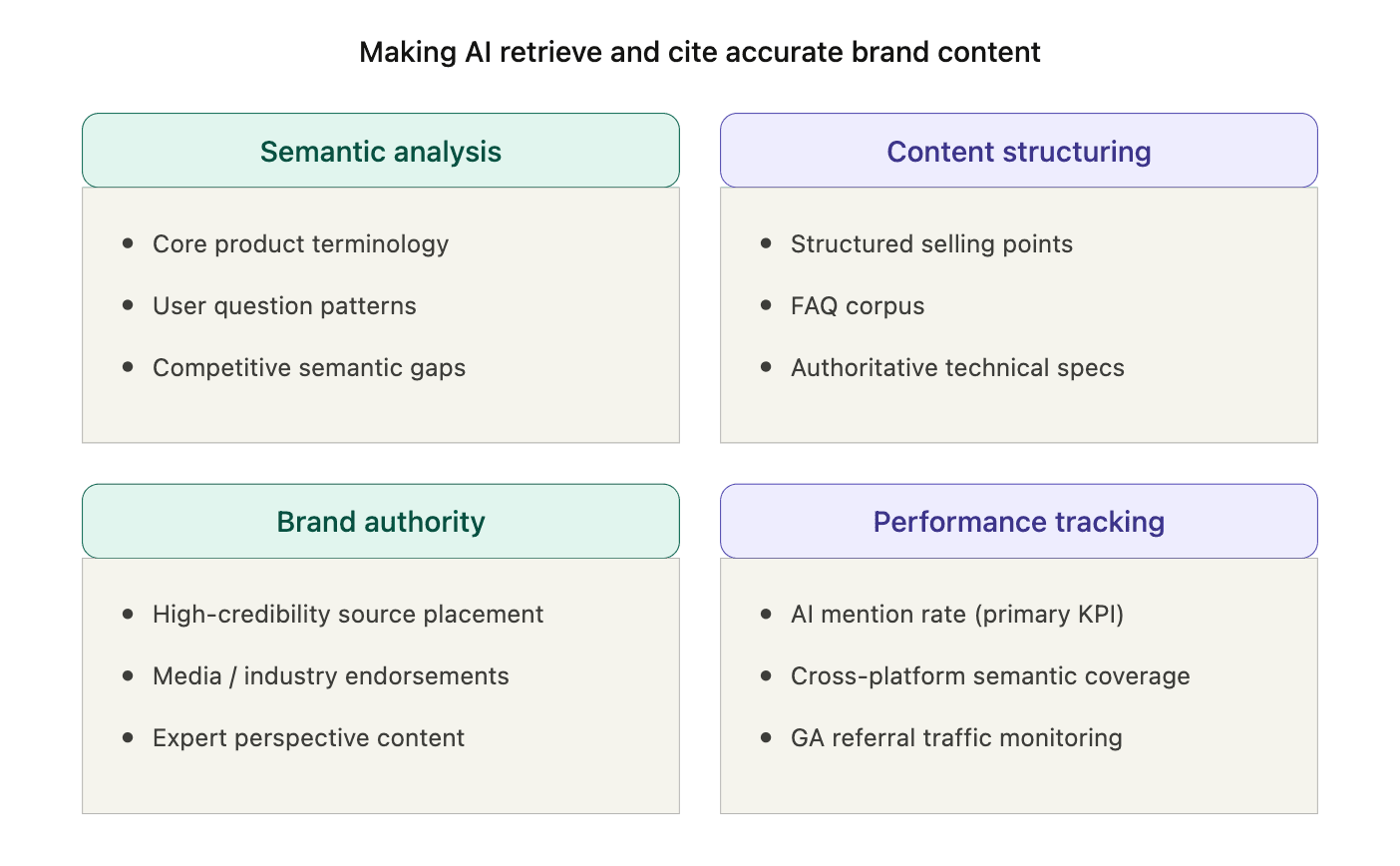 GEO strategy overview — four pillars: Semantic analysis, Content structuring, Brand authority, and Performance tracking
Note: This is a working system built for a real marketing workflow, but the code is a starting point. You’ll want to adapt the prompts, scoring thresholds, and knowledge base structure to your own use case.
How the Pipeline Solves Volume × Quality
| Component | Role |
|---|---|
| OpenClaw | Agent orchestration, messaging integration (Lark, Telegram, WhatsApp) |
| Milvus | Knowledge storage, semantic deduplication, RAG retrieval |
| LLMs (GPT-4o, Claude, Gemini) | Query expansion, article generation, quality scoring |
| Embedding model | Text to vectors for Milvus (OpenAI, 1536 dimensions by default) |
The pipeline runs in two phases. Phase 0 ingests source material into the knowledge base. Phase 1 generates articles from it.
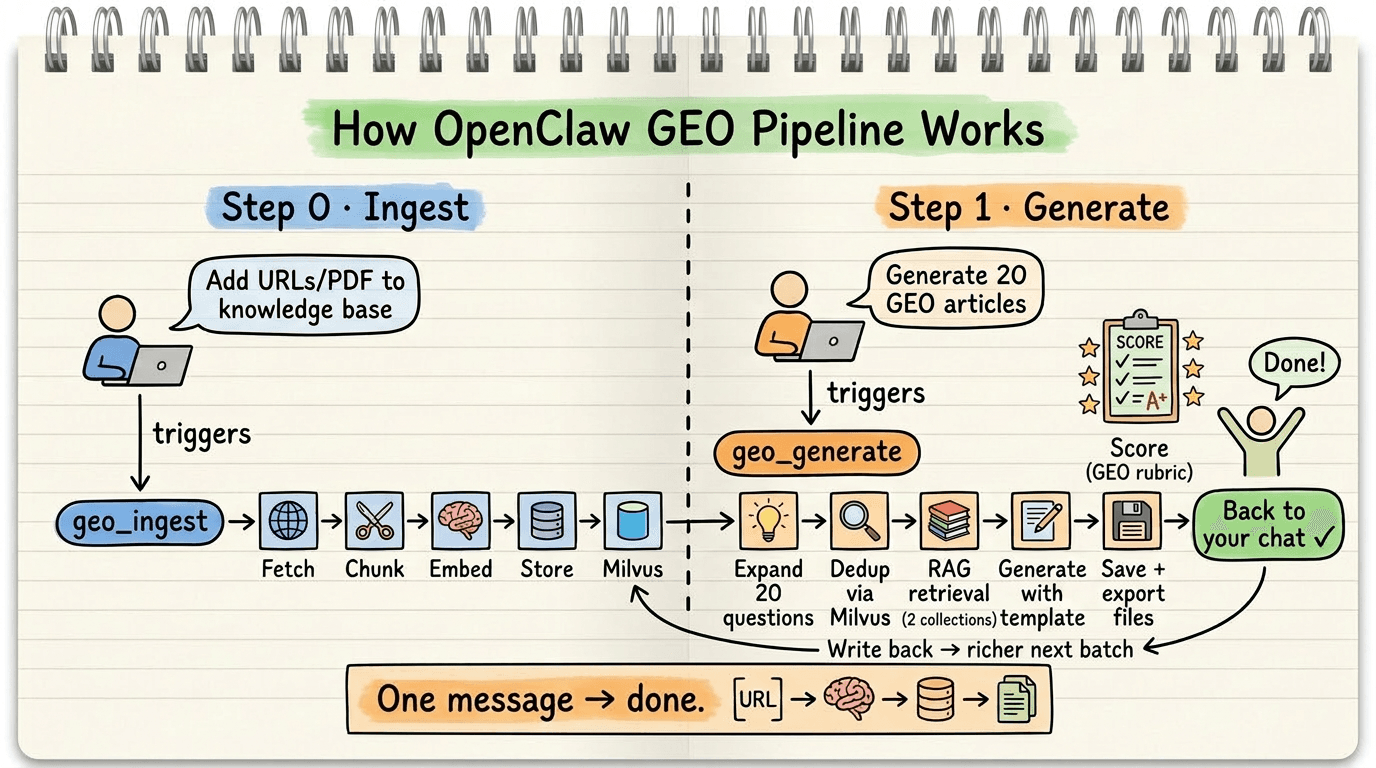 How the OpenClaw GEO Pipeline works — Phase 0 (Ingest: fetch, chunk, embed, store) and Phase 1 (Generate: expand queries, dedup via Milvus, RAG retrieval, generate articles, score, and store)
Here’s what happens inside Phase 1:
- A user sends a message through Lark, Telegram, or WhatsApp. OpenClaw receives it and routes it to the GEO generation skill.
- The skill expands the user’s topic into long-tail search queries using an LLM — the specific questions real users ask AI search engines.
- Each query is embedded and checked against Milvus for semantic duplicates. Queries too similar to existing content (cosine similarity > 0.85) are dropped.
- Surviving queries trigger RAG retrieval from two Milvus collections at once: the knowledge base (brand documents) and the article archive (previously generated content). This dual retrieval keeps output grounded in real source material.
- The LLM generates each article using the retrieved context, then scores it against a GEO quality rubric.
- The finished article writes back to Milvus, enriching the dedup and RAG pools for the next batch.
The GEO skill definition also bakes in optimization rules: lead with a direct answer, use structured formatting, cite sources explicitly, and include original analysis. AI search engines parse content by structure and deprioritize unsourced claims, so each rule maps to a specific retrieval behavior.
Generation runs in batches. A first round goes to the client for review. Once the direction is confirmed, the pipeline scales to full production.
Why a Knowledge Layer Is the Difference Between GEO and AI Spam
What separates this pipeline from “just prompting ChatGPT” is the knowledge layer. Without it, LLM output looks polished but says nothing verifiable — and AI search engines are increasingly good at detecting that. Milvus, the vector database powering this pipeline, brings several capabilities that matter here:
Semantic deduplication catches what keywords miss. Keyword matching treats “Milvus performance benchmarks” and “How does Milvus compare to other vector databases?” as unrelated queries. Vector similarity recognizes they’re asking the same question, so the pipeline skips the duplicate instead of wasting a generation call.
Dual-collection RAG keeps sources and outputs separate. geo_knowledge stores ingested brand documents. geo_articles stores generated content. Every generation query hits both — the knowledge base keeps facts accurate, and the article archive keeps tone consistent across the batch. The two collections are maintained independently, so updating source materials never disrupts existing articles.
A feedback loop that improves with scale. Each generated article writes back to Milvus immediately. The next batch has a larger dedup pool and richer RAG context. Quality compounds over time.
Zero-setup local development. Milvus Lite runs locally with one line of code — no Docker needed. For production, switching to a Milvus cluster or Zilliz Cloud means changing a single URI:
MILVUS_URI = "./geo_milvus.db"           # Local dev (Milvus Lite, no Docker needed)
MILVUS_URI = "https://xxx.zillizcloud.com"  # Production (Zilliz Cloud)
client = MilvusClient(uri=MILVUS_URI)
Step-by-Step Tutorial
The entire pipeline is packaged as an OpenClaw Skill — a directory containing a SKILL.MD instruction file and the code implementation.
skills/geo-generator/
├── SKILL.md                    # Skill definition (instructions + metadata)
├── index.js                    # OpenClaw tool registration, bridges to Python
├── requirements.txt
└── src/
    ├── config.py               # Configuration (Milvus/LLM connection)
    ├── llm_client.py           # LLM wrapper (embedding + chat)
    ├── milvus_store.py         # Milvus operations (article + knowledge collections)
    ├── ingest.py               # Knowledge ingestion (documents + web pages)
    ├── expander.py             # Step 1: LLM expands long-tail queries
    ├── dedup.py                # Step 2: Milvus semantic deduplication
    ├── generator.py            # Step 3: Article generation + GEO scoring
    ├── main.py                 # Main pipeline entry point
    └── templates/
        └── geo_template.md     # GEO article prompt template
Step 1: Define the OpenClaw Skill
SKILL.md tells OpenClaw what this skill can do and how to invoke it. It exposes two tools: geo_ingest for feeding the knowledge base and geo_generate for batch article generation. It also contains the GEO optimization rules that shape what the LLM produces.
---
name: geo-generator
description: Batch generate GEO-optimized articles using Milvus vector database and LLM, with knowledge base ingestion
version: 1.1.0
user-invocable: true
disable-model-invocation: false
command-dispatch: tool
command-tool: geo_generate
command-arg-mode: raw
metadata: {"openclaw":{"emoji":"📝","primaryEnv":"OPENAI_API_KEY","requires":{"bins":["python3"],"env":["OPENAI_API_KEY"],"os":["darwin","linux"]}}}
---
# GEO Article Batch Generator

## What it does

Batch generates GEO (Generative Engine Optimization) articles optimized for AI search engines (Perplexity, ChatGPT Search, Google AI Overview). Uses Milvus for semantic deduplication, knowledge retrieval, and knowledge base storage. LLM for content generation.

## Tools

### geo_ingest — Feed the knowledge base

Before generating articles, users can ingest authoritative source materials to improve accuracy:
- **Local files**: Markdown, TXT, PDF documents
- **Web URLs**: Fetches page content automatically

Examples:
- "Ingest these Milvus docs into the knowledge base: https://milvus.io/docs/overview.md"
- "Add these files to the GEO knowledge base: /path/to/doc1.md /path/to/doc2.pdf"

### geo_generate — Batch generate articles

When the user sends a message like "Generate 20 GEO articles about Milvus vector database":
1. **Parse intent** — Extract: topic keyword, target count, optional language/tone
2. **Expand long-tail questions** — Call LLM to generate N long-tail search queries around the topic
3. **Deduplicate via Milvus** — Embed each query, search Milvus for similar existing content, drop duplicates (similarity > 0.85)
4. **Batch generate** — For each surviving query, retrieve context from BOTH knowledge base and previously generated articles, then call LLM with GEO template
5. **Store & export** — Write each article back into Milvus (for future dedup) and save to output files
6. **Report progress** — Send progress updates and final summary back to the chat

## Recommended workflow

1. First ingest authoritative documents/URLs about the topic
2. Then generate articles — the knowledge base ensures factual accuracy

## GEO Optimization Rules

Every generated article MUST include:
- A direct, concise answer in the first paragraph (AI engines extract this)
- At least 2 citations or data points with sources
- Structured headings (H2/H3), bullet lists, or tables
- A unique perspective or original analysis
- Schema-friendly metadata (title, description, keywords)

## Output format

For each article, return:
- Title
- Meta description
- Full article body (Markdown)
- Target long-tail query
- GEO score (0-100, self-evaluated)

## Guardrails

- Never fabricate citations or statistics — use data from the knowledge base
- If Milvus is unreachable, report the error honestly
- Respect the user's specified count — do not over-generate
- All progress updates should include current/total count
Step 2: Register Tools and Bridge to Python
OpenClaw runs on Node.js, but the GEO pipeline is in Python. index.js bridges the two — it registers each tool with OpenClaw and delegates execution to the corresponding Python script.
function _runPython(script, args, config) {
  return new Promise((resolve) => {
    const child = execFile("python3", [script, ...args], {
      maxBuffer: 10 * 1024 * 1024,
      env: { ...process.env, ...config?.env },
    }, (error, stdout) => {
      // Parse JSON result and return to chat
    });
    child.stdout?.on("data", (chunk) => process.stdout.write(chunk));
  });
}

// Tool 1: Ingest documents/URLs into knowledge base
async function geo_ingest(params, config) {
  const args = [];
  if (params.files?.length) args.push("--files", ...params.files);
  if (params.urls?.length)  args.push("--urls", ...params.urls);
  return _runPython(INGEST_SCRIPT, args, config);
}

// Tool 2: Batch generate GEO articles
async function geo_generate(params, config) {
  return _runPython(MAIN_SCRIPT, [
    "--topic", params.topic,
    "--count", String(params.count || 20),
    "--output", params.output || DEFAULT_OUTPUT,
  ], config);
}
Step 3: Ingest Source Material
Before generating anything, you need a knowledge base. ingest.py fetches web pages or reads local documents, chunks the text, embeds it, and writes it to the geo_knowledge collection in Milvus. This is what keeps generated content grounded in real information rather than LLM hallucinations.
def ingest_sources(files=None, urls=None):
    llm = get_llm_client()
    milvus = get_milvus_client()
    ensure_knowledge_collection(milvus)

    for url in urls:
        text = extract_from_url(url)       # Fetch and extract text
        chunks = chunk_text(text)           # Split into 800-char chunks with overlap
        embeddings = get_embeddings_batch(llm, chunks)
        records = [
            {"embedding": emb, "content": chunk,
             "source": url, "source_type": "url", "chunk_index": i}
            for i, (chunk, emb) in enumerate(zip(chunks, embeddings))
        ]
        insert_knowledge(milvus, records)
Step 4: Expand Long-Tail Queries
Given a topic like “Milvus vector database,” the LLM generates a set of specific, realistic search queries — the kind of questions real users type into AI search engines. The prompt covers different intent types: informational, comparison, how-to, problem-solving, and FAQ.
SYSTEM_PROMPT = """\
You are an SEO/GEO keyword research expert. Generate long-tail search queries.
Requirements:
1. Each query = a specific question a real user might ask
2. Cover different intents: informational, comparison, how-to, problem-solving, FAQ
3. One query per line, no numbering
"""

def expand_queries(client, topic, count):
    user_prompt = f"Topic: {topic}\nPlease generate {count} long-tail search queries."
    result = chat(client, SYSTEM_PROMPT, user_prompt)
    queries = [q.strip() for q in result.strip().splitlines() if q.strip()]
    return queries[:count]
Step 5: Deduplicate via Milvus
This is where vector search earns its place. Each expanded query is embedded and compared against both the geo_knowledge and geo_articles collections. If cosine similarity exceeds 0.85, the query is a semantic duplicate of something already in the system and gets dropped — preventing the pipeline from generating five slightly different articles that all answer the same question.
def deduplicate_queries(llm_client, milvus_client, queries):
    embeddings = get_embeddings_batch(llm_client, queries)
    unique = []
    for query, emb in zip(queries, embeddings):
        if is_duplicate(milvus_client, emb, threshold=0.85):
            print(f"  [Dedup] Skipping duplicate: {query}")
            continue
        unique.append((query, emb))
    return unique
Step 6: Generate Articles with Dual-Source RAG
For each surviving query, the generator retrieves context from both Milvus collections: authoritative source material from geo_knowledge and previously generated articles from geo_articles. This dual retrieval keeps content factually grounded (knowledge base) and internally consistent (article history).
def get_context(client, embedding, top_k=3):
    context_parts = []

    # 1. Knowledge base (authoritative sources)
    for hit in search_knowledge(client, embedding, top_k):
        source = hit["entity"]["source"]
        context_parts.append(f"### Source Material (from: {source}):\n{hit['entity']['content'][:800]}")

    # 2. Previously generated articles
    for hit in search_similar(client, embedding, top_k):
        context_parts.append(f"### Related Article: {hit['entity']['title']}\n{hit['entity']['content'][:500]}")

    return "\n\n".join(context_parts)
The two collections use the same embedding dimension (1536) but store different metadata because they serve different roles: geo_knowledge tracks where each chunk came from (for source attribution), while geo_articles stores the original query and GEO score (for dedup matching and quality filtering).
def generate_one(llm_client, milvus_client, query, embedding):
    context = get_context(milvus_client, embedding)  # Dual-source RAG
    template = _load_template()                       # GEO template
    user_prompt = template.replace("{query}", query).replace("{context}", context)

    raw = chat(llm_client, "You are a senior GEO content writer...", user_prompt)
    article = _parse_article(raw)
    article["geo_score"] = _score_article(llm_client, article["content"])  # Self-evaluate
    insert_article(milvus_client, article)  # Write back for future dedup & RAG
    return article
The Milvus Data Model
Here’s what each collection looks like if you’re creating them from scratch:
# geo_knowledge — Source material for RAG retrieval
schema.add_field("embedding", DataType.FLOAT_VECTOR, dim=1536)
schema.add_field("content", DataType.VARCHAR, max_length=65535)
schema.add_field("source", DataType.VARCHAR, max_length=1024)     # URL or file path
schema.add_field("source_type", DataType.VARCHAR, max_length=32)  # "file" or "url"

# geo_articles — Generated articles for dedup + RAG
schema.add_field("embedding", DataType.FLOAT_VECTOR, dim=1536)
schema.add_field("query", DataType.VARCHAR, max_length=512)
schema.add_field("title", DataType.VARCHAR, max_length=512)
schema.add_field("content", DataType.VARCHAR, max_length=65535)
schema.add_field("geo_score", DataType.INT64)
Running the Pipeline
Drop the skills/geo-generator/ directory into your OpenClaw skills folder, or send the zip file to Lark and let OpenClaw install it. You’ll need to configure your OPENAI_API_KEY.
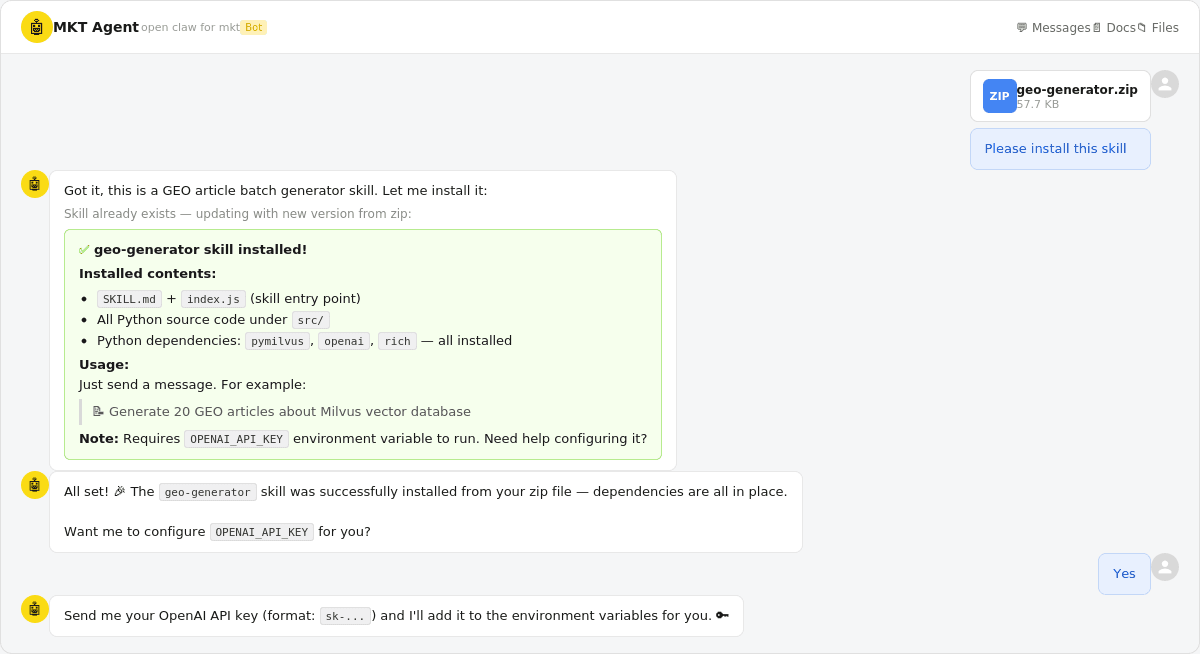 Screenshot showing the OpenClaw skill installation via Lark chat — uploading geo-generator.zip and the bot confirming successful installation with dependency list
From there, interact with the pipeline through chat messages:
Example 1: Ingest source URLs into the knowledge base, then generate articles.
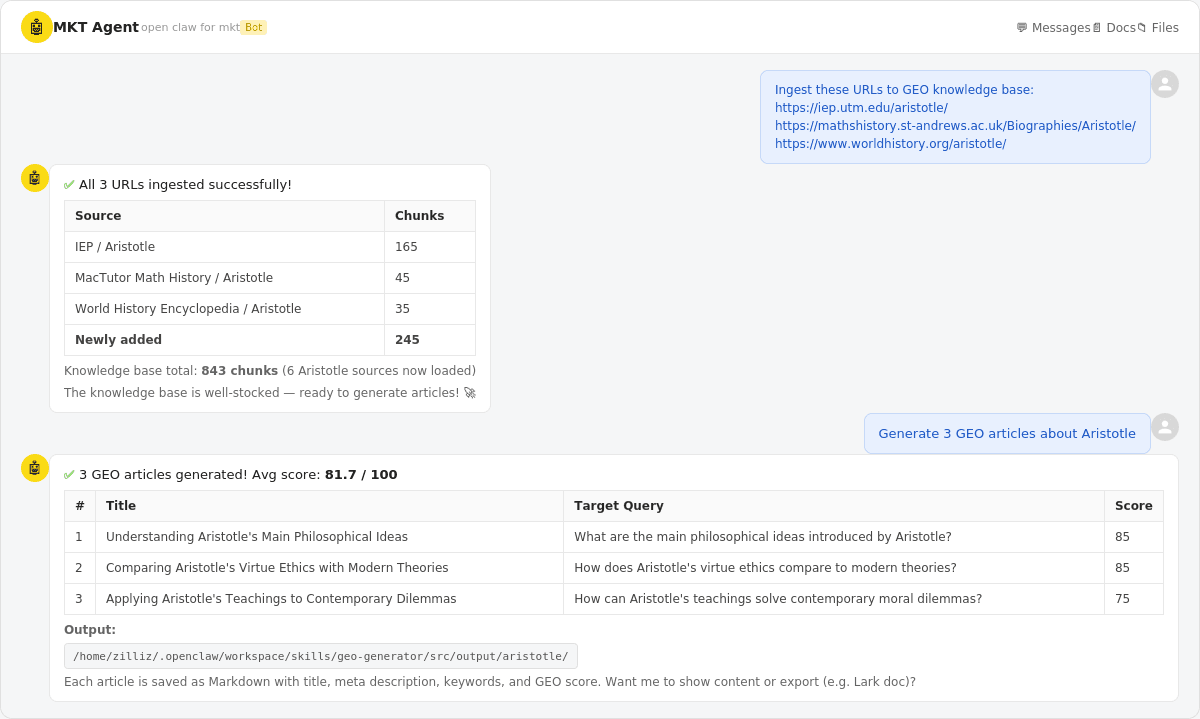 Chat screenshot showing the workflow: user ingests 3 Aristotle URLs (245 chunks added), then generates 3 GEO articles with an average score of 81.7/100
Example 2: Upload a book (Wuthering Heights), then generate 3 GEO articles and export them to a Lark doc.
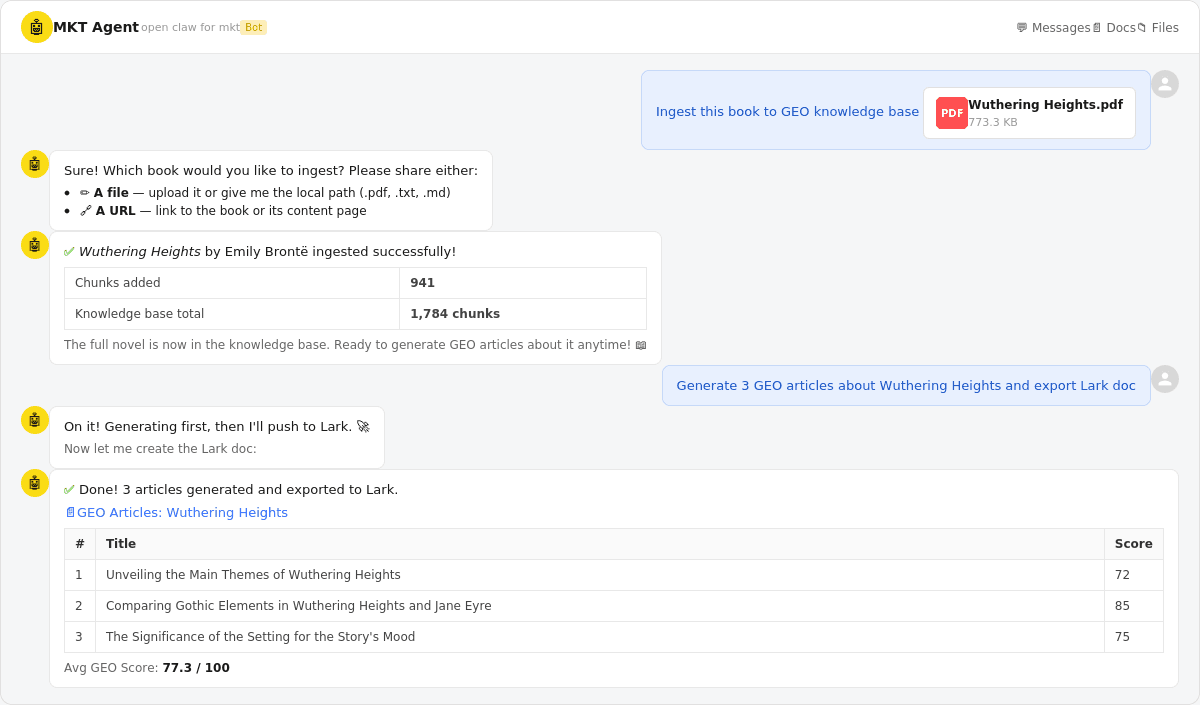 Chat screenshot showing book ingestion (941 chunks from Wuthering Heights), then 3 generated articles exported to a Lark doc with an average GEO score of 77.3/100
When GEO Content Generation Backfires
GEO content generation only works as well as the knowledge base behind it. A few cases where this approach does more harm than good:
No authoritative source material. Without a solid knowledge base, the LLM falls back on training data. The output ends up generic at best, hallucinated at worst. The entire point of the RAG step is to ground generation in verified information — skip that, and you’re just doing prompt engineering with extra steps.
Promoting something that doesn’t exist. If the product doesn’t work as described, that’s not GEO — that’s misinformation. The self-scoring step catches some quality issues, but it can’t verify claims the knowledge base doesn’t contradict.
Your audience is purely human. GEO optimization (structured headings, direct first-paragraph answers, citation density) is designed for AI discoverability. It can feel formulaic if you’re writing purely for human readers. Know which audience you’re targeting.
A note on the dedup threshold. The pipeline drops queries with cosine similarity above 0.85. If too many near-duplicates are getting through, lower it. If the pipeline discards queries that seem genuinely different, raise it. 0.85 is a reasonable starting point, but the right value depends on how narrow your topic is.
Conclusion
GEO is where SEO was ten years ago — early enough that the right infrastructure gives you a real edge. This tutorial builds a pipeline that generates articles AI search engines actually cite, grounded in your brand’s own source material instead of LLM hallucinations. The stack is OpenClaw for orchestration, Milvus for knowledge storage and RAG retrieval, and LLMs for generation and scoring.
The full source code is available at github.com/nicepkg/openclaw.
If you’re building a GEO strategy and need the infrastructure to support it:
- Join the Milvus Slack community to see how other teams are using vector search for content, dedup, and RAG.
- Book a free 20-minute Milvus Office Hours session to walk through your use case with the team.
- If you’d rather skip infrastructure setup, Zilliz Cloud (managed Milvus) has a free tier — one URI change and you’re in production.
A few questions that come up when marketing teams start exploring GEO:
My SEO traffic is dropping. Is GEO the replacement? GEO doesn’t replace SEO — it extends it to a new channel. Traditional SEO still drives traffic from users who click through to pages. GEO targets the growing share of queries where users get answers directly from AI (Perplexity, ChatGPT Search, Google AI Overview) without ever visiting a website. If you’re seeing zero-click rates climb in your analytics, that’s the traffic GEO is designed to recapture — not through clicks, but through brand citations in AI-generated answers.
How is GEO content different from regular AI-generated content? Most AI-generated content is generic — the LLM draws from training data and produces something that sounds reasonable but isn’t grounded in your brand’s actual facts, claims, or data. GEO content is grounded in a knowledge base of verified source material using RAG (retrieval-augmented generation). The difference shows in the output: specific product details instead of vague generalizations, real numbers instead of fabricated stats, and consistent brand voice across dozens of articles.
How many articles do I need for GEO to work? There’s no magic number, but the logic is straightforward: AI models synthesize from multiple sources per answer. The more long-tail queries you cover with quality content, the more often your brand shows up. Start with 20-30 articles around your core topic, measure which ones get cited (check your AI mention rate and referral traffic), and scale from there.
Won’t AI search engines penalize mass-generated content? They will if it’s low-quality. AI search engines are getting better at detecting unsourced claims, recycled phrasing, and content that doesn’t add original value. That’s exactly why this pipeline includes a knowledge base for grounding and a self-scoring step for quality control. The goal isn’t to generate more content — it’s to generate content that’s genuinely useful enough for AI models to cite.
- How the Pipeline Solves Volume × Quality
- Why a Knowledge Layer Is the Difference Between GEO and AI Spam
- Step-by-Step Tutorial
- Step 1: Define the OpenClaw Skill
- Step 2: Register Tools and Bridge to Python
- Step 3: Ingest Source Material
- Step 4: Expand Long-Tail Queries
- Step 5: Deduplicate via Milvus
- Step 6: Generate Articles with Dual-Source RAG
- The Milvus Data Model
- Running the Pipeline
- When GEO Content Generation Backfires
- Conclusion
On This Page
Try Managed Milvus for Free
Zilliz Cloud is hassle-free, powered by Milvus and 10x faster.
Get StartedLike the article? Spread the word