DeepSeek V3-0324: The "Minor Update" That's Crushing Top AI Models
DeepSeek quietly dropped a bombshell last night. Their latest release, DeepSeek v3-0324, was downplayed in the official announcement as just a “minor upgrade” with no API changes. But our extensive testing at Zilliz has revealed something more significant: this update represents a quantum leap in performance, particularly in logic reasoning, programming, and mathematical problem-solving.
What we’re seeing isn’t just incremental improvement – it’s a fundamental shift that positions DeepSeek v3-0324 among the elite tier of language models. And it is open source.
This release deserves your immediate attention for developers and enterprises building AI-powered applications.
What’s New in DeepSeek v3-0324 and How Good Is It Really?
DeepSeek v3-0324 introduces three major improvements over its predecessor, DeepSeek v3:
Larger Model, More Power: The parameter count has increased from 671 billion to 685 billion, allowing the model to handle more complex reasoning and generate more nuanced responses.
A Massive Context Window: With an upgraded 128K token context length, DeepSeek v3-0324 can retain and process significantly more information in a single query, making it ideal for long-form conversations, document analysis, and retrieval-based AI applications.
Enhanced Reasoning, Coding, and Math: This update brings a noticeable boost in logic, programming, and mathematical capabilities, making it a strong contender for AI-assisted coding, scientific research, and enterprise-grade problem-solving.
But the raw numbers don’t tell the whole story. What’s truly impressive is how DeepSeek has managed to simultaneously enhance reasoning capacity and generation efficiency—something that typically involves engineering tradeoffs.
The Secret Sauce: Architectural Innovation
Under the hood, DeepSeek v3-0324 retains its Multi-head Latent Attention (MLA) architecture—an efficient mechanism that compresses Key-Value (KV) caches using latent vectors to reduce memory usage and computational overhead during inference. Additionally, it replaces traditional Feed-Forward Networks (FFN) with Mixture of Experts (MoE) layers, optimizing compute efficiency by dynamically activating the best-performing experts for each token.
However, the most exciting upgrade is multi-token prediction (MTP), which allows each token to predict multiple future tokens simultaneously. This overcomes a significant bottleneck in traditional autoregressive models, improving both accuracy and inference speed.
Together, these innovations create a model that doesn’t just scale well – it scales intelligently, bringing professional-grade AI capabilities within reach of more development teams.
Build a RAG System with Milvus and DeepSeek v3-0324 in 5 Minutes
DeepSeek v3-0324’s powerful reasoning capabilities make it an ideal candidate for Retrieval-Augmented Generation (RAG) systems. In this tutorial, we’ll show you how to build a complete RAG pipeline using DeepSeek v3-0324 and the Milvus vector database in just five minutes. You’ll learn how to retrieve and synthesize knowledge efficiently with minimal setup.
Setting Up Your Environment
First, let’s install the necessary dependencies:
! pip install --upgrade pymilvus[model] openai requests tqdm
Note: If you’re using Google Colab, you’ll need to restart the runtime after installing these packages. Click on the “Runtime” menu at the top of the screen and select “Restart session” from the dropdown menu.
Since DeepSeek provides an OpenAI-compatible API, you’ll need an API key. You can get one by signing up on the DeepSeek platform:
import os

os.environ["DEEPSEEK_API_KEY"] = "***********"
Preparing Your Data
For this tutorial, we’ll use the FAQ pages from the Milvus Documentation 2.4.x as our knowledge source:
! wget https://github.com/milvus-io/milvus-docs/releases/download/v2.4.6-preview/milvus_docs_2.4.x_en.zip
! unzip -q milvus_docs_2.4.x_en.zip -d milvus_docs
Now, let’s load and prepare the FAQ content from the markdown files:
from glob import glob

# Load all markdown files from the FAQ directory
text_lines = []
for file_path in glob("milvus_docs/en/faq/*.md", recursive=True):
    with open(file_path, "r") as file:
        file_text = file.read()
        # Split on headings to separate content sections
        text_lines += file_text.split("# ")
Setting Up the Language and Embedding Models
We’ll use OpenRouter to access DeepSeek v3-0324. OpenRouter provides a unified API for multiple AI models, such as DeepSeek and Claude. By creating a free DeepSeek V3 API key on OpenRouter, you can easily try out DeepSeek V3 0324.
https://assets.zilliz.com/Setting_Up_the_Language_and_Embedding_Models_8b00595a6b.png
from openai import OpenAI

deepseek_client = OpenAI(
   api_key="<OPENROUTER_API_KEY>",
   base_url="https://openrouter.ai/api/v1",
)
For text embeddings, we’ll use Milvus’ built-in embedding model, which is lightweight and effective:
from pymilvus import model as milvus_model

# Initialize the embedding model
embedding_model = milvus_model.DefaultEmbeddingFunction()

# Test the embedding model
test_embedding = embedding_model.encode_queries(["This is a test"])[0]
embedding_dim = len(test_embedding)
print(f"Embedding dimension: {embedding_dim}")
print(f"First 10 values: {test_embedding[:10]}")
Creating a Milvus Collection
Now let’s set up our vector database using Milvus:
from pymilvus import MilvusClient

# Initialize Milvus client (using Milvus Lite for simplicity)
milvus_client = MilvusClient(uri="./milvus_demo.db")
collection_name = "my_rag_collection"

# Remove existing collection if it exists
if milvus_client.has_collection(collection_name):
    milvus_client.drop_collection(collection_name)

# Create a new collection
milvus_client.create_collection(
    collection_name=collection_name,
    dimension=embedding_dim,
    metric_type="IP",  # Inner product distance
    consistency_level="Strong",  # See https://milvus.io/docs/consistency.md for details
)
Pro Tip: For different deployment scenarios, you can adjust your Milvus setup:
For local development: Use
uri="./milvus.db"with Milvus LiteFor larger datasets: Set up a Milvus server via Docker/Kubernetes and use
uri="http://localhost:19530"For production: Use Zilliz Cloud with your cloud endpoint and API key.
Loading Data into Milvus
Let’s convert our text data into embeddings and store them in Milvus:
from tqdm import tqdm

# Create embeddings for all text chunks
data = []
doc_embeddings = embedding_model.encode_documents(text_lines)

# Create records with IDs, vectors, and text
for i, line in enumerate(tqdm(text_lines, desc="Creating embeddings")):
    data.append({"id": i, "vector": doc_embeddings[i], "text": line})

# Insert data into Milvus
milvus_client.insert(collection_name=collection_name, data=data)
Creating embeddings:   0%|          | 0/72 [00:00<?, ?it/s]huggingface/tokenizers: The current process just got forked, after parallelism has already been used. Disabling parallelism to avoid deadlocks...
To disable this warning, you can either:
    - Avoid using `tokenizers` before the fork if possible
    - Explicitly set the environment variable TOKENIZERS_PARALLELISM=(true | false)
Creating embeddings: 100%|██████████| 72/72 [00:00<00:00, 246522.36it/s]


{'insert_count': 72, 'ids': [0, 1, 2, 3, 4, 5, 6, 7, 8, 9, 10, 11, 12, 13, 14, 15, 16, 17, 18, 19, 20, 21, 22, 23, 24, 25, 26, 27, 28, 29, 30, 31, 32, 33, 34, 35, 36, 37, 38, 39, 40, 41, 42, 43, 44, 45, 46, 47, 48, 49, 50, 51, 52, 53, 54, 55, 56, 57, 58, 59, 60, 61, 62, 63, 64, 65, 66, 67, 68, 69, 70, 71], 'cost': 0}
Building the RAG Pipeline
Step 1: Retrieve Relevant Information
Let’s test our RAG system with a common question:
question = "How is data stored in milvus?"

# Search for relevant information
search_res = milvus_client.search(
    collection_name=collection_name,
    data=embedding_model.encode_queries([question]),  # Convert question to embedding
    limit=3,  # Return top 3 results
    search_params={"metric_type": "IP", "params": {}},  # Inner product distance
    output_fields=["text"],  # Return the text field
)

# Examine search results
import json
retrieved_lines_with_distances = [
    (res["entity"]["text"], res["distance"]) for res in search_res[0]
]
print(json.dumps(retrieved_lines_with_distances, indent=4))
[
    [
        " Where does Milvus store data?\n\nMilvus deals with two types of data, inserted data and metadata. \n\nInserted data, including vector data, scalar data, and collection-specific schema, are stored in persistent storage as incremental log. Milvus supports multiple object storage backends, including [MinIO](https://min.io/), [AWS S3](https://aws.amazon.com/s3/?nc1=h_ls), [Google Cloud Storage](https://cloud.google.com/storage?hl=en#object-storage-for-companies-of-all-sizes) (GCS), [Azure Blob Storage](https://azure.microsoft.com/en-us/products/storage/blobs), [Alibaba Cloud OSS](https://www.alibabacloud.com/product/object-storage-service), and [Tencent Cloud Object Storage](https://www.tencentcloud.com/products/cos) (COS).\n\nMetadata are generated within Milvus. Each Milvus module has its own metadata that are stored in etcd.\n\n###",
        0.6572665572166443
    ],
    [
        "How does Milvus flush data?\n\nMilvus returns success when inserted data are loaded to the message queue. However, the data are not yet flushed to the disk. Then Milvus' data node writes the data in the message queue to persistent storage as incremental logs. If `flush()` is called, the data node is forced to write all data in the message queue to persistent storage immediately.\n\n###",
        0.6312146186828613
    ],
    [
        "How does Milvus handle vector data types and precision?\n\nMilvus supports Binary, Float32, Float16, and BFloat16 vector types.\n\n- Binary vectors: Store binary data as sequences of 0s and 1s, used in image processing and information retrieval.\n- Float32 vectors: Default storage with a precision of about 7 decimal digits. Even Float64 values are stored with Float32 precision, leading to potential precision loss upon retrieval.\n- Float16 and BFloat16 vectors: Offer reduced precision and memory usage. Float16 is suitable for applications with limited bandwidth and storage, while BFloat16 balances range and efficiency, commonly used in deep learning to reduce computational requirements without significantly impacting accuracy.\n\n###",
        0.6115777492523193
    ]
]
Step 2: Generate a Response with DeepSeek
Now let’s use DeepSeek to generate a response based on the retrieved information:
# Combine retrieved text chunks
context = "\n".join(
    [line_with_distance[0] for line_with_distance in retrieved_lines_with_distances]
)

# Define prompts for the language model
SYSTEM_PROMPT = """
You are an AI assistant. You are able to find answers to the questions from the contextual passage snippets provided.
"""

USER_PROMPT = f"""
Use the following pieces of information enclosed in <context> tags to provide an answer to the question enclosed in <question> tags.

<context>
{context}
</context>

<question>
{question}
</question>
"""

# Generate response with DeepSeek
response = deepseek_client.chat.completions.create(
    model="deepseek-chat",
    messages=[
        {"role": "system", "content": SYSTEM_PROMPT},
        {"role": "user", "content": USER_PROMPT},
    ],
)

print(response.choices[0].message.content)
In Milvus, data is stored in two main categories: inserted data and metadata.

1. **Inserted Data**: This includes vector data, scalar data, and collection-specific schema. The inserted data is stored in persistent storage as incremental logs. Milvus supports various object storage backends for this purpose, such as MinIO, AWS S3, Google Cloud Storage (GCS), Azure Blob Storage, Alibaba Cloud OSS, and Tencent Cloud Object Storage (COS).

2. **Metadata**: Metadata is generated within Milvus and is specific to each Milvus module. This metadata is stored in etcd, a distributed key-value store.

Additionally, when data is inserted, it is first loaded into a message queue, and Milvus returns success at this stage. The data is then written to persistent storage as incremental logs by the data node. If the `flush()` function is called, the data node is forced to write all data in the message queue to persistent storage immediately.
And there you have it! You’ve successfully built a complete RAG pipeline with DeepSeek v3-0324 and Milvus. This system can now answer questions based on the Milvus documentation with high accuracy and contextual awareness.
Comparing DeepSeek-V3-0324: Original vs. RAG-Enhanced Version
Theory is one thing, but real-world performance is what matters. We tested both the standard DeepSeek v3-0324 (with “Deep Thinking” disabled) and our RAG-enhanced version with the same prompt: Write HTML code to create a fancy website about Milvus.
Website Built with The Standard Model’s Output Code
Here’s what the website looks like:

While visually appealing, the content relies heavily on generic descriptions and misses many of Milvus’ core technical features.
Website Built with Code Generated by the RAG-Enhanced Version
When we integrated Milvus as the knowledge base, the results were dramatically different:
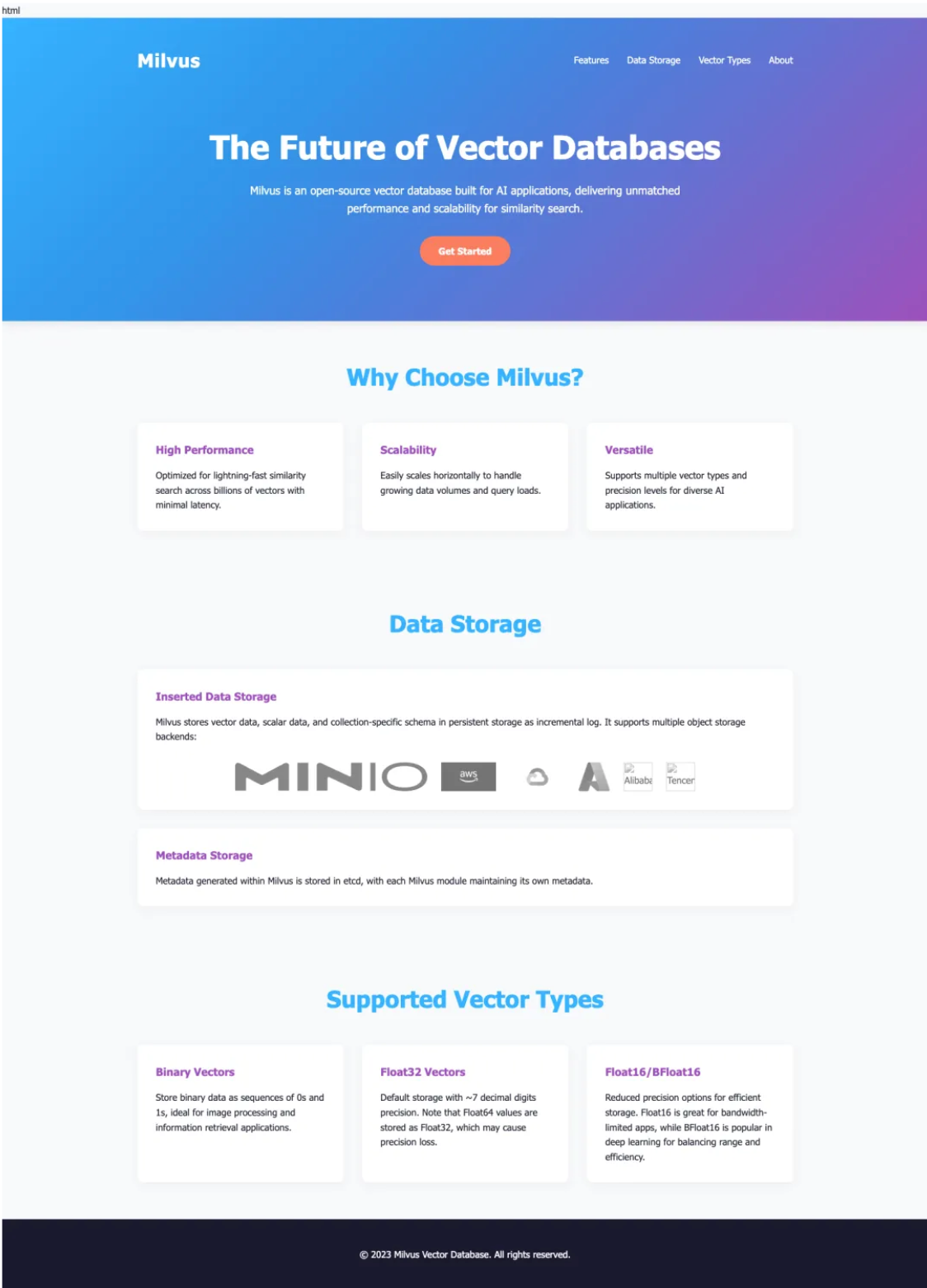
The latter website doesn’t just look better – it demonstrates genuine understanding of Milvus’ architecture, use cases, and technical advantages.
Can DeepSeek v3-0324 Replace Dedicated Reasoning Models?
Our most surprising discovery came when comparing DeepSeek v3-0324 against specialized reasoning models like Claude 3.7 Sonnet and GPT-4 Turbo across mathematical, logical, and code reasoning tasks.
While dedicated reasoning models excel at multi-step problem solving, they often do so at the cost of efficiency. Our benchmarks showed that reasoning-heavy models frequently overanalyze simple prompts, generating 2-3x more tokens than necessary and significantly increasing latency and API costs.
DeepSeek v3-0324 takes a different approach. It demonstrates comparable logical consistency but with remarkably greater conciseness – often producing correct solutions with 40-60% fewer tokens. This efficiency doesn’t come at the expense of accuracy; in our code generation tests, DeepSeek’s solutions matched or exceeded the functionality of those from reasoning-focused competitors.
For developers balancing performance with budget constraints, this efficiency advantage translates directly to lower API costs and faster response times – crucial factors for production applications where user experience hinges on perceived speed.
The Future of AI Models: Blurring the Reasoning Divide
DeepSeek v3-0324’s performance challenges a core assumption in the AI industry: that reasoning and efficiency represent an unavoidable tradeoff. This suggests we may be approaching an inflection point where the distinction between reasoning and non-reasoning models begins to blur.
Leading AI providers may eventually eliminate this distinction entirely, developing models that dynamically adjust their reasoning depth based on task complexity. Such adaptive reasoning would optimize both computational efficiency and response quality, potentially revolutionizing how we build and deploy AI applications.
For developers building RAG systems, this evolution promises more cost-effective solutions that deliver the reasoning depth of premium models without their computational overhead – expanding what’s possible with open-source AI.
- What's New in DeepSeek v3-0324 and How Good Is It Really?
- The Secret Sauce: Architectural Innovation
- Build a RAG System with Milvus and DeepSeek v3-0324 in 5 Minutes
- Setting Up Your Environment
- Preparing Your Data
- Setting Up the Language and Embedding Models
- Creating a Milvus Collection
- Loading Data into Milvus
- Building the RAG Pipeline
- Comparing DeepSeek-V3-0324: Original vs. RAG-Enhanced Version
- Website Built with The Standard Model's Output Code
- Website Built with Code Generated by the RAG-Enhanced Version
- Can DeepSeek v3-0324 Replace Dedicated Reasoning Models?
- The Future of AI Models: Blurring the Reasoning Divide
On This Page
Try Managed Milvus for Free
Zilliz Cloud is hassle-free, powered by Milvus and 10x faster.
Get StartedLike the article? Spread the word