Fix RAG Retrieval Errors with CRAG, LangGraph, and Milvus
As LLM applications go into production, teams increasingly need their models to answer questions grounded in private data or real-time information. Retrieval-augmented generation (RAG)—where the model pulls from an external knowledge base at query time—is the standard approach. It cuts down on hallucinations and keeps answers current.
But here’s a problem that surfaces quickly in practice: a document can score high on similarity and still be completely wrong for the question. Traditional RAG pipelines equate similarity with relevance. In production, that assumption breaks. A top-ranked result might be outdated, only tangentially related, or missing the exact detail the user needs.
CRAG (Corrective Retrieval-Augmented Generation) addresses this by adding evaluation and correction between retrieval and generation. Instead of blindly trusting similarity scores, the system checks whether retrieved content actually answers the question—and fixes the situation when it doesn’t.
This article walks through building a production-ready CRAG system using LangChain, LangGraph, and Milvus.
Three Retrieval Problems Traditional RAG Doesn’t Solve
Most RAG failures in production trace back to one of three issues:
Retrieval mismatch. The document is topically similar but doesn’t actually answer the question. Ask how to configure an HTTPS certificate in Nginx, and the system might return an Apache setup guide, a 2019 walkthrough, or a general explainer on how TLS works. Semantically close, practically useless.
Stale content. Vector search has no concept of recency. Query “Python async best practices” and you’ll get a mix of 2018 patterns and 2024 patterns, ranked purely by embedding distance. The system can’t distinguish which the user actually needs.
Memory contamination. This one compounds over time and is often the hardest to fix. Say the system retrieves an outdated API reference and generates incorrect code. That bad output gets stored back into memory. On the next similar query, the system retrieves it again—reinforcing the mistake. Stale and fresh information gradually mix, and system reliability erodes with every cycle.
These aren’t corner cases. They show up regularly once a RAG system handles real traffic. That’s what makes retrieval quality checks a requirement, not a nice-to-have.
What Is CRAG? Evaluate First, Then Generate
Corrective Retrieval-Augmented Generation (CRAG) is a method that adds an evaluation and correction step between retrieval and generation in a RAG pipeline. It was introduced in the paper Corrective Retrieval Augmented Generation (Yan et al., 2024). Unlike traditional RAG, which makes a binary decision—use the document or discard it—CRAG scores each retrieved result for relevance and routes it through one of three correction paths before it ever reaches the language model.
Traditional RAG struggles when retrieval results land in a gray zone: partially relevant, somewhat dated, or missing a key piece. A simple yes/no gate either discards useful partial information or lets noisy content through. CRAG reframes the pipeline from retrieve → generate to retrieve → evaluate → correct → generate, giving the system a chance to fix retrieval quality before generation begins.
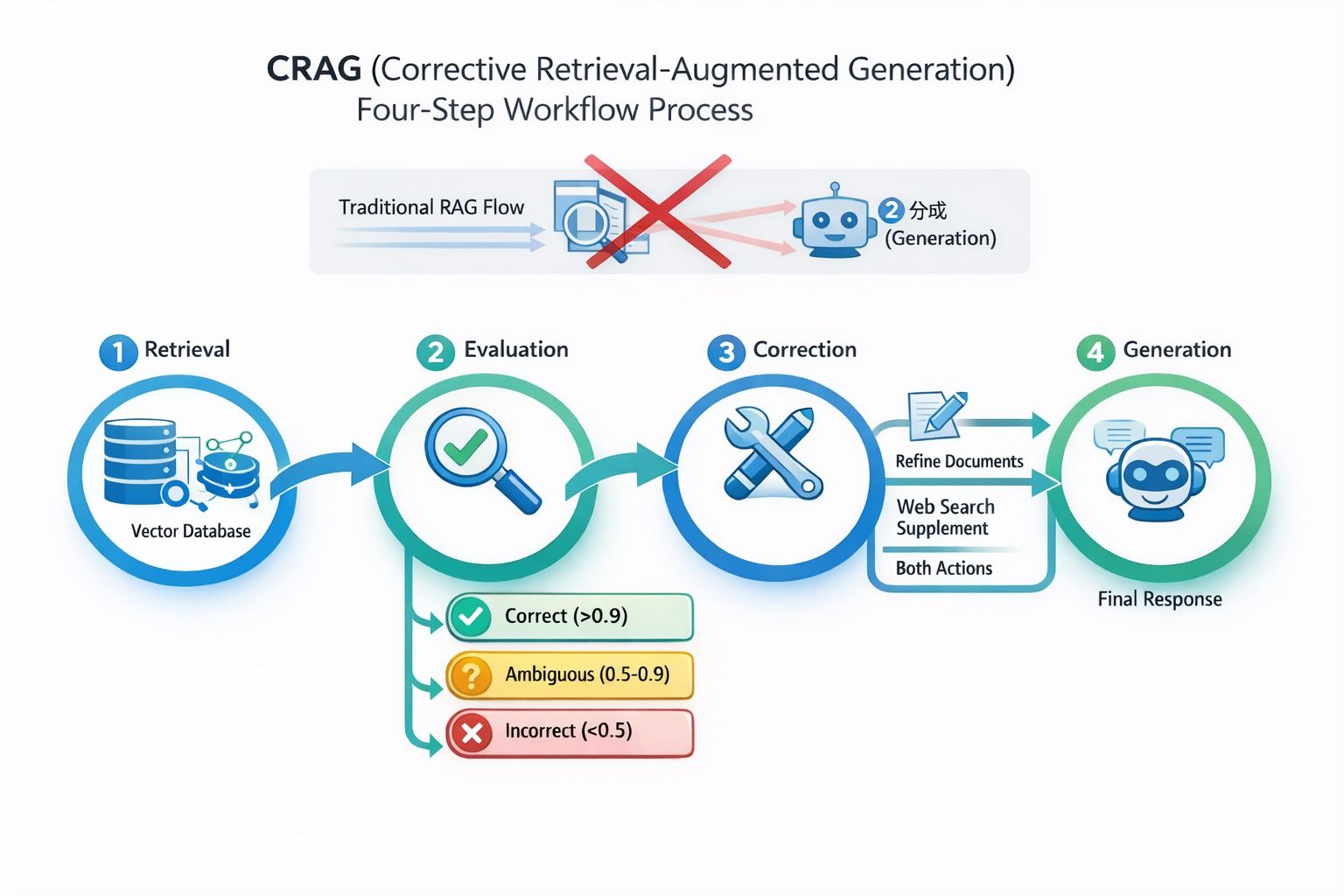 CRAG four-step workflow: Retrieval → Evaluation → Correction → Generation, showing how documents are scored and routed
Retrieved results are classified into one of three categories:
- Correct: directly answers the query; usable after light refinement
- Ambiguous: partially relevant; needs supplemental information
- Incorrect: irrelevant; discard and fall back to alternative sources
| Decision | Confidence | Action |
|---|---|---|
| Correct | > 0.9 | Refine the document content |
| Ambiguous | 0.5–0.9 | Refine the document + supplement with web search |
| Incorrect | < 0.5 | Discard retrieval results; fall back entirely to web search |
Content Refinement
CRAG also addresses a subtler issue with standard RAG: most systems feed the full retrieved document to the model. This wastes tokens and dilutes the signal—the model has to wade through irrelevant paragraphs to find the one sentence that actually matters. CRAG refines retrieved content first, extracting relevant portions and stripping the rest.
The original paper uses knowledge strips and heuristic rules for this. In practice, keyword matching works for many use cases, and production systems can layer on LLM-based summarization or structured extraction for higher quality.
The refinement process has three parts:
- Document decomposition: extract key passages from a longer document
- Query rewriting: turn vague or ambiguous queries into more targeted ones
- Knowledge selection: deduplicate, rank, and retain only the most useful content
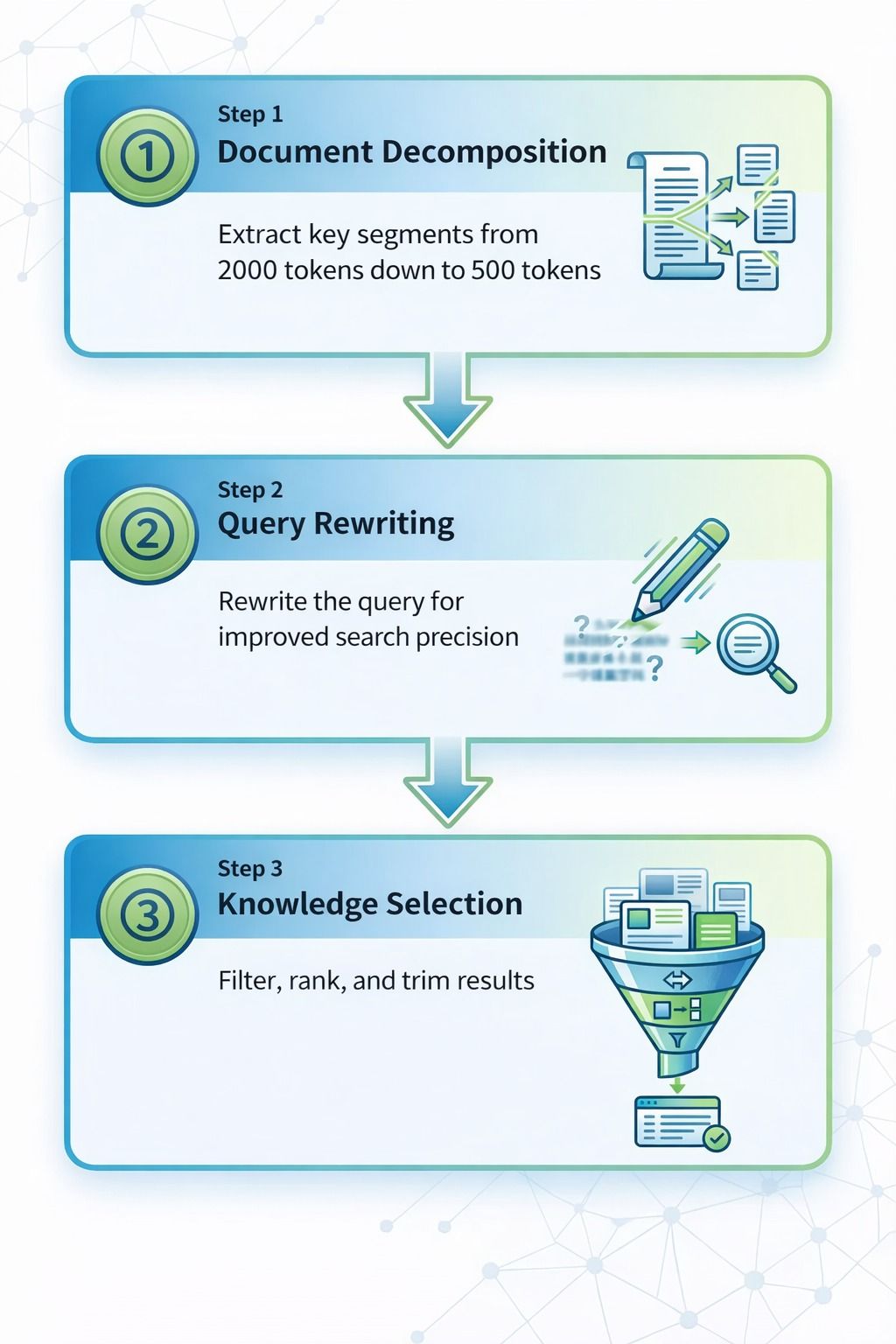 The three-step document refinement process: Document Decomposition (2000 → 500 tokens), Query Rewriting (improved search precision), and Knowledge Selection (filter, rank, and trim)
The Evaluator
The evaluator is the core of CRAG. It’s not meant for deep reasoning—it’s a fast triage gate. Given a query and a set of retrieved documents, it decides whether the content is good enough to use.
The original paper opts for a fine-tuned T5-Large model rather than a general-purpose LLM. The reasoning: speed and precision matter more than flexibility for this particular task.
| Attribute | Fine-tuned T5-Large | GPT-4 |
|---|---|---|
| Latency | 10–20 ms | 200 ms+ |
| Accuracy | 92% (paper experiments) | TBD |
| Task Fit | High — single-task fine-tuned, higher precision | Medium — general-purpose, more flexible but less specialized |
Web Search Fallback
When internal retrieval is flagged as incorrect or ambiguous, CRAG can trigger a web search to pull in fresher or supplemental information. This acts as a safety net for time-sensitive queries and topics where the internal knowledge base has gaps.
Why Milvus Is a Good Fit for CRAG in Production
CRAG’s effectiveness depends on what sits underneath it. The vector database needs to do more than basic similarity search—it needs to support the multi-tenant isolation, hybrid retrieval, and schema flexibility that a production CRAG system demands.
After evaluating several options, we chose Milvus for three reasons.
Multi-Tenant Isolation
In agent-based systems, each user or session needs its own memory space. The naive approach—one collection per tenant—becomes an operational headache fast, especially at scale.
Milvus handles this with Partition Key. Set is_partition_key=True on the agent_id field, and Milvus routes queries to the right partition automatically. No collection sprawl, no manual routing code.
In our benchmarks with 10 million vectors across 100 tenants, Milvus with Clustering Compaction delivered 3–5x higher QPS compared to the unoptimized baseline.
Hybrid Retrieval
Pure vector search falls short on exact-match content—product SKUs like SKU-2024-X5, version strings, or specific terminology.
Milvus 2.5 supports hybrid retrieval natively: dense vectors for semantic similarity, sparse vectors for BM25-style keyword matching, and scalar metadata filtering—all in one query. Results are fused using Reciprocal Rank Fusion (RRF), so you don’t need to build and merge separate retrieval pipelines.
On a 1-million-vector dataset, Milvus Sparse-BM25 retrieval latency came in at 6 ms, with negligible impact on end-to-end CRAG performance.
Flexible Schema for Evolving Memory
As CRAG pipelines mature, the data model evolves with them. We needed to add fields like confidence, verified, and source while iterating on evaluation logic. In most databases, that means migration scripts and downtime.
Milvus supports dynamic JSON fields, so metadata can be extended on the fly without service interruptions.
Here’s a typical schema:
fields = [
    FieldSchema(name="agent_id", dtype=DataType.VARCHAR, is_partition_key=True),  # multi-tenancy
    FieldSchema(name="dense_embedding", dtype=DataType.FLOAT_VECTOR, dim=1536),   # semantic retrieval
    FieldSchema(name="sparse_embedding", dtype=DataType.SPARSE_FLOAT_VECTOR),# BM25
    FieldSchema(name="metadata", dtype=DataType.JSON),# dynamic schema
]

# hybrid retrieval + metadata filtering
results = collection.hybrid_search(
    reqs=[
        AnnSearchRequest(data=[dense_vec], anns_field="dense_embedding", limit=20),
        AnnSearchRequest(data=[sparse_vec], anns_field="sparse_embedding", limit=20)
    ],
    rerank=RRFRanker(),
    output_fields=["metadata"],
    expr='metadata["confidence"] > 0.9',# CRAG confidence filtering
    limit=5
)
Milvus also simplifies deployment scaling. It offers Lite, Standalone, and Distributed modes that are code-compatible—switching from local development to a production cluster only requires changing the connection string.
Hands-On: Build a CRAG System with LangGraph Middleware and Milvus
Why the Middleware Approach?
A common way to build CRAG with LangGraph is to wire up a state graph with nodes and edges controlling each step. This works, but the graph gets tangled as complexity grows, and debugging becomes a headache.
We settled on the Middleware pattern in LangGraph 1.0. It intercepts requests before the model call, so retrieval, evaluation, and correction are handled in one cohesive place. Compared to the state-graph approach:
- Less code: logic is centralized, not scattered across graph nodes
- Easier to follow: the control flow reads linearly
- Easier to debug: failures point to a single location, not a graph traversal
Core Workflow
The pipeline runs in four steps:
- Retrieval: fetch the top 3 relevant documents from Milvus, scoped to the current tenant
- Evaluation: assess document quality with a lightweight model
- Correction: refine, supplement with web search, or fall back entirely—based on the verdict
- Injection: pass the finalized context to the model through a dynamic system prompt
Environment Setup and Data Preparation
Environment variables
export OPENAI_API_KEY="your-api-key"
export TAVILY_API_KEY="your-tavily-key"
Create the Milvus collection
Before running the code, create a collection in Milvus with a schema that matches the retrieval logic.
# filename: crag_agent.py

# ============ Import dependencies ============
from typing import Literal, List
from langchain.agents import create_agent
from langchain.agents.middleware import AgentMiddleware, before_model, dynamic_prompt
from langchain.chat_models import init_chat_model
from langchain_milvus import Milvus
from langchain_openai import OpenAIEmbeddings
from langchain_core.documents import Document
from langchain_core.messages import SystemMessage, HumanMessage
from langchain_community.tools.tavily_search import TavilySearchResults


# ============ CRAG Middleware (minimal-change version) ============
class CRAGMiddleware(AgentMiddleware):
    """CRAG evaluation and correction middleware (uses official decorator-based hooks to avoid permanently polluting the message stack)"""

    def __init__(self, vector_store: Milvus, agent_id: str):
        super().__init__()
        self.vector_store = vector_store
        self.agent_id = agent_id  # multi-tenant isolation
        # Lightweight evaluator: used for relevance judgment (can be replaced with the structured version introduced later)
        self.evaluator = init_chat_model("openai:gpt-4o-mini", temperature=0)
        # Web search fallback
        self.web_search = TavilySearchResults(max_results=3)

    @before_model
    def run_crag(self, state):
        """Run retrieval -> evaluation -> correction before model invocation and prepare the final context"""
        # Get the last user message
        last_msg = state["messages"][-1]
        query = getattr(last_msg, "content", "") if hasattr(last_msg, "content") else last_msg.get("content", "")

        # 1. Retrieval: get documents from Milvus (PartitionKey + confidence filtering)
        docs = self._retrieve_from_milvus(query)

        # 2. Evaluation: three-way decision
        verdict = self._evaluate_relevance(query, docs)

        # 3. Correction: choose the handling strategy based on the verdict
        if verdict == "incorrect":
            # Retrieval failed, rely entirely on Web search
            web_results = self._web_search_fallback(query)
            final_context = self._format_web_results(web_results)
        elif verdict == "ambiguous":
            # Retrieval is ambiguous, refine documents + supplement with Web search
            refined_docs = self._refine_documents(docs, query)
            web_results = self._web_search_fallback(query)
            final_context = self._merge_context(refined_docs, web_results)
        else:
            # Retrieval quality is good, only refine the documents
            refined_docs = self._refine_documents(docs, query)
            final_context = self._format_internal_docs(refined_docs)

        # 4. Put the context into a temporary key, used only for dynamic prompt assembly in the current model call
        state["_crag_context"] = final_context
        return state

    @dynamic_prompt
    def attach_context(self, state, prompt_messages: List):
        """Inject the CRAG-generated context as a SystemMessage before the prompt for the current model call"""
        final_context = state.get("_crag_context")
        if final_context:
            sys_msg = SystemMessage(
                content=f"Here is some relevant background information. Please answer the user's question based on this information:\n\n{final_context}"
            )
            # Applies only to the current call and is not permanently written into state["messages"]
            prompt_messages = [sys_msg] + prompt_messages
        return prompt_messages

    # ======== Internal methods: retrieval / evaluation / refinement / formatting ========

    def _retrieve_from_milvus(self, query: str) -> list:
        """Retrieve documents from Milvus (Partition Key + confidence filtering)"""
        try:
            # Note: different adapter versions may place filter parameters differently; here expr is passed through search_kwargs
            docs = self.vector_store.similarity_search(
                query,
                k=3,
                search_kwargs={"expr": f'agent_id == "{self.agent_id}"'}
            )
            # Confidence filtering (to avoid low-quality memory contamination)
            filtered_docs = [
                doc for doc in docs
                if (doc.metadata or {}).get("confidence", 0.0) > 0.7
            ]
            return filtered_docs or docs  # If there are no high-confidence results, fall back to the original results for evaluator judgment
        except Exception as e:
            print(f"[CRAG] Retrieval failed: {e}")
            return []

    def _evaluate_relevance(self, query: str, docs: list) -> Literal["relevant", "ambiguous", "incorrect"]:
        """Evaluate document relevance (three-way decision), simplified version: the LLM returns the verdict directly"""
        if not docs:
            return "incorrect"

        # Evaluate only the Top-3 documents, taking the first 500 characters of each
        doc_content = "\n\n".join([
            f"[Document {i+1}] {(doc.page_content or '')[:500]}..."
            for i, doc in enumerate(docs[:3])
        ])

        prompt = f"""You are an expert in document relevance evaluation. Assess whether the following documents can answer the query.

Query: {query}

Document content:
{doc_content}

Evaluation criteria:
- relevant: the document directly contains the answer and is highly relevant
- ambiguous: the document is partially relevant and needs external knowledge
- incorrect: the document is irrelevant and cannot answer the query

Return only one word: relevant or ambiguous or incorrect
"""
        try:
            result = self.evaluator.invoke(prompt)
            verdict = (getattr(result, "content", "") or "").strip().lower()
            if verdict not in {"relevant", "ambiguous", "incorrect"}:
                verdict = "ambiguous"
            return verdict
        except Exception as e:
            print(f"[CRAG] Evaluation failed: {e}")
            return "ambiguous"

    def _refine_documents(self, docs: list, query: str) -> list:
        """Refine documents (simplified strips: sentence filtering based on keywords)"""
        refined = []
        # Simple Chinese-period replacement + rough English sentence splitting
        keywords = [kw.strip() for kw in query.split() if kw.strip()]

        for doc in docs:
            text = doc.page_content or ""
            sentences = (
                text.replace("。", "。\n")
                    .replace(". ", ".\n")
                    .replace("! ", "!\n")
                    .replace("? ", "?\n")
                    .split("\n")
            )
            sentences = [s.strip() for s in sentences if s.strip()]

            # Match any keyword
            relevant_sentences = [
                s for s in sentences
                if any(keyword in s for keyword in keywords)
            ]

            if relevant_sentences:
                refined_text = "。".join(relevant_sentences[:3])
                refined.append(Document(page_content=refined_text, metadata=doc.metadata or {}))

        return refined if refined else docs  # If nothing is extracted, fall back to the original documents

    def _web_search_fallback(self, query: str) -> list:
        """Web search fallback"""
        try:
            return self.web_search.invoke(query) or []
        except Exception as e:
            print(f"[CRAG] Web search failed: {e}")
            return []

    def _merge_context(self, internal_docs: list, web_results: list) -> str:
        """Merge internal memory and external knowledge into the final context"""
        parts = []
        if internal_docs:
            parts.append("[Internal Memory]")
            for i, doc in enumerate(internal_docs, 1):
                parts.append(f"{i}. {doc.page_content}")
        if web_results:
            parts.append("[External Knowledge]")
            for i, result in enumerate(web_results, 1):
                content = (result or {}).get("content", "")
                url = (result or {}).get("url", "")
                parts.append(f"{i}. {content}\n   Source: {url}")
        return "\n\n".join(parts) if parts else "No relevant information found"

    def _format_internal_docs(self, docs: list) -> str:
        """Format internal documents"""
        if not docs:
            return "No relevant information found"
        parts = ["[Internal Memory]"]
        for i, doc in enumerate(docs, 1):
            parts.append(f"{i}. {doc.page_content}")
        return "\n\n".join(parts)

    def _format_web_results(self, results: list) -> str:
        """Format Web search results"""
        if not results:
            return "No relevant information found"
        parts = ["[External Knowledge]"]
        for i, result in enumerate(results, 1):
            content = (result or {}).get("content", "")
            url = (result or {}).get("url", "")
            parts.append(f"{i}. {content}\n   Source: {url}")
        return "\n\n".join(parts)


# ============ Initialize the Milvus vector database ============
vector_store = Milvus(
    embedding_function=OpenAIEmbeddings(),
    connection_args={"host": "localhost", "port": "19530"},
    collection_name="agent_memory"
)

# ============ Create Agent ============
agent = create_agent(
    model="openai:gpt-4o",
    tools=[TavilySearchResults(max_results=3)],  # Web search tool
    middleware=[
        CRAGMiddleware(
            vector_store=vector_store,
            agent_id="user_123_session_456"  # multi-tenant isolation: each Agent instance uses its own ID
        )
    ]
)

# ============ Example run ============
if __name__ == "__main__":
    # Example query: use HumanMessage to ensure compatibility
    response = agent.invoke({
        "messages": [
            HumanMessage(content="What were the operating expenses in Nike's latest quarterly earnings report?")
        ]
    })
    print(response["messages"][-1].content)
Version Note: This code uses the latest Middleware features in LangGraph and LangChain. These APIs may change as the frameworks evolve—check the LangGraph documentation for the most current usage.
Key Modules
1. Production-grade evaluator design
The _evaluate_relevance() method in the code above is intentionally simplified for quick testing. For production, you’ll want structured output with confidence scoring and explainability:
from pydantic import BaseModel
from langchain.prompts import PromptTemplate

class RelevanceVerdict(BaseModel):
    """Structured output for the evaluation result"""
    verdict: Literal["relevant", "ambiguous", "incorrect"]
    confidence: float  # confidence score (used for memory quality monitoring)
    reasoning: str     # reason for the judgment (used for debugging and review)

# Note: the CRAG paper uses a fine-tuned T5-Large evaluator (10-20 ms latency)
# Here, gpt-4o-mini is used as the engineering implementation option (easier to deploy, but with slightly higher latency)
grader_llm = ChatOpenAI(model="gpt-4o-mini", temperature=0)

grader_prompt = PromptTemplate(
    template="""You are an expert in document relevance evaluation. Assess whether the following documents can answer the query.

Query: {query}

Document content:
{document}

Evaluation criteria:
- relevant: the document directly contains the answer, confidence > 0.9
- ambiguous: the document is partially relevant, confidence 0.5-0.9
- incorrect: the document is irrelevant, confidence < 0.5

Return in JSON format: {{"verdict": "...", "confidence": 0.xx, "reasoning": "..."}}
""",
    input_variables=["query", "document"]
)

grader_chain = grader_prompt | grader_llm.with_structured_output(RelevanceVerdict)

# Replace the _evaluate_relevance() method in CRAGMiddleware
def _evaluate_relevance(self, query: str, docs: list) -> Literal["relevant", "ambiguous", "incorrect"]:
    """Evaluate document relevance (returns structured result)"""
    if not docs:
        return "incorrect"

    # Evaluate only the Top-3 documents, taking the first 500 characters of each
    doc_content = "\n\n".join([
        f"[Document {i+1}] {doc.page_content[:500]}..."
        for i, doc in enumerate(docs[:3])
    ])

    result = grader_chain.invoke({
        "query": query,
        "document": doc_content
    })

    # Store the confidence score in logs or a monitoring system
    print(f"[CRAG Evaluation] verdict={result.verdict}, confidence={result.confidence:.2f}")
    print(f"[CRAG Reasoning] {result.reasoning}")

    # Optional: store the evaluation result in Milvus for memory quality analysis
    self._store_evaluation_metrics(query, result)

    return result.verdict

def _store_evaluation_metrics(self, query: str, verdict_result: RelevanceVerdict):
    """Store evaluation metrics in Milvus (for memory quality monitoring)"""
    # Example: store the evaluation result in a separate Collection for analysis
    # In actual use, you need to create the evaluation_metrics Collection
    pass
2. Knowledge refinement and fallback
Three mechanisms work together to keep model context high-quality:
- Knowledge refinement extracts the most query-relevant sentences and strips out noise.
- Fallback search triggers when local retrieval is insufficient, pulling in external knowledge via Tavily.
- Context merging combines internal memory with external results into a single, deduplicated context block before it reaches the model.
Tips for Running CRAG in Production
Three areas matter most once you move beyond prototyping.
1. Cost: Pick the Right Evaluator
The evaluator runs on every single query, making it the biggest lever for both latency and cost.
- High-concurrency workloads: A fine-tuned lightweight model like T5-Large keeps latency at 10–20 ms and costs predictable.
- Low-traffic or prototyping: A hosted model like
gpt-4o-miniis faster to set up and needs less operational work, but latency and per-call costs run higher.
2. Observability: Instrument from Day One
The hardest production issues are the ones you can’t see until answer quality has already degraded.
- Infrastructure monitoring: Milvus integrates with Prometheus. Start with three metrics:
milvus_query_latency_seconds,milvus_search_qps, andmilvus_insert_throughput. - Application monitoring: Track CRAG verdict distribution, web search trigger rate, and confidence score distribution. Without these signals, you can’t tell whether a quality drop is caused by bad retrieval or evaluator misjudgment.
3. Long-Term Maintenance: Prevent Memory Contamination
The longer an agent runs, the more stale and low-quality data accumulates in memory. Set up guardrails early:
- Pre-filtering: Only surface memories with
confidence > 0.7so low-quality content gets blocked before it reaches the evaluator. - Time decay: Gradually reduce the weight of older memories. Thirty days is a reasonable starting default, tunable per use case.
- Scheduled cleanup: Run a weekly job to purge old, low-confidence, unverified memories. This prevents the feedback loop where stale data gets retrieved, used, and re-stored.
Wrapping Up — and a Few Common Questions
CRAG addresses one of the most persistent problems in production RAG: retrieval results that look relevant but aren’t. By inserting an evaluation and correction step between retrieval and generation, it filters out bad results, fills in gaps with external search, and gives the model cleaner context to work with.
Getting CRAG to work reliably in production takes more than good retrieval logic, though. It requires a vector database that handles multi-tenant isolation, hybrid search, and evolving schemas—which is where Milvus fits in. On the application side, choosing the right evaluator, instrumenting observability early, and actively managing memory quality are what separate a demo from a system you can trust.
If you’re building RAG or agent systems and running into retrieval quality issues, we’d love to help:
- Join the Milvus Slack community to ask questions, share your architecture, and learn from other developers working on similar problems.
- Book a free 20-minute Milvus Office Hours session to walk through your use case with the team—whether it’s CRAG design, hybrid retrieval, or multi-tenant scaling.
- If you’d rather skip the infrastructure setup and jump straight to building, Zilliz Cloud (managed Milvus) offers a free tier to get started.
A few questions that come up often when teams start implementing CRAG:
How is CRAG different from just adding a reranker to RAG?
A reranker reorders results by relevance but still assumes the retrieved documents are usable. CRAG goes further—it evaluates whether retrieved content actually answers the query at all, and takes corrective action when it doesn’t: refining partial matches, supplementing with web search, or discarding results entirely. It’s a quality control loop, not just a better sort.
Why does a high similarity score sometimes return the wrong document?
Embedding similarity measures semantic closeness in vector space, but that’s not the same as answering the question. A document about configuring HTTPS on Apache is semantically close to a question about HTTPS on Nginx—but it won’t help. CRAG catches this by evaluating relevance to the actual query, not just vector distance.
What should I look for in a vector database for CRAG?
Three things matter most: hybrid retrieval (so you can combine semantic search with keyword matching for exact terms), multi-tenant isolation (so each user or agent session has its own memory space), and a flexible schema (so you can add fields like confidence or verified without downtime as your pipeline evolves).
What happens when none of the retrieved documents are relevant?
CRAG doesn’t just give up. When confidence drops below 0.5, it falls back to web search. When results are ambiguous (0.5–0.9), it merges refined internal documents with external search results. The model always gets some context to work with, even when the knowledge base has gaps.
- Three Retrieval Problems Traditional RAG Doesn't Solve
- What Is CRAG? Evaluate First, Then Generate
- Content Refinement
- The Evaluator
- Web Search Fallback
- Why Milvus Is a Good Fit for CRAG in Production
- Multi-Tenant Isolation
- Hybrid Retrieval
- Flexible Schema for Evolving Memory
- Hands-On: Build a CRAG System with LangGraph Middleware and Milvus
- Why the Middleware Approach?
- Core Workflow
- Environment Setup and Data Preparation
- Key Modules
- Tips for Running CRAG in Production
- 1. Cost: Pick the Right Evaluator
- 2. Observability: Instrument from Day One
- 3. Long-Term Maintenance: Prevent Memory Contamination
- Wrapping Up — and a Few Common Questions
On This Page
Try Managed Milvus for Free
Zilliz Cloud is hassle-free, powered by Milvus and 10x faster.
Get StartedLike the article? Spread the word