

BITMAP
位图索引是一种高效的索引技术,旨在提高低基数标量字段的查询性能。基数是指字段中不同值的数量。不同元素较少的字段被视为低基数字段。
该索引类型通过将字段值表示为紧凑的二进制格式,并对它们执行高效的位运算,从而有助于缩短标量查询的检索时间。与其他类型的索引相比,在处理低基数字段时,位图索引通常具有更高的空间利用率,且查询速度更快。
概述
“位图”(Bitmap) 一词由“位”(Bit) 和“映射”(Map)两个词组合而成。位是计算机中数据的最小单位,只能存储0或1 其中一个值。在此语境下,“映射”是指根据应将何种值分配给 0 和 1 来转换和组织数据的过程。
位图索引由两个主要组成部分构成:位图和键。键代表索引字段中的唯一值。每个唯一值都对应一个位图。这些位图的长度等于Collection中的记录数。 位图中的每个位对应Collection中的一条记录。如果某条记录中索引字段的值与键匹配,则对应的位被设为1;否则,设为0。
假设有一个包含“Category”和“Public”字段的文档Collection。我们希望检索属于“Tech”类别且对“Public”开放的文档。在这种情况下,位图索引的键就是“Tech”和“Public”。
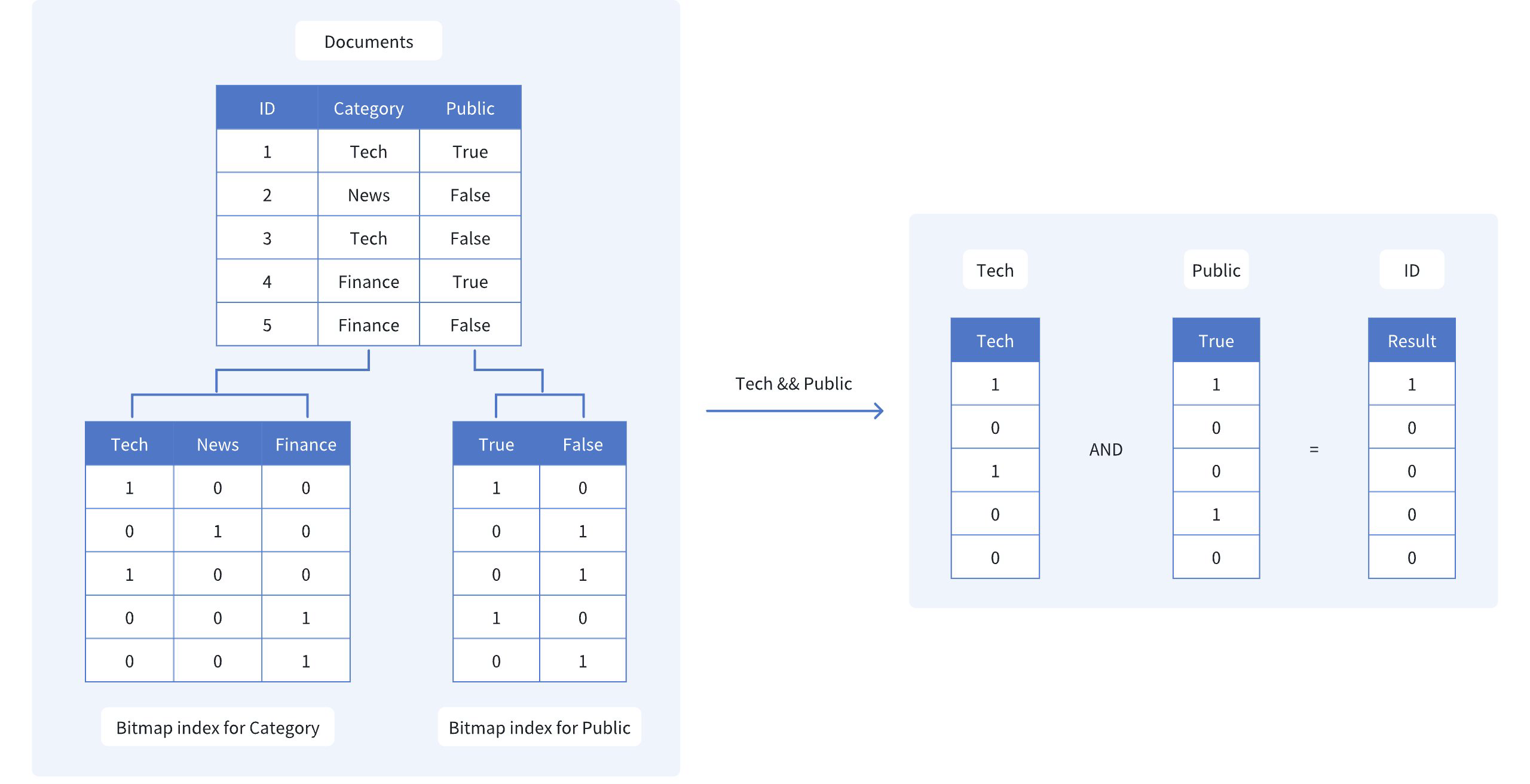 位图
如图所示,Category和Public的位图索引分别为:
Tech:[1, 0, 1, 0, 0],这表明只有第 1 和第 3 个文档属于Tech类别。
Public:[1, 0, 0, 1, 0],这表明只有第 1 个和第 4 个文档对公众开放。
为了查找同时满足这两个条件的文档,我们对这两个位图执行位与(AND)运算:
- Tech且Public:[1, 0, 0, 0, 0]
生成的位图 [1, 0, 0, 0, 0] 表明只有第一份文档(ID 1)同时满足这两个条件。通过使用位图索引和高效的位运算,我们可以快速缩小搜索范围,从而无需扫描整个数据集。
创建位图索引
要在 Milvus 中创建位图索引,请使用 `create_index() ` 方法,并将 `index_type ` 参数设置为 `"BITMAP"`。
from pymilvus import MilvusClient

client = MilvusClient(
    uri="http://localhost:19530",
)

index_params = client.prepare_index_params() # Prepare an empty IndexParams object, without having to specify any index parameters
index_params.add_index(
    field_name="category", # Name of the scalar field to be indexed
    index_type="BITMAP", # Type of index to be created
    index_name="category_bitmap_index" # Name of the index to be created
)

client.create_index(
    collection_name="my_collection", # Specify the collection name
    index_params=index_params
)
import io.milvus.v2.client.ConnectConfig;
import io.milvus.v2.client.MilvusClientV2;
import io.milvus.v2.common.IndexParam;
import io.milvus.v2.service.index.request.CreateIndexReq;
import java.util.Collections;

MilvusClientV2 client = new MilvusClientV2(ConnectConfig.builder()
        .uri("http://localhost:19530")
        .build());

client.createIndex(CreateIndexReq.builder()
        .collectionName("my_collection")
        .indexParams(Collections.singletonList(IndexParam.builder()
                .fieldName("category")
                .indexType(IndexParam.IndexType.BITMAP)
                .indexName("category_bitmap_index")
                .build()))
        .build());
import (
    "context"
    "log"

    "github.com/milvus-io/milvus/client/v3/index"
    "github.com/milvus-io/milvus/client/v3/milvusclient"
)

ctx := context.Background()

cli, err := milvusclient.New(ctx, &milvusclient.ClientConfig{
    Address: "http://localhost:19530",
})

if err != nil {
    log.Fatal("failed to connect to milvus server: ", err.Error())
}

_, err = cli.CreateIndex(ctx, milvusclient.NewCreateIndexOption("my_collection", "category", index.NewBitmapIndex()).WithIndexName("category_bitmap_index"))

if err != nil {
    log.Fatal("failed to create index: ", err.Error())
}
use milvus::v2::prelude::*;

let config = ConnectConfig::new().uri("http://localhost:19530");

let client = ClientV2::new(&config).await?;

client
    .create_index(
        CreateIndexRequest::builder()
            .collection_name("my_collection")
            .index_param(
                IndexParam::new()
                    .field_name("category")
                    .index_type(IndexType::Bitmap)
                    .index_name("category_bitmap_index"),
            )
            .build()?,
    )
    .await?;
#include <iostream>
#include "milvus/MilvusClientV2.h"

auto client = milvus::MilvusClientV2::Create();

auto status = client->Connect(milvus::ConnectParam("http://localhost:19530"));

if (!status.IsOk()) {
    std::cout << status.Message() << std::endl;
}

status = client->CreateIndex(milvus::CreateIndexRequest().WithCollectionName("my_collection")
        .AddIndex(milvus::IndexDesc("category", "category_bitmap_index", milvus::IndexType::BITMAP)));

if (!status.IsOk()) {
    std::cout << status.Message() << std::endl;
}
import { MilvusClient } from "@zilliz/milvus2-sdk-node";

const client = new MilvusClient({ address: "http://localhost:19530" });

await client.createIndex({
    collection_name: "my_collection",
    field_name: "category",
    index_type: "BITMAP",
    index_name: "category_bitmap_index",
});
using Milvus.Client.V2;
using Milvus.Client.V2.Requests.Index;
using Milvus.Client.V2.Types;

var config = new ConnectConfig
{
    Uri = "http://localhost:19530"
};
using var client = new MilvusClientV2(config);
await client.ConnectAsync();

// Prepare index building params
var indexParam = new IndexParam(
    fieldName: "category",
    indexType: IndexType.Bitmap,
    indexName: "category_bitmap_index");

await client.CreateIndexAsync(new CreateIndexReq
{
    CollectionName = "my_collection",
    Indexes = [indexParam]
});
export CLUSTER_ENDPOINT="http://localhost:19530"
export TOKEN="root:Milvus"

curl --request POST \
--url "${CLUSTER_ENDPOINT}/v2/vectordb/indexes/create" \
--header "Authorization: Bearer ${TOKEN}" \
--header "Content-Type: application/json" \
--header "Request-Timeout: 10" \
-d '{
    "collectionName": "my_collection",
    "indexParams": [
        {
            "fieldName": "category",
            "indexName": "category_bitmap_index",
            "indexType": "BITMAP"
        }
    ]
}'

# {
#     "code": 0,
#     "data": {}
# }
在此示例中,我们针对my_collection Collection的category 字段创建了一个位图索引。通过add_index() 方法指定字段名、索引类型和索引名称。
创建位图索引后,您可以在查询操作中使用filter 参数,根据已建立索引的字段执行标量过滤。这使您能够利用位图索引高效地缩小搜索结果范围。有关更多信息,请参阅《过滤原理说明》。
删除索引
使用drop_index() 方法从 Collection 中删除现有索引。
在v2.6.3及更早版本中,在删除标量索引之前,必须先释放 Collection。
从v2.6.4及更高版本开始,一旦不再需要标量索引,即可直接删除,无需先释放 Collection。
client.drop_index(
    collection_name="my_collection",   # Name of the collection
    index_name="category_bitmap_index" # Name of the index to drop
)
import io.milvus.v2.client.ConnectConfig;
import io.milvus.v2.client.MilvusClientV2;
import io.milvus.v2.service.index.request.DropIndexReq;

MilvusClientV2 client = new MilvusClientV2(ConnectConfig.builder()
        .uri("http://localhost:19530")
        .build());

client.dropIndex(DropIndexReq.builder()
        .collectionName("my_collection")
        .indexName("category_bitmap_index")
        .build());
import (
    "context"
    "log"

    "github.com/milvus-io/milvus/client/v3/milvusclient"
)

ctx := context.Background()

cli, err := milvusclient.New(ctx, &milvusclient.ClientConfig{
    Address: "http://localhost:19530",
})

if err != nil {
    log.Fatal("failed to connect to milvus server: ", err.Error())
}

err = cli.DropIndex(ctx, milvusclient.NewDropIndexOption("my_collection", "category_bitmap_index"))

if err != nil {
    log.Fatal("failed to drop index: ", err.Error())
}
use milvus::v2::prelude::*;

let config = ConnectConfig::new().uri("http://localhost:19530");

let client = ClientV2::new(&config).await?;

client
    .drop_index(
        DropIndexRequest::builder()
            .collection_name("my_collection")
            .index_name("category_bitmap_index")
            .build()?,
    )
    .await?;
#include <iostream>
#include "milvus/MilvusClientV2.h"

auto client = milvus::MilvusClientV2::Create();

auto status = client->Connect(milvus::ConnectParam("http://localhost:19530"));

if (!status.IsOk()) {
    std::cout << status.Message() << std::endl;
}

status = client->DropIndex(milvus::DropIndexRequest()
        .WithCollectionName("my_collection")
        .WithIndexName("category_bitmap_index"));

if (!status.IsOk()) {
    std::cout << status.Message() << std::endl;
}
import { MilvusClient } from "@zilliz/milvus2-sdk-node";

const client = new MilvusClient({ address: "http://localhost:19530" });

await client.dropIndex({
    collection_name: "my_collection",
    index_name: "category_bitmap_index",
});
using Milvus.Client.V2.Requests.Index;

await client.DropIndexAsync(new DropIndexReq
{
    CollectionName = "my_collection", // Name of the collection
    IndexName = "category_bitmap_index" // Name of the index to drop
});
export CLUSTER_ENDPOINT="http://localhost:19530"
export TOKEN="root:Milvus"

curl --request POST \
--url "${CLUSTER_ENDPOINT}/v2/vectordb/indexes/drop" \
--header "Authorization: Bearer ${TOKEN}" \
--header "Content-Type: application/json" \
--header "Request-Timeout: 10" \
-d '{
    "collectionName": "my_collection",
    "indexName": "category_bitmap_index"
}'

# {
#     "code": 0,
#     "data": {}
# }
限制
仅支持非主键的标量字段使用位图索引。
该字段的数据类型必须是以下之一:
BOOL,INT8,INT16,INT32,INT64,VARCHARARRAY(元素必须是以下类型之一:BOOL、INT8、INT16、INT32、INT64、VARCHAR)
位图索引不支持以下数据类型:
FLOAT,DOUBLE:浮点类型与位图索引的二进制特性不兼容。JSON:JSON 数据类型具有复杂的结构,无法通过位图索引进行高效表示。
位图索引不适用于高基数字段(即具有大量不同值的字段)。
作为一般准则,当字段的基数小于 500 时,位图索引最为有效。
当基数超过此阈值时,位图索引的性能优势会减弱,且存储开销会变得很大。
对于高Cardinal数字段,请根据您的具体用例和查询要求,考虑使用其他索引技术,例如倒排索引。
