

엔티티 업서트
upsert 작업은 컬렉션에 엔티티를 삽입하거나 업데이트하는 편리한 방법을 제공합니다.
개요
upsert 을 사용하면 업서트 요청에 제공된 기본 키가 컬렉션에 존재하는지 여부에 따라 새 엔티티를 삽입하거나 기존 엔티티를 업데이트할 수 있습니다. 기본 키가 발견되지 않으면 삽입 작업이 수행됩니다. 그렇지 않은 경우 업데이트 작업이 수행됩니다.
Milvus의 업서트(upsert)는 오버라이드 모드 또는 병합 모드 중 하나로 작동합니다.
오버라이드 모드의 업서트
오버라이드 모드로 작동하는 업서트 요청은 삽입과 삭제를 결합한 것입니다. 기존 엔티티에 대한 upsert 요청이 수신되면, Milvus는 요청 페이로드에 포함된 데이터를 삽입하고 동시에 데이터에 지정된 원래 기본 키를 가진 기존 엔티티를 삭제합니다.
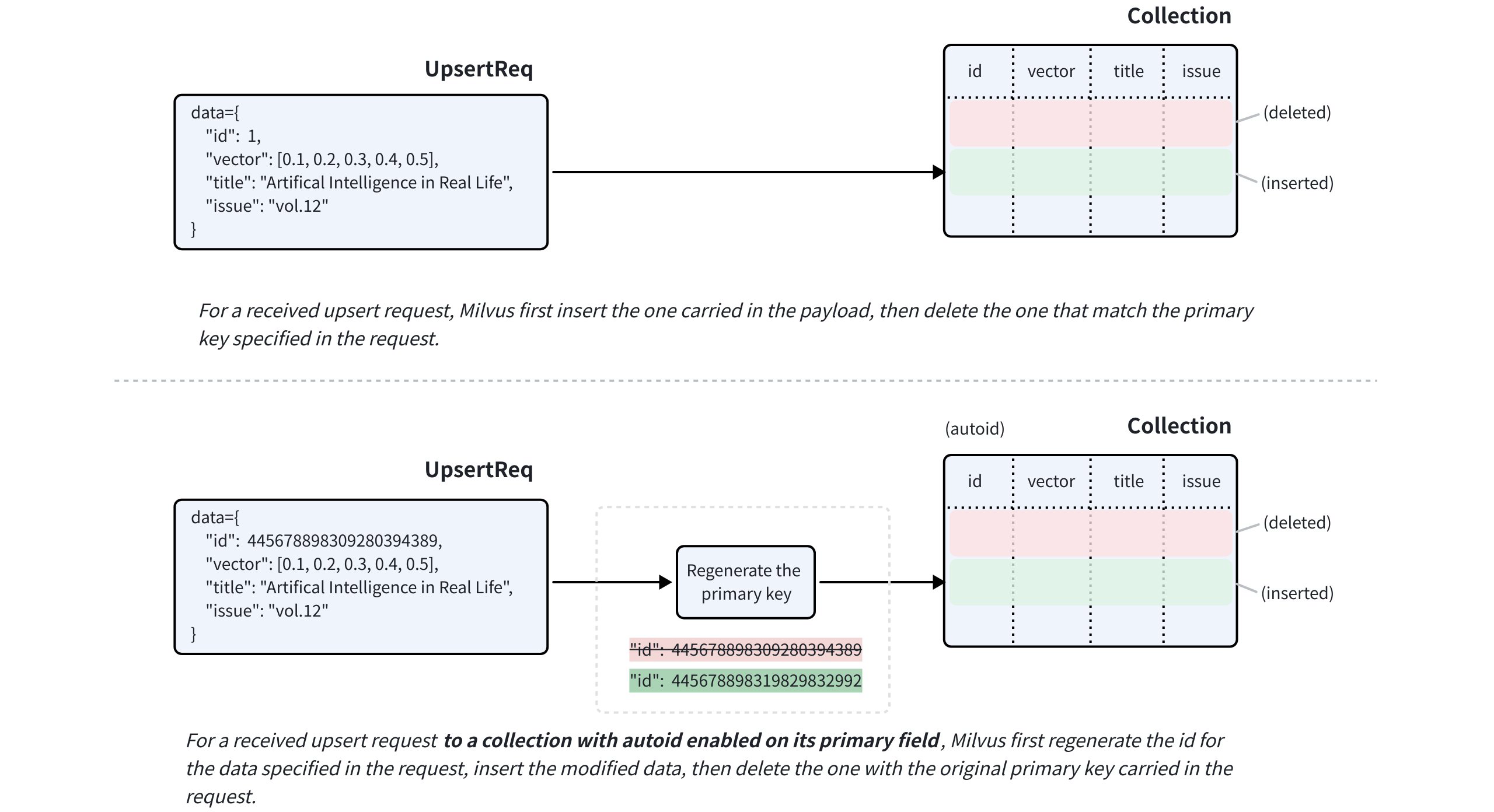 오버라이드 모드의 업서트
대상 컬렉션의 기본 필드에 autoID 가 활성화된 경우에도, upsert 요청에는 대상 엔티티의 기본 키가 반드시 포함되어야 합니다. Milvus는 제공된 기본 키를 사용하여 대체할 엔티티를 찾아내고, 요청 페이로드에 포함된 데이터를 삽입하기 전에 해당 데이터에 대한 새로운 기본 키를 생성합니다.
nullable 가 활성화된 필드의 경우, 업데이트가 필요하지 않다면 upsert 요청에서 해당 필드를 생략할 수 있습니다.
병합 모드의 업서트Compatible with Milvus v2.6.2+
partial_update 플래그를 사용하여 업서트 요청을 병합 모드로 처리할 수도 있습니다. 이를 통해 요청 페이로드에 업데이트가 필요한 필드만 포함할 수 있습니다.
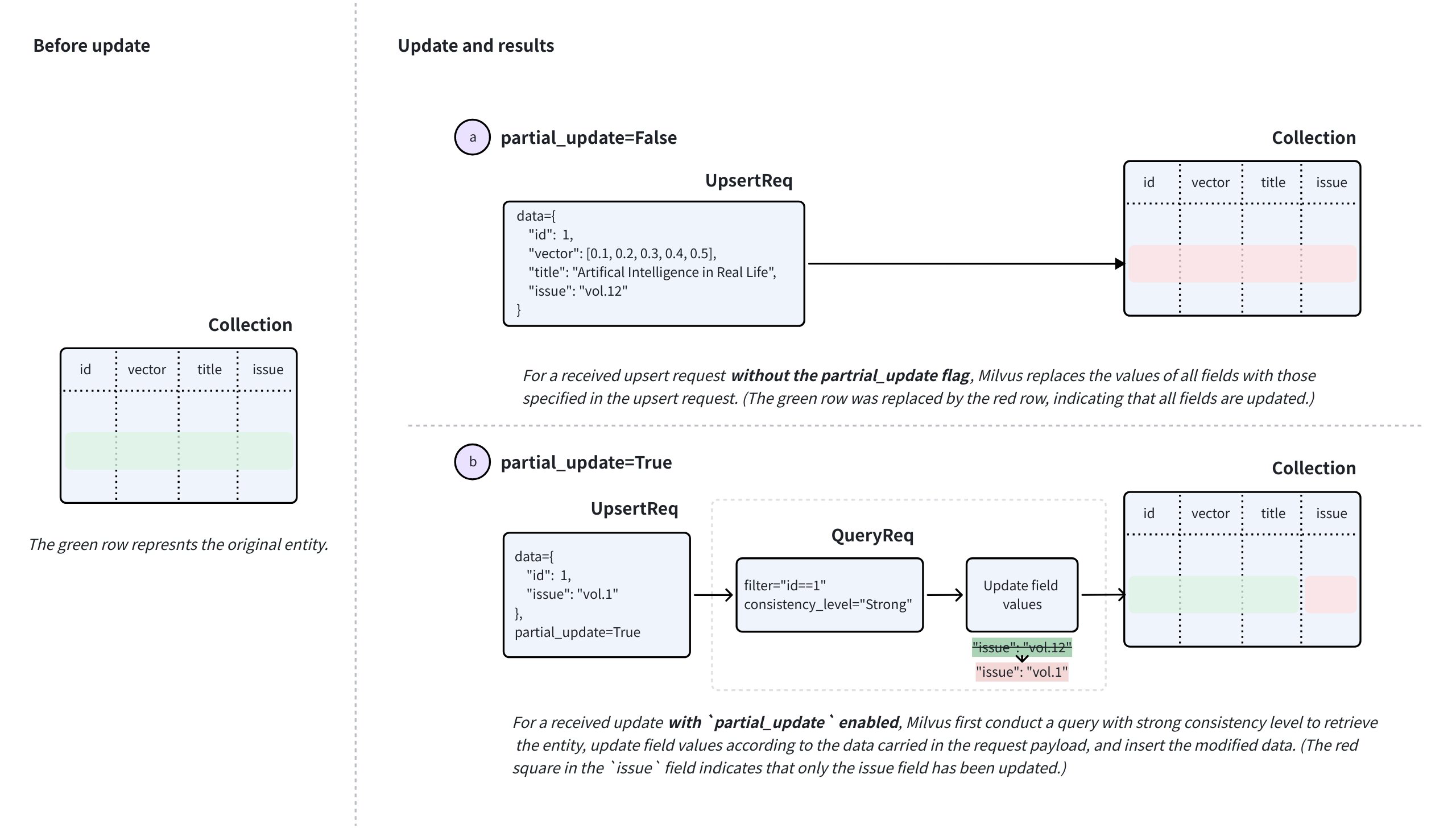 병합 모드에서의 업서트
병합을 수행하려면 upsert 요청에서 partial_update 을 True 으로 설정하고, 기본 키와 업데이트할 필드 및 해당 새 값을 함께 지정하십시오.
이러한 요청을 수신하면 Milvus는 강력한 일관성(strong consistency)을 적용하여 쿼리를 실행해 엔티티를 검색하고, 요청에 포함된 데이터를 기반으로 필드 값을 업데이트한 후, 수정된 데이터를 삽입하고, 마지막으로 요청에 포함된 원래의 기본 키를 가진 기존 엔티티를 삭제합니다.
ARRAY 필드의 경우, Milvus v2.6.17 및 이후 버전에서 병합 모드는 ‘ ARRAY_APPEND ’ 및 ‘ ARRAY_REMOVE ’ 두 가지 연산자를 지원합니다. 이 연산자를 사용하면 엔티티를 먼저 쿼리하여 현재 값을 가져올 필요 없이, 기존 ARRAY 필드에 요소를 추가하거나 일치하는 요소를 제거할 수 있습니다. 자세한 내용은 병합 모드에서 ARRAY 필드 업서트(Upsert)를 참조하십시오.
업서트 동작: 특별 참고 사항
병합 기능을 사용하기 전에 고려해야 할 몇 가지 특별 주의 사항이 있습니다. 다음 사례는 title 및 issue 라는 두 개의 스칼라 필드와, 기본 키 id, 그리고 vector 라는 벡터 필드를 가진 컬렉션이 있다고 가정합니다.
nullable가 활성화된필드에 대한 업서트 .issue필드가 null일 수 있다고 가정합니다. 이러한 필드를 업서트할 때 다음 사항에 유의하십시오:upsert요청에서issue필드를 생략하고partial_update을 비활성화하면,issue필드는 원래 값을 유지하는 대신null으로 업데이트됩니다.issue필드의 원래 값을 유지하려면,partial_update을 활성화하고issue필드를 생략하거나,upsert요청에issue필드를 원래 값 그대로 포함시켜야 합니다.
동적 필드의 Upsert 키.
예제 컬렉션에서 동적 키를 활성화했고, 엔티티의 동적 필드에 있는 키-값 쌍이
{"author": "John", "year": 2020, "tags": ["fiction"]}와 유사하다고 가정해 보겠습니다.author,year,tags와 같은 키를 사용하여 엔티티를 업서트하거나 다른 키를 추가할 때는 다음 사항에 유의하십시오.partial_update가 비활성화된 상태에서 업서트(upsert)를 수행하면, 기본 동작은 덮어쓰기입니다. 즉, 요청에 포함된 스키마에 정의되지 않은 모든 필드와 해당 값에 의해 동적 필드의 값이 덮어쓰게 됩니다.예를 들어, 요청에 포함된 데이터가
{"author": "Jane", "genre": "fantasy"}인 경우, 대상 엔티티의 동적 필드에 있는 키-값 쌍이 해당 값으로 업데이트됩니다.partial_update가 활성화된 상태에서 upsert를 수행하면 기본 동작은 병합입니다. 즉, 동적 필드의 값이 요청에 포함된 모든 스키마에 정의되지 않은 필드 및 해당 값과 병합됩니다.예를 들어, 요청에 포함된 데이터가
{"author": "John", "year": 2020, "tags": ["fiction"]}인 경우, 업서트 후 대상 엔티티의 동적 필드에 있는 키-값 쌍은{"author": "John", "year": 2020, "tags": ["fiction"], "genre": "fantasy"}로 변경됩니다.
JSON 필드를 업서트합니다.
예제 컬렉션에
extras라는 스키마 정의 JSON 필드가 있고, 엔티티의 이 JSON 필드에 포함된 키-값 쌍이{"author": "John", "year": 2020, "tags": ["fiction"]}와 유사하다고 가정해 보겠습니다.수정된 JSON 데이터로 엔티티의
extras필드를 업서트할 때, JSON 필드는 전체로 처리되므로 개별 키를 선택적으로 업데이트할 수 없다는 점에 유의하십시오. 즉, JSON 필드는 병합 모드에서 업서트를 지원하지 않습니다.ARRAY필드에업서트(upsert)를 수행합니다 .기본적으로 병합 모드의
ARRAY필드는 REPLACE 의미론을 따릅니다. 즉, 요청에 포함된 값이 기존 배열을 덮어씁니다. 보다 세밀한 업데이트를 위해 Milvus v2.6.17 이상 버전에서는 다음 두 가지 연산자도 지원합니다.ARRAY_APPEND요청 페이로드에 포함된 요소를 기존 배열의 끝에 추가합니다.ARRAY_REMOVE요청 페이로드의 값과 일치하는 모든 요소를 기존 배열에서 제거합니다.
연산자 구문, 지원되는 요소 유형 및 기타 제약 사항에 대해서는 병합 모드에서 ARRAY 필드 업서트(Upsert)를 참조하십시오.
StructArray 필드 업서트.
엔티티의 StructArray 필드를 업서트하면 필드 값이 덮어쓰입니다. 이를 수행하려면, 병합 모드에서 업서트를 수행하는 경우에도 각 사전 목록을 제공해야 하며, 각 사전에는 구조체 스키마에 정의된 모든 하위 필드가 포함되어야 합니다.
자세한 내용은 병합 모드에서 StructArray 필드 업서트하기를 참조하십시오.
제한 사항 및 제약 조건
위 내용을 바탕으로 준수해야 할 몇 가지 제한 사항이 있습니다:
'
upsert' 요청에는 'autoID'가 활성화된 경우에도 항상 대상 엔티티의 기본 키가 포함되어야 합니다. 'autoID' 컬렉션의 경우, 요청에 포함된 기본 키는 대체할 기존 엔티티를 식별합니다. Milvus는 삽입된 대체 엔티티에 대해 새로운 기본 키를 생성합니다.대상 컬렉션은 로드되어 있어야 하며 쿼리 실행이 가능해야 합니다.
요청에 지정된 모든 필드는 대상 컬렉션의 스키마에 존재해야 합니다.
요청에 지정된 모든 필드의 값은 스키마에 정의된 데이터 유형과 일치해야 합니다.
함수를 사용하여 다른 필드에서 파생된 필드의 경우, Milvus는 재계산을 허용하기 위해 업서트(upsert) 과정에서 파생된 필드를 제거합니다.
컬렉션에 엔티티 업서트하기
이 섹션에서는 my_collection 라는 컬렉션에 엔티티를 업서트(upsert)할 것입니다. 이 컬렉션에는 id, vector, title, issue 라는 네 개의 필드만 있습니다. id 필드는 기본 필드이며, title 및 issue 필드는 스칼라 필드입니다.
컬렉션에 이 세 개 엔티티가 존재하는 경우, 업서트(upsert) 요청에 포함된 엔티티로 덮어쓰게 됩니다.
from pymilvus import MilvusClient

client = MilvusClient(
    uri="http://localhost:19530",
    token="root:Milvus"
)

data=[
    {
        "id": 0,
        "vector": [-0.619954382375778, 0.4479436794798608, -0.17493894838751745, -0.4248030059917294, -0.8648452746018911],
        "title": "Artificial Intelligence in Real Life",
        "issue": "vol.12"
    }, {
        "id": 1,
        "vector": [0.4762662251462588, -0.6942502138717026, -0.4490002642657902, -0.628696575798281, 0.9660395877041965],
        "title": "Hollow Man",
        "issue": "vol.19"
    }, {
        "id": 2,
        "vector": [-0.8864122635045097, 0.9260170474445351, 0.801326976181461, 0.6383943392381306, 0.7563037341572827],
        "title": "Treasure Hunt in Missouri",
        "issue": "vol.12"
    }
]

res = client.upsert(
    collection_name='my_collection',
    data=data
)

print(res)

# Output
# {'upsert_count': 3}
import com.google.gson.Gson;
import com.google.gson.JsonObject;
import io.milvus.v2.client.ConnectConfig;
import io.milvus.v2.client.MilvusClientV2;
import io.milvus.v2.service.vector.request.UpsertReq;
import io.milvus.v2.service.vector.response.UpsertResp;

import java.util.*;

MilvusClientV2 client = new MilvusClientV2(ConnectConfig.builder()
        .uri("http://localhost:19530")
        .token("root:Milvus")
        .build());

Gson gson = new Gson();
List<JsonObject> data = Arrays.asList(
        gson.fromJson("{\"id\": 0, \"vector\": [-0.619954382375778, 0.4479436794798608, -0.17493894838751745, -0.4248030059917294, -0.8648452746018911], \"title\": \"Artificial Intelligence in Real Life\", \"issue\": \"\vol.12\"}", JsonObject.class),
        gson.fromJson("{\"id\": 1, \"vector\": [0.4762662251462588, -0.6942502138717026, -0.4490002642657902, -0.628696575798281, 0.9660395877041965], \"title\": \"Hollow Man\", \"issue\": \"vol.19\"}", JsonObject.class),
        gson.fromJson("{\"id\": 2, \"vector\": [-0.8864122635045097, 0.9260170474445351, 0.801326976181461, 0.6383943392381306, 0.7563037341572827], \"title\": \"Treasure Hunt in Missouri\", \"issue\": \"vol.12\"}", JsonObject.class),
);

UpsertReq upsertReq = UpsertReq.builder()
        .collectionName("my_collection")
        .data(data)
        .build();

UpsertResp upsertResp = client.upsert(upsertReq);
System.out.println(upsertResp);

// Output:
//
// UpsertResp(upsertCnt=3)
const { MilvusClient, DataType } = require("@zilliz/milvus2-sdk-node")

const address = "http://localhost:19530";
const token = "root:Milvus";
const client = new MilvusClient({address, token});

data = [
    {id: 0, vector: [-0.619954382375778, 0.4479436794798608, -0.17493894838751745, -0.4248030059917294, -0.8648452746018911], title: "Artificial Intelligence in Real Life", issue: "vol.12"},
    {id: 1, vector: [0.4762662251462588, -0.6942502138717026, -0.4490002642657902, -0.628696575798281, 0.9660395877041965], title: "Hollow Man", issue: "vol.19"},
    {id: 2, vector: [-0.8864122635045097, 0.9260170474445351, 0.801326976181461, 0.6383943392381306, 0.7563037341572827], title: "Treasure Hunt in Missouri", issue: "vol.12"},
]

res = await client.upsert({
    collection_name: "my_collection",
    data: data,
})

console.log(res.upsert_cnt)

// Output
//
// 3
//
import (
    "context"
    "fmt"

    "github.com/milvus-io/milvus/client/v2/column"
    "github.com/milvus-io/milvus/client/v2/milvusclient"
)

ctx, cancel := context.WithCancel(context.Background())
defer cancel()

milvusAddr := "localhost:19530"
client, err := milvusclient.New(ctx, &milvusclient.ClientConfig{
    Address: milvusAddr,
})
if err != nil {
    fmt.Println(err.Error())
    // handle error
}
defer client.Close(ctx)

titleColumn := column.NewColumnString("title", []string{
    "Artificial Intelligence in Real Life", "Hollow Man", "Treasure Hunt in Missouri",
})

issueColumn := column.NewColumnString("issue", []string{
    "vol.12", "vol.19", "vol.12"
})

_, err = client.Upsert(ctx, milvusclient.NewColumnBasedInsertOption("my_collection").
    WithInt64Column("id", []int64{0, 1, 2, 3, 4, 5, 6, 7, 8, 9}).
    WithFloatVectorColumn("vector", 5, [][]float32{
        {0.3580376395471989, -0.6023495712049978, 0.18414012509913835, -0.26286205330961354, 0.9029438446296592},
        {0.19886812562848388, 0.06023560599112088, 0.6976963061752597, 0.2614474506242501, 0.838729485096104},
        {0.43742130801983836, -0.5597502546264526, 0.6457887650909682, 0.7894058910881185, 0.20785793220625592},
    }).
    WithColumns(titleColumn, issueColumn),
)
if err != nil {
    fmt.Println(err.Error())
    // handle err
}
export CLUSTER_ENDPOINT="http://localhost:19530"
export TOKEN="root:Milvus"

curl --request POST \
--url "${CLUSTER_ENDPOINT}/v2/vectordb/entities/upsert" \
--header "Authorization: Bearer ${TOKEN}" \
--header "Content-Type: application/json" \
--header "Request-Timeout: 10" \
-d '{
    "data": [
        {"id": 0, "vector": [0.3580376395471989, -0.6023495712049978, 0.18414012509913835, -0.26286205330961354, 0.9029438446296592], "title": "Artificial Intelligence in Real Life", "issue": "vol.12"},
        {"id": 1, "vector": [0.19886812562848388, 0.06023560599112088, 0.6976963061752597, 0.2614474506242501, 0.838729485096104], "title": "Hollow Man", "issue": "vol.19"},
        {"id": 2, "vector": [0.43742130801983836, -0.5597502546264526, 0.6457887650909682, 0.7894058910881185, 0.20785793220625592], "title": "Treasure Hunt in Missouri", "issue": "vol.12"},
],
    "collectionName": "my_collection"
}'

# {
#     "code": 0,
#     "data": {
#         "upsertCount": 3,
#         "upsertIds": [
#             0,
#             1,
#             2,
#         ]
#     }
# }
파티션에 엔티티 업서트
지정된 파티션에 엔티티를 업서트할 수도 있습니다. 다음 코드 예제는 컬렉션에 PartitionA라는 파티션이 있다고 가정합니다.
파티션에 이 세 개의 엔티티가 존재하는 경우, 요청에 포함된 엔티티로 덮어쓰게 됩니다.
data=[
    {
        "id": 10,
        "vector": [0.06998888224297328, 0.8582816610326578, -0.9657938677934292, 0.6527905683627726, -0.8668460657158576],
        "title": "Layour Design Reference",
        "issue": "vol.34"
    },
    {
        "id": 11,
        "vector": [0.6060703043917468, -0.3765080534566074, -0.7710758854987239, 0.36993888322346136, 0.5507513364206531],
        "title": "Doraemon and His Friends",
        "issue": "vol.2"
    },
    {
        "id": 12,
        "vector": [-0.9041813104515337, -0.9610546012461163, 0.20033003106083358, 0.11842506351635174, 0.8327356724591011],
        "title": "Pikkachu and Pokemon",
        "issue": "vol.12"
    },
]

res = client.upsert(
    collection_name="my_collection",
    data=data,
    partition_name="partitionA"
)

print(res)

# Output
# {'upsert_count': 3}
import io.milvus.v2.service.vector.request.UpsertReq;
import io.milvus.v2.service.vector.response.UpsertResp;

Gson gson = new Gson();
List<JsonObject> data = Arrays.asList(
        gson.fromJson("{\"id\": 10, \"vector\": [0.06998888224297328, 0.8582816610326578, -0.9657938677934292, 0.6527905683627726, -0.8668460657158576], \"title\": \"Layour Design Reference\", \"issue\": \"vol.34\"}", JsonObject.class),
        gson.fromJson("{\"id\": 11, \"vector\": [0.6060703043917468, -0.3765080534566074, -0.7710758854987239, 0.36993888322346136, 0.5507513364206531], \"title\": \"Doraemon and His Friends\", \"issue\": \"vol.2\"}", JsonObject.class),
        gson.fromJson("{\"id\": 12, \"vector\": [-0.9041813104515337, -0.9610546012461163, 0.20033003106083358, 0.11842506351635174, 0.8327356724591011], \"title\": \"Pikkachu and Pokemon\", \"issue\": \"vol.12\"}", JsonObject.class),
);

UpsertReq upsertReq = UpsertReq.builder()
        .collectionName("my_collection")
        .partitionName("partitionA")
        .data(data)
        .build();

UpsertResp upsertResp = client.upsert(upsertReq);
System.out.println(upsertResp);

// Output:
//
// UpsertResp(upsertCnt=3)
const { MilvusClient, DataType } = require("@zilliz/milvus2-sdk-node")

// 6. Upsert data in partitions
data = [
    {id: 10, vector: [0.06998888224297328, 0.8582816610326578, -0.9657938677934292, 0.6527905683627726, -0.8668460657158576], title: "Layour Design Reference", issue: "vol.34"},
    {id: 11, vector: [0.6060703043917468, -0.3765080534566074, -0.7710758854987239, 0.36993888322346136, 0.5507513364206531], title: "Doraemon and His Friends", issue: "vol.2"},
    {id: 12, vector: [-0.9041813104515337, -0.9610546012461163, 0.20033003106083358, 0.11842506351635174, 0.8327356724591011], title: "Pikkachu and Pokemon", issue: "vol.12"},
]

res = await client.upsert({
    collection_name: "my_collection",
    data: data,
    partition_name: "partitionA"
})

console.log(res.upsert_cnt)

// Output
//
// 3
//
titleColumn = column.NewColumnString("title", []string{
    "Layour Design Reference", "Doraemon and His Friends", "Pikkachu and Pokemon",
})
issueColumn = column.NewColumnString("issue", []string{
    "vol.34", "vol.2", "vol.12",
})

_, err = client.Upsert(ctx, milvusclient.NewColumnBasedInsertOption("my_collection").
    WithPartition("partitionA").
    WithInt64Column("id", []int64{10, 11, 12, 13, 14, 15, 16, 17, 18, 19}).
    WithFloatVectorColumn("vector", 5, [][]float32{
        {0.3580376395471989, -0.6023495712049978, 0.18414012509913835, -0.26286205330961354, 0.9029438446296592},
        {0.19886812562848388, 0.06023560599112088, 0.6976963061752597, 0.2614474506242501, 0.838729485096104},
        {0.43742130801983836, -0.5597502546264526, 0.6457887650909682, 0.7894058910881185, 0.20785793220625592},
    }).
    WithColumns(titleColumn, issueColumn),
)
if err != nil {
    fmt.Println(err.Error())
    // handle err
}
export CLUSTER_ENDPOINT="http://localhost:19530"
export TOKEN="root:Milvus"

curl --request POST \
--url "${CLUSTER_ENDPOINT}/v2/vectordb/entities/upsert" \
--header "Authorization: Bearer ${TOKEN}" \
--header "Content-Type: application/json" \
--header "Request-Timeout: 10" \
-d '{
    "data": [
        {"id": 10, "vector": [0.06998888224297328, 0.8582816610326578, -0.9657938677934292, 0.6527905683627726, -0.8668460657158576], "title": "Layour Design Reference", "issue": "vol.34"},
        {"id": 11, "vector": [0.6060703043917468, -0.3765080534566074, -0.7710758854987239, 0.36993888322346136, 0.5507513364206531], "title": "Doraemon and His Friends", "issue": "vol.2"},
        {"id": 12, "vector": [-0.9041813104515337, -0.9610546012461163, 0.20033003106083358, 0.11842506351635174, 0.8327356724591011], "title": "Pikkachu and Pokemon", "issue": "vol.12"},
    ],
    "collectionName": "my_collection",
    "partitionName": "partitionA"
}'

# {
#     "code": 0,
#     "data": {
#         "upsertCount": 3,
#         "upsertIds": [
#             10,
#             11,
#             12,
#         ]
#     }
# }
병합 모드에서 엔티티 업서트Compatible with Milvus v2.6.2+
다음 코드 예제는 부분 업데이트를 통해 엔티티를 업서트하는 방법을 보여줍니다. 업데이트가 필요한 필드와 해당 새 값만 명시적인 부분 업데이트 플래그와 함께 제공하면 됩니다.
다음 예제에서는 업서트 요청에 지정된 엔티티의 ` issue ` 필드가 요청에 포함된 값으로 업데이트됩니다.
병합 모드에서 업서트를 수행할 때는 요청에 포함된 엔티티들이 동일한 필드 집합을 갖도록 해야 합니다. 다음 코드 스니펫에 표시된 것처럼 업서트할 엔티티가 두 개 이상인 경우, 오류를 방지하고 데이터 무결성을 유지하기 위해 이들 엔티티가 동일한 필드를 포함하도록 하는 것이 중요합니다.
data=[
    {
        "id": 1,
        "issue": "vol.14"
    },
    {
        "id": 2,
        "issue": "vol.7"
    }
]

res = client.upsert(
    collection_name="my_collection",
    data=data,
    partial_update=True
)

print(res)

# Output
# {'upsert_count': 2}
JsonObject row1 = new JsonObject();
row1.addProperty("id", 1);
row1.addProperty("issue", "vol.14");

JsonObject row2 = new JsonObject();
row2.addProperty("id", 2);
row2.addProperty("issue", "vol.7");

UpsertReq upsertReq = UpsertReq.builder()
        .collectionName("my_collection")
        .data(Arrays.asList(row1, row2))
        .partialUpdate(true)
        .build();

UpsertResp upsertResp = client.upsert(upsertReq);
System.out.println(upsertResp);

// Output:
//
// UpsertResp(upsertCnt=2)
pkColumn := column.NewColumnInt64("id", []int64{1, 2})
issueColumn = column.NewColumnString("issue", []string{
    "vol.17", "vol.7",
})

_, err = client.Upsert(ctx, milvusclient.NewColumnBasedInsertOption("my_collection").
    WithColumns(pkColumn, issueColumn).
    WithPartialUpdate(true),
)
if err != nil {
    fmt.Println(err.Error())
    // handle err
}
const data=[
    {
        "id": 1,
        "issue": "vol.14"
    },
    {
        "id": 2,
        "issue": "vol.7"
    }
];

const res = await client.upsert({
    collection_name: "my_collection",
    data,
    partial_update: true
});

console.log(res)

// Output
//
// 2
//
export CLUSTER_ENDPOINT="http://localhost:19530"
export TOKEN="root:Milvus"

export COLLECTION_NAME="my_collection"
export UPSERT_DATA='[
  {
    "id": 1,
    "issue": "vol.14"
  },
  {
    "id": 2,
    "issue": "vol.7"
  }
]'

curl -X POST "http://localhost:19530/v2/vectordb/entities/upsert" \
  -H "Content-Type: application/json" \
  -H "Request-Timeout: 10" \
  -H "Authorization: Bearer ${TOKEN}" \
  -d "{
    \"collectionName\": \"${COLLECTION_NAME}\",
    \"data\": ${UPSERT_DATA},
    \"partialUpdate\": true
  }"

# {
#     "code": 0,
#     "data": {
#         "upsertCount": 2,
#         "upsertIds": [
#              3,
#             12,
#         ]
#     }
# }
병합 모드에서 ARRAY 필드 업서트Compatible with Milvus 2.6.17+
Milvus v2.6.17 이전 버전에서는 ` ARRAY ` 필드의 일부를 업데이트하려면 클라이언트 측에서 ‘읽기-수정-쓰기’ 흐름을 거쳐야 했습니다. 즉, 기존 배열을 조회한 후 애플리케이션 코드에서 변경하고, 전체 대체 값을 업서트해야 했습니다. 부분 업데이트 연산자(ARRAY_APPEND 및 ARRAY_REMOVE)를 사용하면 추가하거나 제거할 요소만 전송할 수 있어, 클라이언트 측 로직을 줄이고 업서트 전에 수행되는 불필요한 읽기 작업을 피할 수 있습니다.
주 키가 1 인 엔티티에 이미 tags = ["new", "trial"] 가 있다고 가정해 봅시다. 부분 업데이트 연산자가 도입되기 전에는, "premium" 요소를 배열에 추가하려면 전체 대체 배열을 업서트해야 했습니다:
client.upsert(
    collection_name="users",
    data=[{"pk": 1, "tags": ["new", "trial", "premium"]}],
    partial_update=True,
)
List<JsonObject> replacementData = Collections.singletonList(
        gson.fromJson("{\"pk\": 1, \"tags\": [\"new\", \"trial\", \"premium\"]}", JsonObject.class)
);

client.upsert(UpsertReq.builder()
        .collectionName("users")
        .partialUpdate(true)
        .data(replacementData)
        .build());
// nodejs
// go
# restful
ARRAY_APPEND 를 사용하면 추가할 요소만 전송하면 됩니다:
client.upsert(
    collection_name="users",
    data=[{"pk": 1, "tags": ["premium"]}],
    field_ops={"tags": FieldOp.array_append()},
)
List<JsonObject> appendData = Collections.singletonList(
        gson.fromJson("{\"pk\": 1, \"tags\": [\"premium\"]}", JsonObject.class)
);

UpsertReq.FieldPartialUpdateOp appendTags = UpsertReq.FieldPartialUpdateOp.builder()
        .fieldName("tags")
        .opType(UpsertReq.FieldPartialUpdateOp.OpType.ARRAY_APPEND)
        .build();

client.upsert(UpsertReq.builder()
        .collectionName("users")
        .data(appendData)
        .fieldOps(Collections.singletonList(appendTags))
        .build());
// nodejs
// go
# restful
ARRAY_REMOVE 를 사용하면 제거할 일치하는 요소만 전송하면 됩니다:
client.upsert(
    collection_name="users",
    data=[{"pk": 1, "tags": ["trial"]}],
    field_ops={"tags": FieldOp.array_remove()},
)
List<JsonObject> removeData = Collections.singletonList(
        gson.fromJson("{\"pk\": 1, \"tags\": [\"trial\"]}", JsonObject.class)
);

UpsertReq.FieldPartialUpdateOp removeTags = UpsertReq.FieldPartialUpdateOp.builder()
        .fieldName("tags")
        .opType(UpsertReq.FieldPartialUpdateOp.OpType.ARRAY_REMOVE)
        .build();

client.upsert(UpsertReq.builder()
        .collectionName("users")
        .data(removeData)
        .fieldOps(Collections.singletonList(removeTags))
        .build());
// nodejs
// go
# restful
field_ops 를 통해 필드에 두 연산자 중 하나를 적용하면 부분 업데이트 세미언틱스가 암시적으로 활성화됩니다. 따라서 field_ops 와 함께 partial_update=True 를 전달할 필요가 없습니다.
제한 사항
페이로드 값은 대상
ARRAY필드의element_type과 일치해야 합니다. 예를 들어, 대상 필드가ARRAY<VARCHAR>인 경우 페이로드에는 문자열 값이 포함되어야 합니다.Milvus v2.6.17 이상에서는
ARRAY_APPEND및ARRAY_REMOVE이element_type이BOOL,INT8,INT16,INT32,INT64,FLOAT,DOUBLE또는VARCHAR인ARRAY필드를 지원합니다.ARRAY_APPEND작업 후, 결과 배열의 길이는 해당 필드의max_capacity을 초과해서는 안 됩니다.동일한 엔티티에 대한 동시 업서트(upsert)는 요청 간에 원자성을 보장하지 않습니다. 두 요청이 동시에 동일한
ARRAY필드를 업데이트하는 경우, 나중에 수행된 쓰기 작업이 이전에 수행된 작업을 덮어쓸 수 있습니다. 모든 동시 변경 사항을 보존해야 하는 경우 애플리케이션 수준에서 조정을 수행하십시오.
예제
다음 예제는 기본 키 pk, ARRAY<VARCHAR> 유형의 tags 필드, embedding 벡터 필드를 가진 작은 users 컬렉션을 사용합니다. 먼저 초기 tags 값을 가진 두 개의 엔티티를 삽입한 다음, ARRAY_APPEND 및 ARRAY_REMOVE 를 사용하여 각 연산자가 저장된 배열을 어떻게 변경하는지 보여줍니다.
from pymilvus import DataType, FieldOp, MilvusClient

client = MilvusClient(
    uri="http://localhost:19530",
    token="root:Milvus"
)

# 1. Create a collection with an ARRAY<VARCHAR> field
schema = client.create_schema(enable_dynamic_field=False)
schema.add_field("pk", DataType.INT64, is_primary=True)
schema.add_field("embedding", DataType.FLOAT_VECTOR, dim=5)
schema.add_field(
    "tags",
    DataType.ARRAY,
    element_type=DataType.VARCHAR,
    max_capacity=8,
    max_length=32,
)

index_params = client.prepare_index_params()
index_params.add_index(
    field_name="embedding",
    index_type="AUTOINDEX",
    metric_type="L2",
)

client.create_collection(
    collection_name="users",
    schema=schema,
    index_params=index_params
)

# 2. Seed two entities
client.insert(
    collection_name="users",
    data=[
        {"pk": 1, "embedding": [0.1, 0.2, 0.3, 0.4, 0.5], "tags": ["new"]},
        {"pk": 2, "embedding": [0.6, 0.7, 0.8, 0.9, 1.0], "tags": ["new", "trial"]},
    ],
)

# 3. Append tags without reading the existing ARRAY values
client.upsert(
    collection_name="users",
    data=[
        {"pk": 1, "tags": ["premium", "vip"]},
        {"pk": 2, "tags": ["premium"]},
    ],
    field_ops={"tags": FieldOp.array_append()},
)

res = client.query(
    collection_name="users",
    filter="pk in [1, 2]",
    output_fields=["pk", "tags"],
)
print(res)

# Example output:
# data: [
#   "{'pk': 1, 'tags': ['new', 'premium', 'vip']}",
#   "{'pk': 2, 'tags': ['new', 'trial', 'premium']}"
# ]

# 4. Remove matching tags without replacing the full ARRAY field
client.upsert(
    collection_name="users",
    data=[
        {"pk": 1, "tags": ["new"]},
        {"pk": 2, "tags": ["trial"]},
    ],
    field_ops={"tags": FieldOp.array_remove()},
)

res = client.query(
    collection_name="users",
    filter="pk in [1, 2]",
    output_fields=["pk", "tags"],
)
print(res)

# Example output:
# data: [
#   "{'pk': 1, 'tags': ['premium', 'vip']}",
#   "{'pk': 2, 'tags': ['new', 'premium']}"
# ]
// java
// nodejs
// go
# restful
병합 모드에서 StructArray 필드 업서트
엔티티의 StructArray 필드를 업서트하면 해당 필드 값이 덮어쓰입니다. 즉, StructArray 필드를 업서트할 때는 구조체 스키마에 정의된 모든 하위 필드를 포함해야 합니다.
다음 예제는 6개의 하위 필드를 가진 StructArray 필드인 ` chunks ` 필드를 병합 모드에서 업서트하는 방법을 보여줍니다. 작업이 완료되면, ID가 1인 엔티티의 ` chunks ` 필드는 요청에 제공된 두 요소의 구조체로 구성된 배열로 설정됩니다.
client.upsert(
    collection_name="books",
    data=[{
        "id": 1,
        "chunks": [
            {
              "text": "Use HNSW efSearch to trade recall for latency.",
              "section": "index",
              "page": 1,
              "quality_score": 0.92,
              "has_code": True,
              "emb_list_vector": [0.11, 0.21, 0.31, 0.41]
            },
            {
              "text": "Range search returns vectors within a distance boundary.",
              "section": "search",
              "page": 2,
              "quality_score": 0.86,
              "has_code": False,
              "emb_list_vector": [0.18, 0.23, 0.29, 0.36]
            }
        ]
    }],
    partial_update=True
)
// java
// nodejs
// go
# restful