

MilvusとCrawl4AIでRAGを構築する


Crawl4AIは、LLMのための高速でAIに対応したウェブクローリングを提供します。オープンソースでRAG用に最適化されており、高度な抽出とリアルタイムのパフォーマンスでスクレイピングを簡素化します。
このチュートリアルでは、MilvusとCrawl4AIを使用して、RAG(Retrieval-Augmented Generation)パイプラインを構築する方法を紹介します。このパイプラインは、ウェブデータのクロールのためのCrawl4AI、ベクトルストレージのためのMilvus、そして洞察に満ちた、コンテキストを認識した応答を生成するためのOpenAIを統合しています。
準備
依存関係と環境
まず、以下のコマンドを実行して必要な依存関係をインストールする:
$ pip install -U crawl4ai pymilvus openai requests tqdm
Google Colabを使用している場合、インストールした依存関係を有効にするために、ランタイムを再起動する必要があるかもしれません(画面上部の "Runtime "メニューをクリックし、ドロップダウンメニューから "Restart session "を選択してください)。
crawl4aiを完全にセットアップするには、以下のコマンドを実行してください:
# Run post-installation setup
$ crawl4ai-setup

# Verify installation
$ crawl4ai-doctor
[36m[INIT].... → Running post-installation setup...[0m
[36m[INIT].... → Installing Playwright browsers...[0m
[32m[COMPLETE] ● Playwright installation completed successfully.[0m
[36m[INIT].... → Starting database initialization...[0m
[32m[COMPLETE] ● Database initialization completed successfully.[0m
[32m[COMPLETE] ● Post-installation setup completed![0m
[0m[36m[INIT].... → Running Crawl4AI health check...[0m
[36m[INIT].... → Crawl4AI 0.4.247[0m
[36m[TEST].... ℹ Testing crawling capabilities...[0m
[36m[EXPORT].. ℹ Exporting PDF and taking screenshot took 0.80s[0m
[32m[FETCH]... ↓ https://crawl4ai.com... | Status: [32mTrue[0m | Time: 4.22s[0m
[36m[SCRAPE].. ◆ Processed https://crawl4ai.com... | Time: 14ms[0m
[32m[COMPLETE] ● https://crawl4ai.com... | Status: [32mTrue[0m | Total: [33m4.23s[0m[0m
[32m[COMPLETE] ● ✅ Crawling test passed![0m
[0m
OpenAI APIキーの設定
この例では、OpenAIをLLMとして使用します。OPENAI_API_KEYを環境変数として用意してください。
import os

os.environ["OPENAI_API_KEY"] = "sk-***********"
LLMと埋め込みモデルの準備
埋め込みモデルを準備するために、OpenAIクライアントを初期化します。
from openai import OpenAI

openai_client = OpenAI()
OpenAIクライアントを使ってテキスト埋め込みを生成する関数を定義します。例として、text-embedding-3-smallモデルを使います。
def emb_text(text):
    return (
        openai_client.embeddings.create(input=text, model="text-embedding-3-small")
        .data[0]
        .embedding
    )
テスト埋め込みを生成し、その次元と最初のいくつかの要素を表示する。
test_embedding = emb_text("This is a test")
embedding_dim = len(test_embedding)
print(embedding_dim)
print(test_embedding[:10])
1536
[0.009889289736747742, -0.005578675772994757, 0.00683477520942688, -0.03805781528353691, -0.01824733428657055, -0.04121600463986397, -0.007636285852640867, 0.03225184231996536, 0.018949154764413834, 9.352207416668534e-05]
Crawl4AIを使ってデータをクロールする。
from crawl4ai import *


async def crawl():
    async with AsyncWebCrawler() as crawler:
        result = await crawler.arun(
            url="https://lilianweng.github.io/posts/2023-06-23-agent/",
        )
        return result.markdown


markdown_content = await crawl()
[INIT].... → Crawl4AI 0.4.247
[FETCH]... ↓ https://lilianweng.github.io/posts/2023-06-23-agen... | Status: True | Time: 0.07s
[COMPLETE] ● https://lilianweng.github.io/posts/2023-06-23-agen... | Status: True | Total: 0.08s
クロールされたコンテンツを処理する
クロールされたコンテンツをMilvusに挿入するために管理しやすくするために、単純に "# " を使ってコンテンツを区切ります。これは、クロールされたマークダウンファイルの各主要部分のコンテンツを大まかに区切ることができます。
def split_markdown_content(content):
    return [section.strip() for section in content.split("# ") if section.strip()]


# Process the crawled markdown content
sections = split_markdown_content(markdown_content)

# Print the first few sections to understand the structure
for i, section in enumerate(sections[:3]):
    print(f"Section {i+1}:")
    print(section[:300] + "...")
    print("-" * 50)
Section 1:
[Lil'Log](https://lilianweng.github.io/posts/2023-06-23-agent/<https:/lilianweng.github.io/> "Lil'Log \(Alt + H\)")
  * |


  * [ Posts ](https://lilianweng.github.io/posts/2023-06-23-agent/<https:/lilianweng.github.io/> "Posts")
  * [ Archive ](https://lilianweng.github.io/posts/2023-06-23-agent/<h...
--------------------------------------------------
Section 2:
LLM Powered Autonomous Agents
Date: June 23, 2023 | Estimated Reading Time: 31 min | Author: Lilian Weng
Table of Contents
  * [Agent System Overview](https://lilianweng.github.io/posts/2023-06-23-agent/<#agent-system-overview>)
  * [Component One: Planning](https://lilianweng.github.io/posts/2023...
--------------------------------------------------
Section 3:
Agent System Overview[#](https://lilianweng.github.io/posts/2023-06-23-agent/<#agent-system-overview>)
In a LLM-powered autonomous agent system, LLM functions as the agent’s brain, complemented by several key components:
  * **Planning**
    * Subgoal and decomposition: The agent breaks down large t...
--------------------------------------------------
Milvusにデータを読み込む
コレクションの作成
from pymilvus import MilvusClient

milvus_client = MilvusClient(uri="./milvus_demo.db")
collection_name = "my_rag_collection"
INFO:numexpr.utils:Note: NumExpr detected 10 cores but "NUMEXPR_MAX_THREADS" not set, so enforcing safe limit of 8.
INFO:numexpr.utils:NumExpr defaulting to 8 threads.
MilvusClient の引数として:
./milvus.dbのようにuriをローカルファイルとして設定する方法が最も便利である。データ規模が大きい場合は、dockerやkubernetes上に、よりパフォーマンスの高いMilvusサーバを構築することができます。このセットアップでは、サーバの uri、例えば
http://localhost:19530をuriとして使用してください。MilvusのフルマネージドクラウドサービスであるZilliz Cloudを利用する場合は、Zilliz CloudのPublic EndpointとApi keyに対応する
uriとtokenを調整してください。
コレクションが既に存在するか確認し、存在する場合は削除します。
if milvus_client.has_collection(collection_name):
    milvus_client.drop_collection(collection_name)
指定したパラメータで新しいコレクションを作成します。
フィールド情報を指定しない場合、Milvusは自動的にプライマリキー用のデフォルトid フィールドと、ベクトルデータを格納するためのvector フィールドを作成します。予約されたJSONフィールドは、スキーマで定義されていないフィールドとその値を格納するために使用されます。
milvus_client.create_collection(
    collection_name=collection_name,
    dimension=embedding_dim,
    metric_type="IP",  # Inner product distance
    consistency_level="Strong",  # Supported values are (`"Strong"`, `"Session"`, `"Bounded"`, `"Eventually"`). See https://milvus.io/docs/consistency.md#Consistency-Level for more details.
)
データの挿入
from tqdm import tqdm

data = []
for i, section in enumerate(tqdm(sections, desc="Processing sections")):
    embedding = emb_text(section)
    data.append({"id": i, "vector": embedding, "text": section})

# Insert data into Milvus
milvus_client.insert(collection_name=collection_name, data=data)
Processing sections:   0%|          | 0/18 [00:00<?, ?it/s]INFO:httpx:HTTP Request: POST https://api.openai.com/v1/embeddings "HTTP/1.1 200 OK"
Processing sections:   6%|▌         | 1/18 [00:00<00:12,  1.37it/s]INFO:httpx:HTTP Request: POST https://api.openai.com/v1/embeddings "HTTP/1.1 200 OK"
Processing sections:  11%|█         | 2/18 [00:01<00:11,  1.39it/s]INFO:httpx:HTTP Request: POST https://api.openai.com/v1/embeddings "HTTP/1.1 200 OK"
Processing sections:  17%|█▋        | 3/18 [00:02<00:10,  1.40it/s]INFO:httpx:HTTP Request: POST https://api.openai.com/v1/embeddings "HTTP/1.1 200 OK"
Processing sections:  22%|██▏       | 4/18 [00:02<00:07,  1.85it/s]INFO:httpx:HTTP Request: POST https://api.openai.com/v1/embeddings "HTTP/1.1 200 OK"
Processing sections:  28%|██▊       | 5/18 [00:02<00:06,  2.06it/s]INFO:httpx:HTTP Request: POST https://api.openai.com/v1/embeddings "HTTP/1.1 200 OK"
Processing sections:  33%|███▎      | 6/18 [00:03<00:06,  1.94it/s]INFO:httpx:HTTP Request: POST https://api.openai.com/v1/embeddings "HTTP/1.1 200 OK"
Processing sections:  39%|███▉      | 7/18 [00:03<00:05,  2.14it/s]INFO:httpx:HTTP Request: POST https://api.openai.com/v1/embeddings "HTTP/1.1 200 OK"
Processing sections:  44%|████▍     | 8/18 [00:04<00:04,  2.29it/s]INFO:httpx:HTTP Request: POST https://api.openai.com/v1/embeddings "HTTP/1.1 200 OK"
Processing sections:  50%|█████     | 9/18 [00:04<00:04,  2.20it/s]INFO:httpx:HTTP Request: POST https://api.openai.com/v1/embeddings "HTTP/1.1 200 OK"
Processing sections:  56%|█████▌    | 10/18 [00:05<00:03,  2.09it/s]INFO:httpx:HTTP Request: POST https://api.openai.com/v1/embeddings "HTTP/1.1 200 OK"
Processing sections:  61%|██████    | 11/18 [00:06<00:04,  1.68it/s]INFO:httpx:HTTP Request: POST https://api.openai.com/v1/embeddings "HTTP/1.1 200 OK"
Processing sections:  67%|██████▋   | 12/18 [00:06<00:04,  1.48it/s]INFO:httpx:HTTP Request: POST https://api.openai.com/v1/embeddings "HTTP/1.1 200 OK"
Processing sections:  72%|███████▏  | 13/18 [00:07<00:02,  1.75it/s]INFO:httpx:HTTP Request: POST https://api.openai.com/v1/embeddings "HTTP/1.1 200 OK"
Processing sections:  78%|███████▊  | 14/18 [00:07<00:01,  2.02it/s]INFO:httpx:HTTP Request: POST https://api.openai.com/v1/embeddings "HTTP/1.1 200 OK"
Processing sections:  83%|████████▎ | 15/18 [00:07<00:01,  2.12it/s]INFO:httpx:HTTP Request: POST https://api.openai.com/v1/embeddings "HTTP/1.1 200 OK"
Processing sections:  89%|████████▉ | 16/18 [00:08<00:01,  1.61it/s]INFO:httpx:HTTP Request: POST https://api.openai.com/v1/embeddings "HTTP/1.1 200 OK"
Processing sections:  94%|█████████▍| 17/18 [00:09<00:00,  1.92it/s]INFO:httpx:HTTP Request: POST https://api.openai.com/v1/embeddings "HTTP/1.1 200 OK"
Processing sections: 100%|██████████| 18/18 [00:09<00:00,  1.83it/s]


{'insert_count': 18, 'ids': [0, 1, 2, 3, 4, 5, 6, 7, 8, 9, 10, 11, 12, 13, 14, 15, 16, 17], 'cost': 0}
RAGの構築
クエリのデータを取得する
先ほどクロールしたウェブサイトに関するクエリの質問を指定してみよう。
question = "What are the main components of autonomous agents?"
コレクションで質問を検索し、セマンティックなトップ3マッチを取得します。
search_res = milvus_client.search(
    collection_name=collection_name,
    data=[emb_text(question)],
    limit=3,
    search_params={"metric_type": "IP", "params": {}},
    output_fields=["text"],
)
INFO:httpx:HTTP Request: POST https://api.openai.com/v1/embeddings "HTTP/1.1 200 OK"
クエリの検索結果を見てみよう。
import json

retrieved_lines_with_distances = [
    (res["entity"]["text"], res["distance"]) for res in search_res[0]
]
print(json.dumps(retrieved_lines_with_distances, indent=4))
[
[
"Agent System Overview[#](https://lilianweng.github.io/posts/2023-06-23-agent/<#agent-system-overview>)\nIn a LLM-powered autonomous agent system, LLM functions as the agent\u2019s brain, complemented by several key components:\n * **Planning**\n * Subgoal and decomposition: The agent breaks down large tasks into smaller, manageable subgoals, enabling efficient handling of complex tasks.\n * Reflection and refinement: The agent can do self-criticism and self-reflection over past actions, learn from mistakes and refine them for future steps, thereby improving the quality of final results.\n * **Memory**\n * Short-term memory: I would consider all the in-context learning (See [Prompt Engineering](https://lilianweng.github.io/posts/2023-06-23-agent/<https:/lilianweng.github.io/posts/2023-03-15-prompt-engineering/>)) as utilizing short-term memory of the model to learn.\n * Long-term memory: This provides the agent with the capability to retain and recall (infinite) information over extended periods, often by leveraging an external vector store and fast retrieval.\n * **Tool use**\n * The agent learns to call external APIs for extra information that is missing from the model weights (often hard to change after pre-training), including current information, code execution capability, access to proprietary information sources and more.\n\n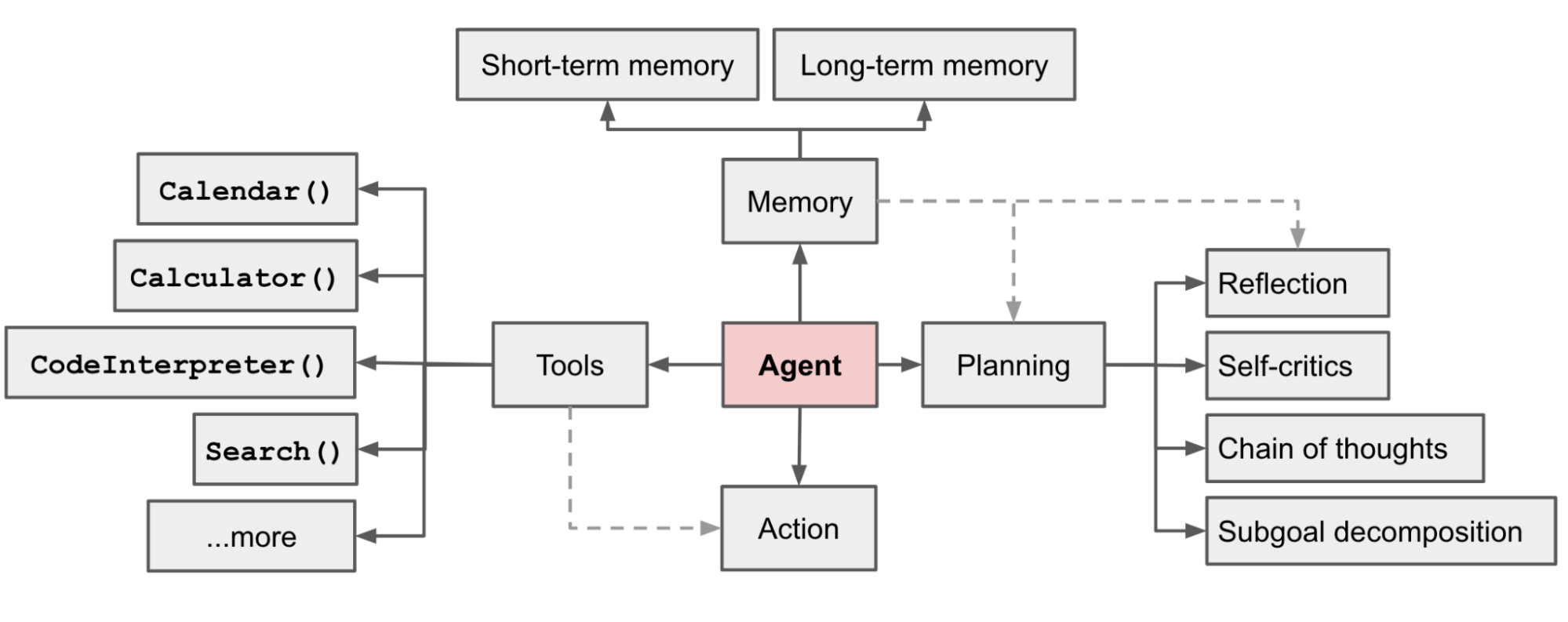 Fig. 1. Overview of a LLM-powered autonomous agent system.",
0.6433743238449097
],
[
"LLM Powered Autonomous Agents \nDate: June 23, 2023 | Estimated Reading Time: 31 min | Author: Lilian Weng \nTable of Contents\n * [Agent System Overview](https://lilianweng.github.io/posts/2023-06-23-agent/<#agent-system-overview>)\n * [Component One: Planning](https://lilianweng.github.io/posts/2023-06-23-agent/<#component-one-planning>)\n * [Task Decomposition](https://lilianweng.github.io/posts/2023-06-23-agent/<#task-decomposition>)\n * [Self-Reflection](https://lilianweng.github.io/posts/2023-06-23-agent/<#self-reflection>)\n * [Component Two: Memory](https://lilianweng.github.io/posts/2023-06-23-agent/<#component-two-memory>)\n * [Types of Memory](https://lilianweng.github.io/posts/2023-06-23-agent/<#types-of-memory>)\n * [Maximum Inner Product Search (MIPS)](https://lilianweng.github.io/posts/2023-06-23-agent/<#maximum-inner-product-search-mips>)\n * [Component Three: Tool Use](https://lilianweng.github.io/posts/2023-06-23-agent/<#component-three-tool-use>)\n * [Case Studies](https://lilianweng.github.io/posts/2023-06-23-agent/<#case-studies>)\n * [Scientific Discovery Agent](https://lilianweng.github.io/posts/2023-06-23-agent/<#scientific-discovery-agent>)\n * [Generative Agents Simulation](https://lilianweng.github.io/posts/2023-06-23-agent/<#generative-agents-simulation>)\n * [Proof-of-Concept Examples](https://lilianweng.github.io/posts/2023-06-23-agent/<#proof-of-concept-examples>)\n * [Challenges](https://lilianweng.github.io/posts/2023-06-23-agent/<#challenges>)\n * [Citation](https://lilianweng.github.io/posts/2023-06-23-agent/<#citation>)\n * [References](https://lilianweng.github.io/posts/2023-06-23-agent/<#references>)\n\n\nBuilding agents with LLM (large language model) as its core controller is a cool concept. Several proof-of-concepts demos, such as [AutoGPT](https://lilianweng.github.io/posts/2023-06-23-agent/<https:/github.com/Significant-Gravitas/Auto-GPT>), [GPT-Engineer](https://lilianweng.github.io/posts/2023-06-23-agent/<https:/github.com/AntonOsika/gpt-engineer>) and [BabyAGI](https://lilianweng.github.io/posts/2023-06-23-agent/<https:/github.com/yoheinakajima/babyagi>), serve as inspiring examples. The potentiality of LLM extends beyond generating well-written copies, stories, essays and programs; it can be framed as a powerful general problem solver.",
0.5462194085121155
],
[
"Component One: Planning[#](https://lilianweng.github.io/posts/2023-06-23-agent/<#component-one-planning>)\nA complicated task usually involves many steps. An agent needs to know what they are and plan ahead.\n#",
0.5223420858383179
]
]
LLMを使ってRAGレスポンスを取得する
検索されたドキュメントを文字列フォーマットに変換する。
context = "\n".join(
    [line_with_distance[0] for line_with_distance in retrieved_lines_with_distances]
)
ラネージ・モデルのシステム・プロンプトとユーザー・プロンプトを定義する。このプロンプトはmilvusから検索されたドキュメントで組み立てられる。
SYSTEM_PROMPT = """
Human: You are an AI assistant. You are able to find answers to the questions from the contextual passage snippets provided.
"""
USER_PROMPT = f"""
Use the following pieces of information enclosed in <context> tags to provide an answer to the question enclosed in <question> tags.
<context>
{context}
</context>
<question>
{question}
</question>
"""
OpenAI ChatGPTを使ってプロンプトに基づいたレスポンスを生成する。
response = openai_client.chat.completions.create(
    model="gpt-4o",
    messages=[
        {"role": "system", "content": SYSTEM_PROMPT},
        {"role": "user", "content": USER_PROMPT},
    ],
)
print(response.choices[0].message.content)
INFO:httpx:HTTP Request: POST https://api.openai.com/v1/chat/completions "HTTP/1.1 200 OK"


The main components of autonomous agents are:

1. **Planning**:
   - Subgoal and decomposition: Breaking down large tasks into smaller, manageable subgoals.
   - Reflection and refinement: Self-criticism and reflection to learn from past actions and improve future steps.

2. **Memory**:
   - Short-term memory: In-context learning using prompt engineering.
   - Long-term memory: Retaining and recalling information over extended periods using an external vector store and fast retrieval.

3. **Tool use**:
   - Calling external APIs for information not contained in the model weights, accessing current information, code execution capabilities, and proprietary information sources.
