



使用 Milvus 和 Gemini 建置 RAG
Gemini API與Google AI Studio可協助您開始運用 Google 最新的模型,並將您的構想轉化為可擴展的應用程式。 Gemini 提供對強大語言模型(如Gemini-2.5-Flash 和Gemini-2.5-Pro )的存取權限,適用於文字生成、文件處理、視覺、音訊分析等任務。它還提供Gemini Embedding 2 ,這是一個多模態嵌入模型,支援文字、圖片、影片、音訊及 PDF 文件,並透過 Matryoshka 表徵學習(Matryoshka Representation Learning)提供靈活的輸出維度。 透過此 API,您可以輸入包含數百萬個標記的長上下文、針對特定任務微調模型、產生 JSON 等結構化輸出,並運用語義檢索與程式碼執行等功能。
在本教學中,我們將向您展示如何使用 Milvus 和 Gemini 建置 RAG(檢索增強生成)處理流程。我們將運用 Gemini 模型,根據給定的查詢生成回應,並結合從 Milvus 檢索到的相關資訊進行增強。
準備工作
依賴項與環境
首先,安裝所需的套件:
$ pip install --upgrade pymilvus milvus-lite google-genai requests tqdm
若您使用 Google Colab,為啟用剛安裝的依賴項,可能需要重新啟動執行環境(點擊螢幕頂端的「Runtime」選單,並從下拉式選單中選擇「Restart session」)。
您應先登入 Google AI Studio 平台,並將API 金鑰 GEMINI_API_KEY 設定為環境變數。
import os

os.environ["GEMINI_API_KEY"] = "***********"
準備資料
我們將Milvus 文件 2.4.x中的常見問題 (FAQ) 頁面用作 RAG 中的私有知識,這對於簡單的 RAG 管道而言是個很好的資料來源。
下載 ZIP 檔案,並將文件解壓縮至milvus_docs 資料夾中。
$ wget https://github.com/milvus-io/milvus-docs/releases/download/v2.4.6-preview/milvus_docs_2.4.x_en.zip
$ unzip -q milvus_docs_2.4.x_en.zip -d milvus_docs
我們將從milvus_docs/en/faq 資料夾中載入所有 Markdown 檔案。對於每個文件,我們僅需使用「# 」來分隔檔案中的內容,這能大致區分 Markdown 檔案中各主要部分的內容。
from glob import glob

text_lines = []

for file_path in glob("milvus_docs/en/faq/*.md", recursive=True):
    with open(file_path, "r") as file:
        file_text = file.read()

    text_lines += file_text.split("# ")
準備大型語言模型(LLM)與嵌入模型
我們使用gemini-2.5-flash 作為 LLM,並採用gemini-embedding-2-preview 作為嵌入模型。gemini-embedding-2-preview 是 Google 最新的多模態嵌入模型,透過 Matryoshka 表徵學習(Matryoshka Representation Learning),支援文字、圖片、影片、音訊及 PDF 文件,並具備靈活的輸出維度(128–3,072)。
讓我們試著從 LLM 生成一個測試回應:
from google import genai

client = genai.Client(api_key=os.environ["GEMINI_API_KEY"])

response = client.models.generate_content(
    model="gemini-2.5-flash", contents="who are you"
)
print(response.text)
I am a large language model, trained by Google.

I'm designed to process and generate human-like text based on the vast amount of data I was trained on. This allows me to:

*   Answer questions
*   Provide summaries
*   Generate creative content
*   Translate languages
*   And much more

I don't have personal experiences, feelings, or consciousness. I'm a tool designed to be helpful and informative.
產生一個測試嵌入向量,並輸出其維度及前幾個元素。
test_embeddings = client.models.embed_content(
    model="gemini-embedding-2-preview", contents=["This is a test1", "This is a test2"]
)

embedding_dim = len(test_embeddings.embeddings[0].values)
print(embedding_dim)
print(test_embeddings.embeddings[0].values[:10])
3072
[-0.016769307, 0.013630492, 0.020277105, 0.0035285393, 0.003968259, -0.013498845, 0.028525498, 0.025498547, -0.021553498, 0.015233516]
將資料載入 Milvus
建立 Collection
讓我們初始化 Milvus 客戶端並設定我們的 Collection:
from pymilvus import MilvusClient

milvus_client = MilvusClient(uri="./milvus_demo.db")

collection_name = "my_rag_collection"
關於 `MilvusClient` 的參數:
- 將 `
uri` 設定為本機檔案(例如 `./milvus.db`)是最方便的方法,因為它會自動利用Milvus Lite將所有資料儲存至此檔案中。 - 若您擁有大量資料,可於Docker 或 Kubernetes 上架設效能更佳的 Milvus 伺服器。在此設定中,請將伺服器 URI(例如
http://localhost:19530)設為您的uri。 - 若您想使用Zilliz Cloud(Milvus 的全託管雲端服務),請調整
uri和token,這兩者分別對應 Zilliz Cloud 中的「公開端點」和「API 金鑰」。
檢查該集合是否已存在,若已存在則刪除它。
if milvus_client.has_collection(collection_name):
    milvus_client.drop_collection(collection_name)
根據指定的參數建立新的集合。
若未指定任何欄位資訊,Milvus 將自動建立一個預設的id 欄位作為主鍵,並建立一個vector 欄位來儲存向量資料。系統會使用一個預留的 JSON 欄位來儲存非模式定義的欄位及其值。
milvus_client.create_collection(
    collection_name=collection_name,
    dimension=embedding_dim,
    metric_type="IP",  # Inner product distance
    # Strong consistency waits for all loads to complete, adding latency with large datasets
    # consistency_level="Strong",  # Strong consistency level
)
插入資料
遍歷文字行,建立嵌入向量,然後將資料插入 Milvus。
此處出現了一個新的text 欄位,這是集合模式中未定義的欄位。它將自動新增至預留的 JSON 動態欄位中,從高層次來看,該欄位可視為一般欄位。
from tqdm import tqdm

data = []

doc = client.models.embed_content(model="gemini-embedding-2-preview", contents=text_lines)

for i, line in enumerate(tqdm(text_lines, desc="Creating embeddings")):
    data.append({"id": i, "vector": doc.embeddings[i].values, "text": line})

milvus_client.insert(collection_name=collection_name, data=data)
Creating embeddings: 100%|██████████| 72/72 [00:00<00:00, 337796.30it/s]


{'insert_count': 72, 'ids': [0, 1, 2, 3, 4, 5, 6, 7, 8, 9, 10, 11, 12, 13, 14, 15, 16, 17, 18, 19, 20, 21, 22, 23, 24, 25, 26, 27, 28, 29, 30, 31, 32, 33, 34, 35, 36, 37, 38, 39, 40, 41, 42, 43, 44, 45, 46, 47, 48, 49, 50, 51, 52, 53, 54, 55, 56, 57, 58, 59, 60, 61, 62, 63, 64, 65, 66, 67, 68, 69, 70, 71], 'cost': 0}
建立 RAG
針對查詢擷取資料
讓我們指定一個關於 Milvus 的常見問題。
question = "How is data stored in milvus?"
在集合中搜尋該問題,並擷取語義上最相關的前三項結果。
quest_embed = client.models.embed_content(model="gemini-embedding-2-preview", contents=question)

search_res = milvus_client.search(
    collection_name=collection_name,
    data=[quest_embed.embeddings[0].values],
    limit=3,  # Return top 3 results
    search_params={"metric_type": "IP", "params": {}},  # Inner product distance
    output_fields=["text"],  # Return the text field
)
讓我們來看看此查詢的搜尋結果
import json

retrieved_lines_with_distances = [
    (res["entity"]["text"], res["distance"]) for res in search_res[0]
]
print(json.dumps(retrieved_lines_with_distances, indent=4))
[
    [
        " Where does Milvus store data?\n\nMilvus deals with two types of data, inserted data and metadata. \n\nInserted data, including vector data, scalar data, and collection-specific schema, are stored in persistent storage as incremental log. Milvus supports multiple object storage backends, including [MinIO](https://min.io/), [AWS S3](https://aws.amazon.com/s3/?nc1=h_ls), [Google Cloud Storage](https://cloud.google.com/storage?hl=en#object-storage-for-companies-of-all-sizes) (GCS), [Azure Blob Storage](https://azure.microsoft.com/en-us/products/storage/blobs), [Alibaba Cloud OSS](https://www.alibabacloud.com/product/object-storage-service), and [Tencent Cloud Object Storage](https://www.tencentcloud.com/products/cos) (COS).\n\nMetadata are generated within Milvus. Each Milvus module has its own metadata that are stored in etcd.\n\n###",
        0.864
    ],
    [
        "Why is there no vector data in etcd?\n\netcd stores Milvus module metadata; MinIO stores entities.",
        0.7923
    ],
    [
        "What is the maximum dataset size Milvus can handle?\n\n  \nTheoretically, the maximum dataset size Milvus can handle is determined by the hardware it is run on, specifically system memory and storage:\n\n- Milvus loads all specified collections and partitions into memory before running queries. Therefore, memory size determines the maximum amount of data Milvus can query.\n- When new entities and and collection-related schema (currently only MinIO is supported for data persistence) are added to Milvus, system storage determines the maximum allowable size of inserted data.\n\n###",
        0.7857
    ]
]
使用大型語言模型 (LLM) 生成 RAG 回應
將檢索到的文件轉換為字串格式。
context = "\n".join(
    [line_with_distance[0] for line_with_distance in retrieved_lines_with_distances]
)
為語言模型定義系統提示與使用者提示。此提示是根據從 Milvus 檢索到的文件所組建的。
from google.genai import types

SYSTEM_PROMPT = """
Human: You are an AI assistant. You are able to find answers to the questions from the contextual passage snippets provided.
"""
USER_PROMPT = f"""
Use the following pieces of information enclosed in <context> tags to provide an answer to the question enclosed in <question> tags.
<context>
{context}
</context>
<question>
{question}
</question>
"""
使用 Gemini 根據提示生成回應。
response = client.models.generate_content(
    model="gemini-2.5-flash",
    config=types.GenerateContentConfig(system_instruction=SYSTEM_PROMPT),
    contents=USER_PROMPT,
)
print(response.text)
Milvus stores data in two main ways:

1.  **Inserted Data:** This includes vector data, scalar data, and collection-specific schema. This type of data is stored in persistent storage as an incremental log. Milvus supports various object storage backends for this, such as MinIO, AWS S3, Google Cloud Storage (GCS), Azure Blob Storage, Alibaba Cloud OSS, and Tencent Cloud Object Storage (COS).
2.  **Metadata:** Metadata is generated within Milvus by its various modules. Each module's metadata is stored in etcd.
多模態搜尋
由於gemini-embedding-2-preview 將文字、圖像及其他模態映射至相同的嵌入空間,因此我們可以進行跨模態搜尋——例如,使用文字查詢來尋找最相關的圖像。
準備圖像資料
我們從 Milvus Bootcamp 儲存庫下載了一組 RAG 架構圖,作為我們的圖像資料集。
import urllib.request
from pathlib import Path

image_dir = Path("images")
image_dir.mkdir(exist_ok=True)

image_files = [
    "vanilla_rag.png",
    "hyde.png",
    "query_routing.png",
    "self_reflection.png",
    "hybrid_and_rerank.png",
    "hierarchical_index.png",
]

base_url = "https://raw.githubusercontent.com/milvus-io/bootcamp/master/pics/advanced_rag/"

for fname in image_files:
    path = image_dir / fname
    if not path.exists():
        urllib.request.urlretrieve(base_url + fname, path)
        print(f"Downloaded {fname}")
    else:
        print(f"Already exists {fname}")

print(f"\nTotal images: {len(image_files)}")
Downloaded vanilla_rag.png
Downloaded hyde.png
Downloaded query_routing.png
Downloaded self_reflection.png
Downloaded hybrid_and_rerank.png
Downloaded hierarchical_index.png

Total images: 6
對圖片進行嵌入並儲存至 Milvus
我們將每張圖片讀取為位元組,並傳遞給gemini-embedding-2-preview 以產生嵌入向量,隨後將其儲存至新的 Milvus 集合中。
from google.genai import types

image_data = []

for fname in image_files:
    path = image_dir / fname
    with open(path, "rb") as f:
        image_bytes = f.read()

    result = client.models.embed_content(
        model="gemini-embedding-2-preview",
        contents=types.Part.from_bytes(data=image_bytes, mime_type="image/png"),
    )
    image_data.append(
        {
            "id": len(image_data),
            "vector": result.embeddings[0].values,
            "filename": fname,
        }
    )
    print(f"Embedded {fname}")

# Create a new collection for images
image_collection = "image_collection"
if milvus_client.has_collection(image_collection):
    milvus_client.drop_collection(image_collection)

milvus_client.create_collection(
    collection_name=image_collection,
    dimension=len(image_data[0]["vector"]),
    metric_type="IP",
)

milvus_client.insert(collection_name=image_collection, data=image_data)
print(f"\nInserted {len(image_data)} image embeddings (dim={len(image_data[0]['vector'])})")
Embedded vanilla_rag.png
Embedded hyde.png
Embedded query_routing.png
Embedded self_reflection.png
Embedded hybrid_and_rerank.png
Embedded hierarchical_index.png

Inserted 6 image embeddings (dim=3072)
跨模態搜尋:文字查詢 → 圖片結果
現在,讓我們使用文字查詢來跨圖像嵌入進行搜尋。由於文字和圖像都映射到相同的嵌入空間中,因此我們可以直接進行比對。
from IPython.display import display, Image

text_queries = [
    "How does a basic RAG pipeline work?",
    "What is the hypothetical document embedding approach?",
    "How to combine hybrid search with reranking?",
]

for query in text_queries:
    query_embed = client.models.embed_content(
        model="gemini-embedding-2-preview", contents=query
    )

    results = milvus_client.search(
        collection_name=image_collection,
        data=[query_embed.embeddings[0].values],
        limit=1,
        search_params={"metric_type": "IP", "params": {}},
        output_fields=["filename"],
    )

    best = results[0][0]
    print(f"\nQuery: {query}")
    print(f"Match: {best['entity']['filename']} (score: {best['distance']:.4f})")
    display(Image(filename=str(image_dir / best["entity"]["filename"]), width=600))
Query: How does a basic RAG pipeline work?
Match: vanilla_rag.png (score: 0.5132)
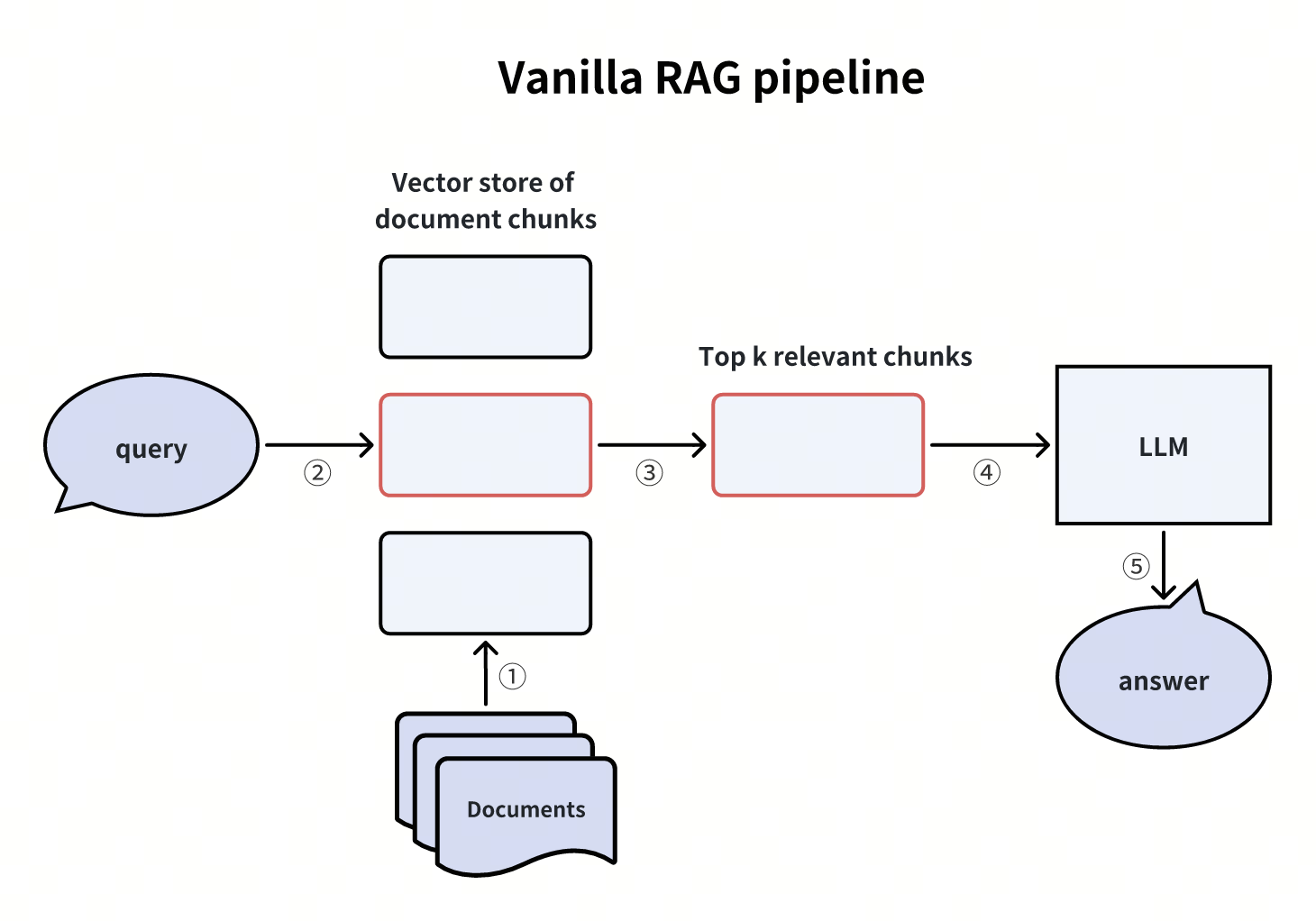 基礎 RAG 處理流程
Query: What is the hypothetical document embedding approach?
Match: hyde.png (score: 0.4756)
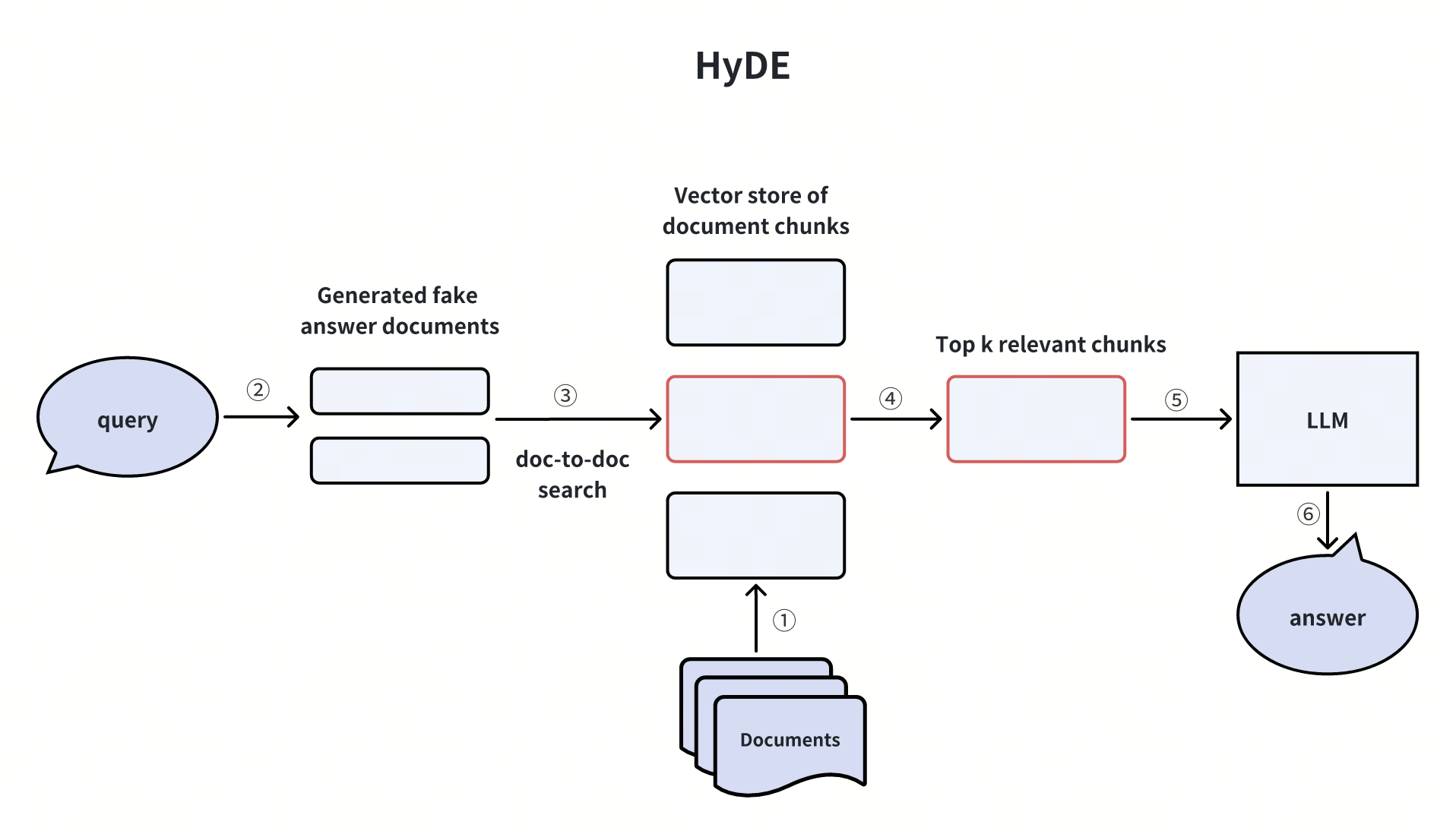 HyDE
HyDE
Query: How to combine hybrid search with reranking?
Match: hybrid_and_rerank.png (score: 0.5271)
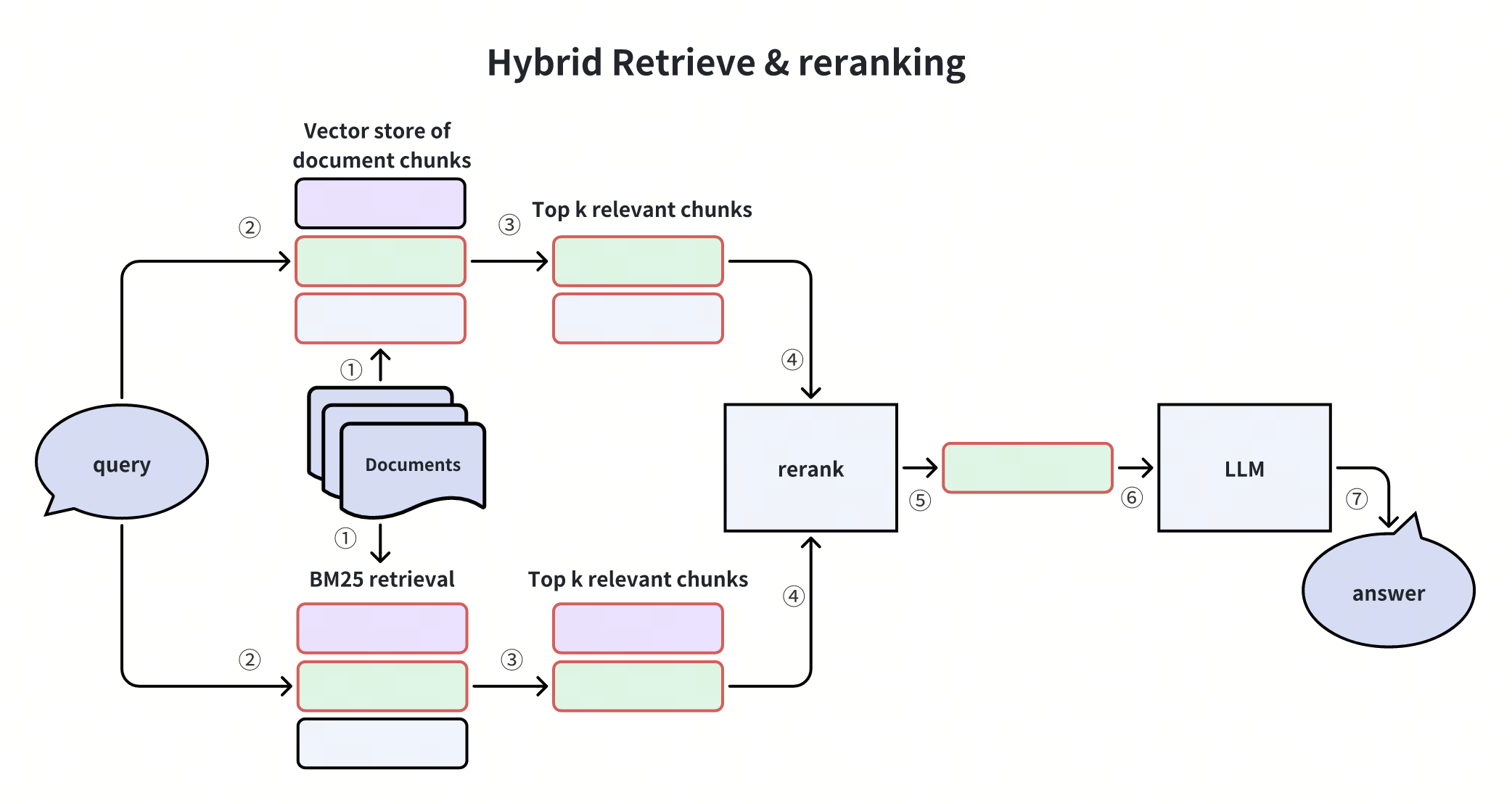 混合檢索與重新排序
太棒了!我們已成功利用 Milvus 和 Gemini 建置了一條 RAG 處理流程,並展示了透過文字查詢檢索相關圖片的跨模態搜尋功能——所有這些皆由gemini-embedding-2-preview 的統一嵌入空間所驅動。
