

アップサート・エンティティ
upsert 操作は、コレクション内のエンティティを挿入または更新する便利な方法を提供します。
概要
upsert を使用して、新しいエンティティを挿入するか、既存のエンティティを更新することができます。主キーが見つからない場合は、挿入操作が発生します。そうでない場合は、更新操作が実行されます。
Milvusのupsertはoverrideまたはmergeモードで動作します。
オーバーライドモードでのupsert
オーバーライドモードで動作するupsertリクエストは、挿入と削除を組み合わせたものです。既存のエンティティのupsert リクエストを受信すると、Milvusはリクエスト ペイロードで運ばれたデータを挿入し、同時にデータで指定された元の主キーを持つ既存のエンティティを削除します。
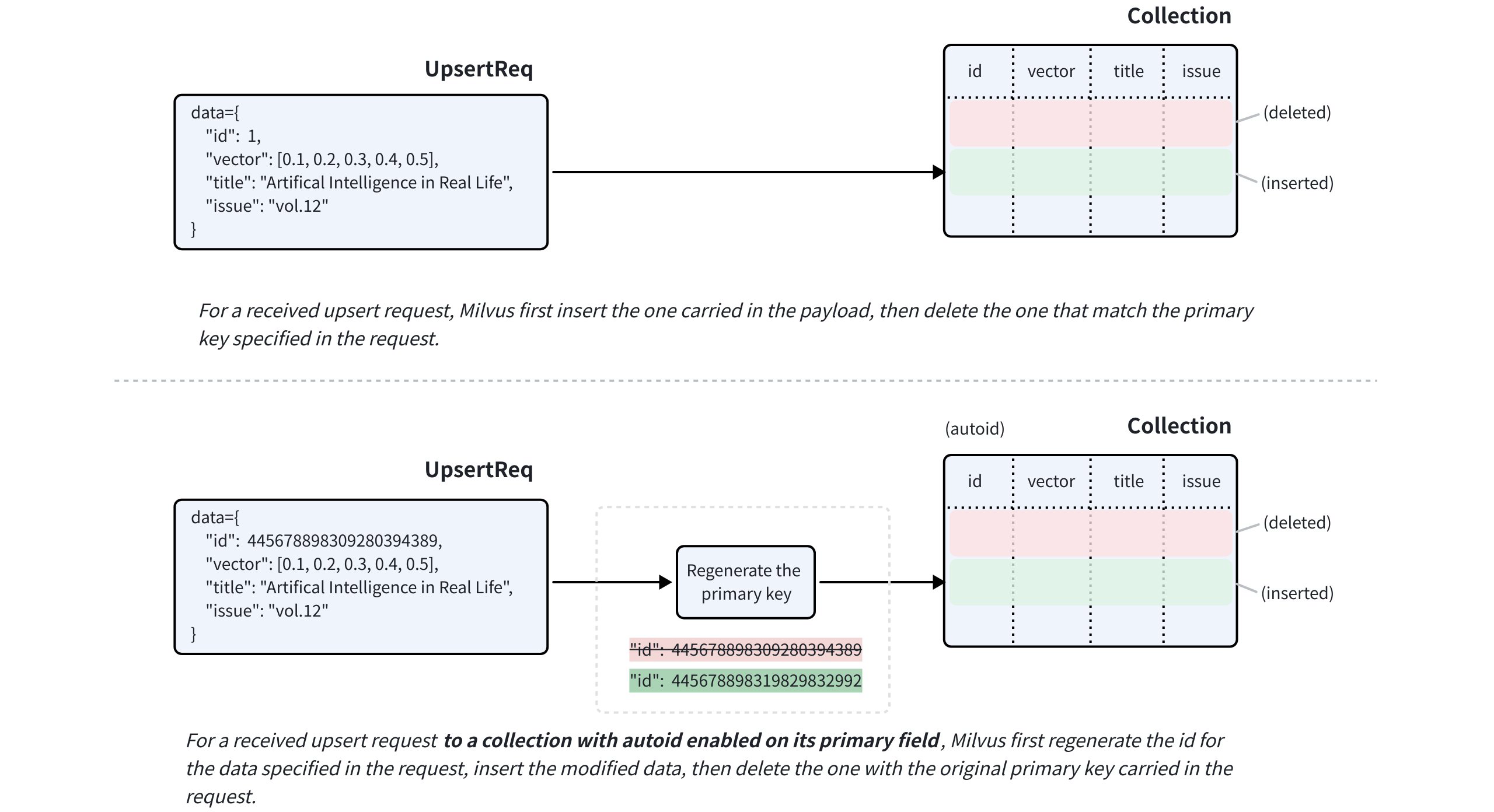 上書きモードでのアップサート
ターゲット コレクションのプライマリ フィールドでautoID が有効になっている場合でも、upsert 要求にはターゲット エンティティのプライマリ キーを含める必要があります。Milvusは提供された主キーを使用して置換するエンティティを特定し、挿入する前にリクエストのペイロードに含まれるデータに対して新しい主キーを生成します。
nullable が有効なフィールドについては、更新が不要な場合、upsert リクエストで省略できます。
マージモードでのアップサートCompatible with Milvus v2.6.2+
partial_update フラグを使用して、upsertリクエストをマージモードで動作させることもできます。これにより、更新が必要なフィールドのみをリクエストのペイロードに含めることができます。
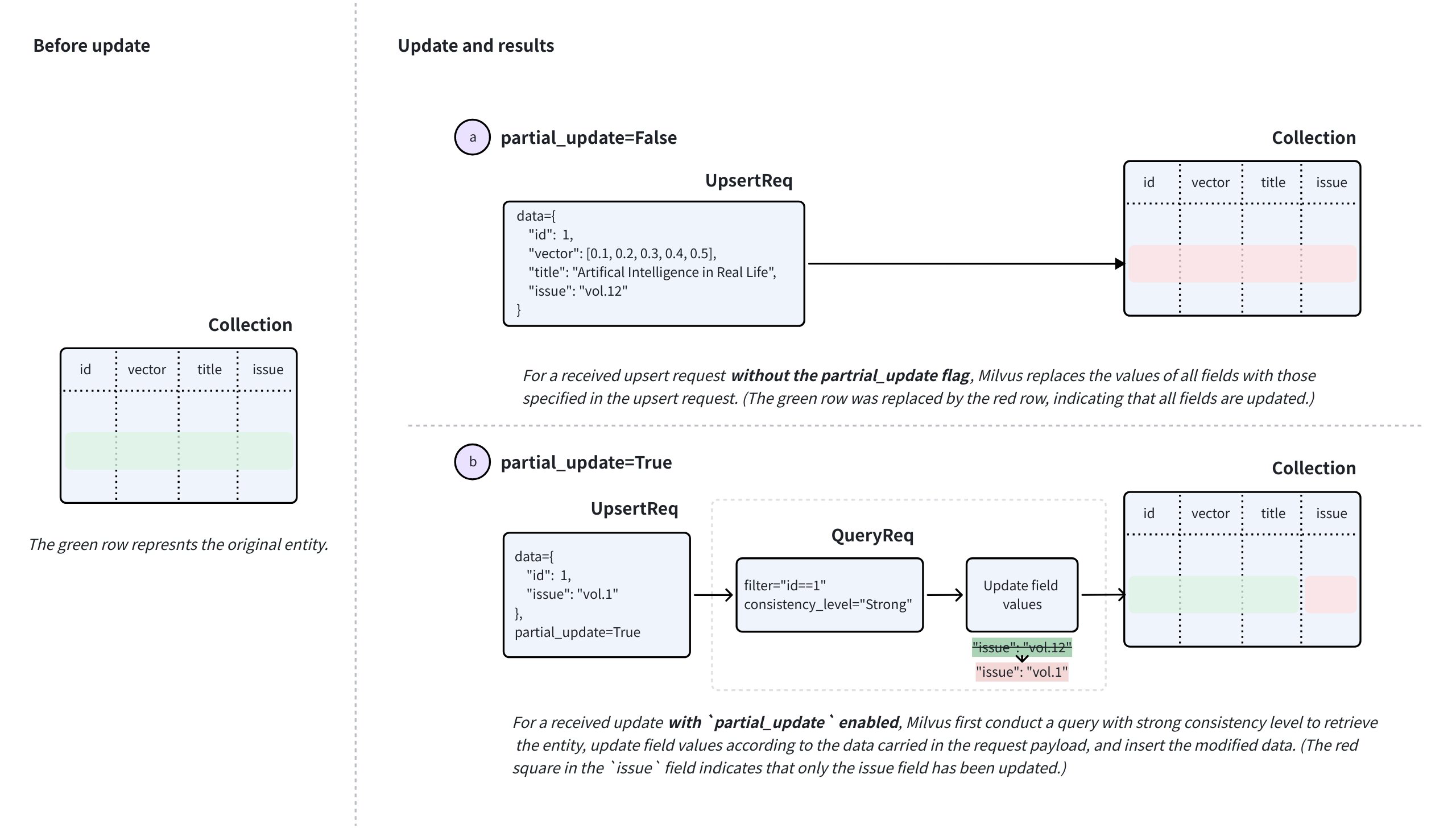 マージモードでのupsert
マージを実行するには、upsert リクエストで、主キーと更新するフィールドの新しい値とともに、partial_update をTrue に設定します。
このようなリクエストを受け取ると、milvusは強い一貫性を持つクエリを実行してエンティティを取得し、リクエストのデータに基づいてフィールド値を更新し、変更されたデータを挿入し、リクエストに含まれるオリジナルの主キーを持つ既存のエンティティを削除します。
アップサート動作: 特別な注意事項
マージ機能を使用する前に考慮すべき特別な注意事項がいくつかあります。以下のケースは、title およびissue という 2 つのスカラ・フィールドと、id というプライマリ・キー、vector というベクトル・フィールドを持つコレクションがあると仮定します。
nullableが有効になっているフィールドをアップサートします 。issueフィールドは NULL にできるとします。これらのフィールドをアップサートする場合、以下の点に注意してください:upsert要求でissueフィールドを省略し、partial_updateを無効にすると、issueフィールドは元の値を保持する代わりに、nullに更新されます。issueフィールドの元の値を保持するには、partial_updateを有効にしてissueフィールドを省略するか、upsertリクエストに元の値のissueフィールドを含める必要があります。
動的フィールドのキーをアップサートする。
例のコレクションでダイナミック・キーを有効にし、エンティティのダイナミック・ フィールドのキーと値のペアが
{"author": "John", "year": 2020, "tags": ["fiction"]}のようになっているとします。author、year、tagsなどのキーを持つエンティティをアップサートする場合、または他のキーを追加する場合は、以下の点に注意してください:partial_updateを無効にしてアップサートを行った場合、デフォルトの動作はオーバーライドになります。これは、ダイナミック・フィールドの値が、要求に含まれるすべての非スキーマ定義 フィールドとその値によってオーバーライドされることを意味します。例えば、要求に含まれるデータが
{"author": "Jane", "genre": "fantasy"}の場合、ターゲット・エンティティのダイナミック・フィールドのキーと値のペアはその値に更新されます。partial_updateを有効にしてアップサートする場合、デフォルトの動作はマージです。これは、ダイナミック・フィールドの値が、要求に含まれるすべての非スキーマ定義フィールドとその値にマージされることを意味します。例えば、要求に含まれるデータが
{"author": "John", "year": 2020, "tags": ["fiction"]}の場合、ターゲット・エンティティのダイナミック・フィールドのキーと値のペアは、アップサート後に{"author": "John", "year": 2020, "tags": ["fiction"], "genre": "fantasy"}になります。
JSONフィールドのアップサート
サンプル・コレクションに
extrasというスキーマ定義の JSON フィールドがあり、エンティティのこの JSON フィールドのキー・バリュー・ペアが{"author": "John", "year": 2020, "tags": ["fiction"]}と類似しているとします。変更されたJSONデータでエンティティの
extrasフィールドをアップサートする場合、JSONフィールドは全体として扱われ、個々のキーを選択的に更新することはできないことに注意してください。言い換えると、JSON フィールドはマージ・モードでのアップサートに対応していません。
制限と制約
上記の内容に基づき、いくつかの制限と制約があります:
autoIDが有効な場合でも、upsert要求は常にターゲットエンティティの主キーを含む必要があります。autoIDコレクションの場合、要求の主キーは置換する既存のエンティティを識別します。Milvusは、挿入された置換エンティティの新しい主キーを生成します。対象のコレクションがロードされ、クエリが可能である必要があります。
要求で指定されたすべてのフィールドがターゲット・コレクションのスキーマに存在する必要があります。
要求で指定されたすべてのフィールドの値が、スキーマで定義されたデータ型に一致する必要があります。
関数を使用して他のフィールドから派生したフィールドについては、Milvusは再計算を可能にするため、アップサート中に派生フィールドを削除します。
コレクション内のエンティティのアップサート
このセクションでは、my_collection という名前のコレクションにエンティティをアップサートします。このコレクションには、id 、vector 、title 、issue という2つのフィールドのみがあります。id フィールドはプライマリフィールドで、title とissue フィールドはスカラーフィールドである。
コレクションに3つのエンティティが存在する場合、upsertリクエストに含まれるエンティティによってオーバーライドされる。
from pymilvus import MilvusClient

client = MilvusClient(
    uri="http://localhost:19530",
    token="root:Milvus"
)

data=[
    {
        "id": 0,
        "vector": [-0.619954382375778, 0.4479436794798608, -0.17493894838751745, -0.4248030059917294, -0.8648452746018911],
        "title": "Artificial Intelligence in Real Life",
        "issue": "vol.12"
    }, {
        "id": 1,
        "vector": [0.4762662251462588, -0.6942502138717026, -0.4490002642657902, -0.628696575798281, 0.9660395877041965],
        "title": "Hollow Man",
        "issue": "vol.19"
    }, {
        "id": 2,
        "vector": [-0.8864122635045097, 0.9260170474445351, 0.801326976181461, 0.6383943392381306, 0.7563037341572827],
        "title": "Treasure Hunt in Missouri",
        "issue": "vol.12"
    }
]

res = client.upsert(
    collection_name='my_collection',
    data=data
)

print(res)

# Output
# {'upsert_count': 3}
import com.google.gson.Gson;
import com.google.gson.JsonObject;
import io.milvus.v2.client.ConnectConfig;
import io.milvus.v2.client.MilvusClientV2;
import io.milvus.v2.service.vector.request.UpsertReq;
import io.milvus.v2.service.vector.response.UpsertResp;

import java.util.*;

MilvusClientV2 client = new MilvusClientV2(ConnectConfig.builder()
        .uri("http://localhost:19530")
        .token("root:Milvus")
        .build());

Gson gson = new Gson();
List<JsonObject> data = Arrays.asList(
        gson.fromJson("{\"id\": 0, \"vector\": [-0.619954382375778, 0.4479436794798608, -0.17493894838751745, -0.4248030059917294, -0.8648452746018911], \"title\": \"Artificial Intelligence in Real Life\", \"issue\": \"\vol.12\"}", JsonObject.class),
        gson.fromJson("{\"id\": 1, \"vector\": [0.4762662251462588, -0.6942502138717026, -0.4490002642657902, -0.628696575798281, 0.9660395877041965], \"title\": \"Hollow Man\", \"issue\": \"vol.19\"}", JsonObject.class),
        gson.fromJson("{\"id\": 2, \"vector\": [-0.8864122635045097, 0.9260170474445351, 0.801326976181461, 0.6383943392381306, 0.7563037341572827], \"title\": \"Treasure Hunt in Missouri\", \"issue\": \"vol.12\"}", JsonObject.class),
);

UpsertReq upsertReq = UpsertReq.builder()
        .collectionName("my_collection")
        .data(data)
        .build();

UpsertResp upsertResp = client.upsert(upsertReq);
System.out.println(upsertResp);

// Output:
//
// UpsertResp(upsertCnt=3)
const { MilvusClient, DataType } = require("@zilliz/milvus2-sdk-node")

const address = "http://localhost:19530";
const token = "root:Milvus";
const client = new MilvusClient({address, token});

data = [
    {id: 0, vector: [-0.619954382375778, 0.4479436794798608, -0.17493894838751745, -0.4248030059917294, -0.8648452746018911], title: "Artificial Intelligence in Real Life", issue: "vol.12"},
    {id: 1, vector: [0.4762662251462588, -0.6942502138717026, -0.4490002642657902, -0.628696575798281, 0.9660395877041965], title: "Hollow Man", issue: "vol.19"},
    {id: 2, vector: [-0.8864122635045097, 0.9260170474445351, 0.801326976181461, 0.6383943392381306, 0.7563037341572827], title: "Treasure Hunt in Missouri", issue: "vol.12"},
]

res = await client.upsert({
    collection_name: "my_collection",
    data: data,
})

console.log(res.upsert_cnt)

// Output
//
// 3
//
import (
    "context"
    "fmt"

    "github.com/milvus-io/milvus/client/v2/column"
    "github.com/milvus-io/milvus/client/v2/milvusclient"
)

ctx, cancel := context.WithCancel(context.Background())
defer cancel()

milvusAddr := "localhost:19530"
client, err := milvusclient.New(ctx, &milvusclient.ClientConfig{
    Address: milvusAddr,
})
if err != nil {
    fmt.Println(err.Error())
    // handle error
}
defer client.Close(ctx)

titleColumn := column.NewColumnString("title", []string{
    "Artificial Intelligence in Real Life", "Hollow Man", "Treasure Hunt in Missouri",
})

issueColumn := column.NewColumnString("issue", []string{
    "vol.12", "vol.19", "vol.12"
})

_, err = client.Upsert(ctx, milvusclient.NewColumnBasedInsertOption("my_collection").
    WithInt64Column("id", []int64{0, 1, 2, 3, 4, 5, 6, 7, 8, 9}).
    WithFloatVectorColumn("vector", 5, [][]float32{
        {0.3580376395471989, -0.6023495712049978, 0.18414012509913835, -0.26286205330961354, 0.9029438446296592},
        {0.19886812562848388, 0.06023560599112088, 0.6976963061752597, 0.2614474506242501, 0.838729485096104},
        {0.43742130801983836, -0.5597502546264526, 0.6457887650909682, 0.7894058910881185, 0.20785793220625592},
    }).
    WithColumns(titleColumn, issueColumn),
)
if err != nil {
    fmt.Println(err.Error())
    // handle err
}
export CLUSTER_ENDPOINT="http://localhost:19530"
export TOKEN="root:Milvus"

curl --request POST \
--url "${CLUSTER_ENDPOINT}/v2/vectordb/entities/upsert" \
--header "Authorization: Bearer ${TOKEN}" \
--header "Content-Type: application/json" \
--header "Request-Timeout: 10" \
-d '{
    "data": [
        {"id": 0, "vector": [0.3580376395471989, -0.6023495712049978, 0.18414012509913835, -0.26286205330961354, 0.9029438446296592], "title": "Artificial Intelligence in Real Life", "issue": "vol.12"},
        {"id": 1, "vector": [0.19886812562848388, 0.06023560599112088, 0.6976963061752597, 0.2614474506242501, 0.838729485096104], "title": "Hollow Man", "issue": "vol.19"},
        {"id": 2, "vector": [0.43742130801983836, -0.5597502546264526, 0.6457887650909682, 0.7894058910881185, 0.20785793220625592], "title": "Treasure Hunt in Missouri", "issue": "vol.12"},
],
    "collectionName": "my_collection"
}'

# {
#     "code": 0,
#     "data": {
#         "upsertCount": 3,
#         "upsertIds": [
#             0,
#             1,
#             2,
#         ]
#     }
# }
パーティション内のエンティティのアップサート
指定したパーティションにエンティティをアップサートすることもできる。以下のコード・スニペットは、コレクションにPartitionAというパーティションがあると仮定しています。
パーティションに3つのエンティティが存在する場合、リクエストに含まれるエンティティで上書きされます。
data=[
    {
        "id": 10,
        "vector": [0.06998888224297328, 0.8582816610326578, -0.9657938677934292, 0.6527905683627726, -0.8668460657158576],
        "title": "Layour Design Reference",
        "issue": "vol.34"
    },
    {
        "id": 11,
        "vector": [0.6060703043917468, -0.3765080534566074, -0.7710758854987239, 0.36993888322346136, 0.5507513364206531],
        "title": "Doraemon and His Friends",
        "issue": "vol.2"
    },
    {
        "id": 12,
        "vector": [-0.9041813104515337, -0.9610546012461163, 0.20033003106083358, 0.11842506351635174, 0.8327356724591011],
        "title": "Pikkachu and Pokemon",
        "issue": "vol.12"
    },
]

res = client.upsert(
    collection_name="my_collection",
    data=data,
    partition_name="partitionA"
)

print(res)

# Output
# {'upsert_count': 3}
import io.milvus.v2.service.vector.request.UpsertReq;
import io.milvus.v2.service.vector.response.UpsertResp;

Gson gson = new Gson();
List<JsonObject> data = Arrays.asList(
        gson.fromJson("{\"id\": 10, \"vector\": [0.06998888224297328, 0.8582816610326578, -0.9657938677934292, 0.6527905683627726, -0.8668460657158576], \"title\": \"Layour Design Reference\", \"issue\": \"vol.34\"}", JsonObject.class),
        gson.fromJson("{\"id\": 11, \"vector\": [0.6060703043917468, -0.3765080534566074, -0.7710758854987239, 0.36993888322346136, 0.5507513364206531], \"title\": \"Doraemon and His Friends\", \"issue\": \"vol.2\"}", JsonObject.class),
        gson.fromJson("{\"id\": 12, \"vector\": [-0.9041813104515337, -0.9610546012461163, 0.20033003106083358, 0.11842506351635174, 0.8327356724591011], \"title\": \"Pikkachu and Pokemon\", \"issue\": \"vol.12\"}", JsonObject.class),
);

UpsertReq upsertReq = UpsertReq.builder()
        .collectionName("my_collection")
        .partitionName("partitionA")
        .data(data)
        .build();

UpsertResp upsertResp = client.upsert(upsertReq);
System.out.println(upsertResp);

// Output:
//
// UpsertResp(upsertCnt=3)
const { MilvusClient, DataType } = require("@zilliz/milvus2-sdk-node")

// 6. Upsert data in partitions
data = [
    {id: 10, vector: [0.06998888224297328, 0.8582816610326578, -0.9657938677934292, 0.6527905683627726, -0.8668460657158576], title: "Layour Design Reference", issue: "vol.34"},
    {id: 11, vector: [0.6060703043917468, -0.3765080534566074, -0.7710758854987239, 0.36993888322346136, 0.5507513364206531], title: "Doraemon and His Friends", issue: "vol.2"},
    {id: 12, vector: [-0.9041813104515337, -0.9610546012461163, 0.20033003106083358, 0.11842506351635174, 0.8327356724591011], title: "Pikkachu and Pokemon", issue: "vol.12"},
]

res = await client.upsert({
    collection_name: "my_collection",
    data: data,
    partition_name: "partitionA"
})

console.log(res.upsert_cnt)

// Output
//
// 3
//
titleColumn = column.NewColumnString("title", []string{
    "Layour Design Reference", "Doraemon and His Friends", "Pikkachu and Pokemon",
})
issueColumn = column.NewColumnString("issue", []string{
    "vol.34", "vol.2", "vol.12",
})

_, err = client.Upsert(ctx, milvusclient.NewColumnBasedInsertOption("my_collection").
    WithPartition("partitionA").
    WithInt64Column("id", []int64{10, 11, 12, 13, 14, 15, 16, 17, 18, 19}).
    WithFloatVectorColumn("vector", 5, [][]float32{
        {0.3580376395471989, -0.6023495712049978, 0.18414012509913835, -0.26286205330961354, 0.9029438446296592},
        {0.19886812562848388, 0.06023560599112088, 0.6976963061752597, 0.2614474506242501, 0.838729485096104},
        {0.43742130801983836, -0.5597502546264526, 0.6457887650909682, 0.7894058910881185, 0.20785793220625592},
    }).
    WithColumns(titleColumn, issueColumn),
)
if err != nil {
    fmt.Println(err.Error())
    // handle err
}
export CLUSTER_ENDPOINT="http://localhost:19530"
export TOKEN="root:Milvus"

curl --request POST \
--url "${CLUSTER_ENDPOINT}/v2/vectordb/entities/upsert" \
--header "Authorization: Bearer ${TOKEN}" \
--header "Content-Type: application/json" \
--header "Request-Timeout: 10" \
-d '{
    "data": [
        {"id": 10, "vector": [0.06998888224297328, 0.8582816610326578, -0.9657938677934292, 0.6527905683627726, -0.8668460657158576], "title": "Layour Design Reference", "issue": "vol.34"},
        {"id": 11, "vector": [0.6060703043917468, -0.3765080534566074, -0.7710758854987239, 0.36993888322346136, 0.5507513364206531], "title": "Doraemon and His Friends", "issue": "vol.2"},
        {"id": 12, "vector": [-0.9041813104515337, -0.9610546012461163, 0.20033003106083358, 0.11842506351635174, 0.8327356724591011], "title": "Pikkachu and Pokemon", "issue": "vol.12"},
    ],
    "collectionName": "my_collection",
    "partitionName": "partitionA"
}'

# {
#     "code": 0,
#     "data": {
#         "upsertCount": 3,
#         "upsertIds": [
#             10,
#             11,
#             12,
#         ]
#     }
# }
マージモードでのエンティティのアップサートCompatible with Milvus v2.6.2+
以下のコード例は、部分的な更新でエンティティをアップサートする方法を示している。更新が必要なフィールドとその新しい値のみを、明示的な部分更新フラグとともに指定します。
以下の例では、upsert 要求で指定されたエンティティのissue フィールドが、要求に含まれる値に更新されます。
マージモードでupsertを実行する場合は、その要求に関係するエンティティが同じフィールドセットを持って いることを確認してください。次のコード・スニペットに示すように、upsert するエンティティが 2 つ以上あるとすると、エラーを防いでデータの整合性を維持するために、それらのエンティティに同じフィールドが含まれていることが重要です。
data=[
    {
        "id": 1,
        "issue": "vol.14"
    },
    {
        "id": 2,
        "issue": "vol.7"
    }
]

res = client.upsert(
    collection_name="my_collection",
    data=data,
    partial_update=True
)

print(res)

# Output
# {'upsert_count': 2}
JsonObject row1 = new JsonObject();
row1.addProperty("id", 1);
row1.addProperty("issue", "vol.14");

JsonObject row2 = new JsonObject();
row2.addProperty("id", 2);
row2.addProperty("issue", "vol.7");

UpsertReq upsertReq = UpsertReq.builder()
        .collectionName("my_collection")
        .data(Arrays.asList(row1, row2))
        .partialUpdate(true)
        .build();

UpsertResp upsertResp = client.upsert(upsertReq);
System.out.println(upsertResp);

// Output:
//
// UpsertResp(upsertCnt=2)
pkColumn := column.NewColumnInt64("id", []int64{1, 2})
issueColumn = column.NewColumnString("issue", []string{
    "vol.17", "vol.7",
})

_, err = client.Upsert(ctx, milvusclient.NewColumnBasedInsertOption("my_collection").
    WithColumns(pkColumn, issueColumn).
    WithPartialUpdate(true),
)
if err != nil {
    fmt.Println(err.Error())
    // handle err
}
const data=[
    {
        "id": 1,
        "issue": "vol.14"
    },
    {
        "id": 2,
        "issue": "vol.7"
    }
];

const res = await client.upsert({
    collection_name: "my_collection",
    data,
    partial_update: true
});

console.log(res)

// Output
//
// 2
//
export CLUSTER_ENDPOINT="http://localhost:19530"
export TOKEN="root:Milvus"

export COLLECTION_NAME="my_collection"
export UPSERT_DATA='[
  {
    "id": 1,
    "issue": "vol.14"
  },
  {
    "id": 2,
    "issue": "vol.7"
  }
]'

curl -X POST "http://localhost:19530/v2/vectordb/entities/upsert" \
  -H "Content-Type: application/json" \
  -H "Request-Timeout: 10" \
  -H "Authorization: Bearer ${TOKEN}" \
  -d "{
    \"collectionName\": \"${COLLECTION_NAME}\",
    \"data\": ${UPSERT_DATA},
    \"partialUpdate\": true
  }"

# {
#     "code": 0,
#     "data": {
#         "upsertCount": 2,
#         "upsertIds": [
#              3,
#             12,
#         ]
#     }
# }