



MilvusとGeminiを使ってRAGを構築する
Gemini APIとGoogle AI Studioを活用すれば、Googleの最新モデルを用いた開発をすぐに開始し、アイデアをスケーラブルなアプリケーションへと具現化できます。 Geminiでは、Gemini-2.5-Flash やGemini-2.5-Pro といった強力な言語モデルを利用でき、テキスト生成、文書処理、画像認識、音声分析などのタスクに対応しています。また、Gemini Embedding 2 も提供されており、これはMatryoshka Representation Learningを通じて柔軟な出力次元を実現し、テキスト、画像、動画、音声、PDF文書をサポートするマルチモーダル埋め込みモデルです。 このAPIを使用すると、数百万トークンに及ぶ長いコンテキストを入力したり、特定のタスクに合わせてモデルを微調整したり、JSONのような構造化された出力を生成したり、セマンティック検索やコード実行といった機能を活用したりすることができます。
このチュートリアルでは、MilvusとGeminiを使用してRAG(Retrieval-Augmented Generation)パイプラインを構築する方法をご紹介します。Geminiモデルを使用して、指定されたクエリに基づいて応答を生成し、Milvusから取得した関連情報を付加します。
準備
依存関係と環境
まず、必要なパッケージをインストールします:
$ pip install --upgrade pymilvus milvus-lite google-genai requests tqdm
Google Colab を使用している場合、インストールしたばかりの依存機能を有効にするには、ランタイムを再起動する必要がある場合があります(画面上部の「Runtime」メニューをクリックし、ドロップダウンメニューから「Restart session」を選択してください)。
まず、Google AI Studioプラットフォームにログインし、APIキー GEMINI_API_KEY を環境変数として設定してください。
import os

os.environ["GEMINI_API_KEY"] = "***********"
データの準備
RAGのプライベートナレッジとして、Milvus Documentation 2.4.xのFAQページを使用します。これは、シンプルなRAGパイプラインに適したデータソースです。
zipファイルをダウンロードし、ドキュメントをmilvus_docs フォルダに解凍します。
$ wget https://github.com/milvus-io/milvus-docs/releases/download/v2.4.6-preview/milvus_docs_2.4.x_en.zip
$ unzip -q milvus_docs_2.4.x_en.zip -d milvus_docs
milvus_docs/en/faq フォルダ内のすべてのマークダウンファイルを読み込みます。各ドキュメントについては、ファイル内のコンテンツを区切るために単に「# 」を使用します。これにより、マークダウンファイルの各主要部分のコンテンツを大まかに区切ることができます。
from glob import glob

text_lines = []

for file_path in glob("milvus_docs/en/faq/*.md", recursive=True):
    with open(file_path, "r") as file:
        file_text = file.read()

    text_lines += file_text.split("# ")
LLMと埋め込みモデルの準備
LLM としてgemini-2.5-flash を使用し、埋め込みモデルとしてgemini-embedding-2-preview を使用します。gemini-embedding-2-preview は Google の最新のマルチモーダル埋め込みモデルであり、Matryoshka Representation Learning を通じて、テキスト、画像、動画、音声、PDF 文書をサポートし、柔軟な出力次元(128~3,072)に対応しています。
LLMからテスト用応答を生成してみましょう:
from google import genai

client = genai.Client(api_key=os.environ["GEMINI_API_KEY"])

response = client.models.generate_content(
    model="gemini-2.5-flash", contents="who are you"
)
print(response.text)
I am a large language model, trained by Google.

I'm designed to process and generate human-like text based on the vast amount of data I was trained on. This allows me to:

*   Answer questions
*   Provide summaries
*   Generate creative content
*   Translate languages
*   And much more

I don't have personal experiences, feelings, or consciousness. I'm a tool designed to be helpful and informative.
テスト用埋め込みを生成し、その次元数と最初の数要素を出力します。
test_embeddings = client.models.embed_content(
    model="gemini-embedding-2-preview", contents=["This is a test1", "This is a test2"]
)

embedding_dim = len(test_embeddings.embeddings[0].values)
print(embedding_dim)
print(test_embeddings.embeddings[0].values[:10])
3072
[-0.016769307, 0.013630492, 0.020277105, 0.0035285393, 0.003968259, -0.013498845, 0.028525498, 0.025498547, -0.021553498, 0.015233516]
Milvusにデータを読み込みます
コレクションを作成する
Milvusクライアントを初期化し、コレクションを設定しましょう:
from pymilvus import MilvusClient

milvus_client = MilvusClient(uri="./milvus_demo.db")

collection_name = "my_rag_collection"
MilvusClient の引数については:
uriをローカルファイル(例:./milvus.db)として設定するのが最も便利な方法です。これにより、Milvus Liteが自動的に利用され、すべてのデータがこのファイルに保存されます。- 大規模なデータがある場合は、Docker や Kubernetes 上でより高性能な Milvus サーバーを構築できます。この設定では、
uriの代わりにサーバーの URI(例:http://localhost:19530)を使用してください。 - Milvus向けのフルマネージドクラウドサービスであるZilliz Cloudをご利用になる場合は、Zilliz CloudのパブリックエンドポイントおよびAPIキーに対応する
uriとtokenを調整してください。
コレクションがすでに存在するか確認し、存在する場合は削除してください。
if milvus_client.has_collection(collection_name):
    milvus_client.drop_collection(collection_name)
指定したパラメータで新しいコレクションを作成します。
フィールド情報を指定しない場合、Milvus は、主キー用のデフォルトのid フィールドと、ベクトルデータを格納するためのvector フィールドを自動的に作成します。予約済みの JSON フィールドは、スキーマで定義されていないフィールドとその値を格納するために使用されます。
milvus_client.create_collection(
    collection_name=collection_name,
    dimension=embedding_dim,
    metric_type="IP",  # Inner product distance
    # Strong consistency waits for all loads to complete, adding latency with large datasets
    # consistency_level="Strong",  # Strong consistency level
)
データの挿入
テキスト行を順に処理し、エンベディングを作成してから、データをMilvusに挿入します。
ここに新しいフィールド「text 」があります。これはコレクションスキーマで定義されていないフィールドです。このフィールドは、予約済みJSON動的フィールドに自動的に追加され、大まかに言えば通常のフィールドとして扱うことができます。
from tqdm import tqdm

data = []

doc = client.models.embed_content(model="gemini-embedding-2-preview", contents=text_lines)

for i, line in enumerate(tqdm(text_lines, desc="Creating embeddings")):
    data.append({"id": i, "vector": doc.embeddings[i].values, "text": line})

milvus_client.insert(collection_name=collection_name, data=data)
Creating embeddings: 100%|██████████| 72/72 [00:00<00:00, 337796.30it/s]


{'insert_count': 72, 'ids': [0, 1, 2, 3, 4, 5, 6, 7, 8, 9, 10, 11, 12, 13, 14, 15, 16, 17, 18, 19, 20, 21, 22, 23, 24, 25, 26, 27, 28, 29, 30, 31, 32, 33, 34, 35, 36, 37, 38, 39, 40, 41, 42, 43, 44, 45, 46, 47, 48, 49, 50, 51, 52, 53, 54, 55, 56, 57, 58, 59, 60, 61, 62, 63, 64, 65, 66, 67, 68, 69, 70, 71], 'cost': 0}
RAGの構築
クエリに対するデータの取得
Milvusに関するよくある質問を指定してみましょう。
question = "How is data stored in milvus?"
コレクション内でその質問を検索し、セマンティックな一致度上位3件を取得します。
quest_embed = client.models.embed_content(model="gemini-embedding-2-preview", contents=question)

search_res = milvus_client.search(
    collection_name=collection_name,
    data=[quest_embed.embeddings[0].values],
    limit=3,  # Return top 3 results
    search_params={"metric_type": "IP", "params": {}},  # Inner product distance
    output_fields=["text"],  # Return the text field
)
クエリの検索結果を見てみましょう
import json

retrieved_lines_with_distances = [
    (res["entity"]["text"], res["distance"]) for res in search_res[0]
]
print(json.dumps(retrieved_lines_with_distances, indent=4))
[
    [
        " Where does Milvus store data?\n\nMilvus deals with two types of data, inserted data and metadata. \n\nInserted data, including vector data, scalar data, and collection-specific schema, are stored in persistent storage as incremental log. Milvus supports multiple object storage backends, including [MinIO](https://min.io/), [AWS S3](https://aws.amazon.com/s3/?nc1=h_ls), [Google Cloud Storage](https://cloud.google.com/storage?hl=en#object-storage-for-companies-of-all-sizes) (GCS), [Azure Blob Storage](https://azure.microsoft.com/en-us/products/storage/blobs), [Alibaba Cloud OSS](https://www.alibabacloud.com/product/object-storage-service), and [Tencent Cloud Object Storage](https://www.tencentcloud.com/products/cos) (COS).\n\nMetadata are generated within Milvus. Each Milvus module has its own metadata that are stored in etcd.\n\n###",
        0.864
    ],
    [
        "Why is there no vector data in etcd?\n\netcd stores Milvus module metadata; MinIO stores entities.",
        0.7923
    ],
    [
        "What is the maximum dataset size Milvus can handle?\n\n  \nTheoretically, the maximum dataset size Milvus can handle is determined by the hardware it is run on, specifically system memory and storage:\n\n- Milvus loads all specified collections and partitions into memory before running queries. Therefore, memory size determines the maximum amount of data Milvus can query.\n- When new entities and and collection-related schema (currently only MinIO is supported for data persistence) are added to Milvus, system storage determines the maximum allowable size of inserted data.\n\n###",
        0.7857
    ]
]
LLMを使用してRAGの応答を取得する
取得したドキュメントを文字列形式に変換します。
context = "\n".join(
    [line_with_distance[0] for line_with_distance in retrieved_lines_with_distances]
)
言語モデル用のシステムプロンプトとユーザープロンプトを定義します。このプロンプトは、Milvusから取得したドキュメントを組み合わせて作成されます。
from google.genai import types

SYSTEM_PROMPT = """
Human: You are an AI assistant. You are able to find answers to the questions from the contextual passage snippets provided.
"""
USER_PROMPT = f"""
Use the following pieces of information enclosed in <context> tags to provide an answer to the question enclosed in <question> tags.
<context>
{context}
</context>
<question>
{question}
</question>
"""
Geminiを使用して、プロンプトに基づいて応答を生成します。
response = client.models.generate_content(
    model="gemini-2.5-flash",
    config=types.GenerateContentConfig(system_instruction=SYSTEM_PROMPT),
    contents=USER_PROMPT,
)
print(response.text)
Milvus stores data in two main ways:

1.  **Inserted Data:** This includes vector data, scalar data, and collection-specific schema. This type of data is stored in persistent storage as an incremental log. Milvus supports various object storage backends for this, such as MinIO, AWS S3, Google Cloud Storage (GCS), Azure Blob Storage, Alibaba Cloud OSS, and Tencent Cloud Object Storage (COS).
2.  **Metadata:** Metadata is generated within Milvus by its various modules. Each module's metadata is stored in etcd.
マルチモーダル検索
gemini-embedding-2-preview はテキスト、画像、その他のモダリティを同じ埋め込み空間にマッピングするため、クロスモーダル検索を行うことができます。例えば、テキストクエリを使用して最も関連性の高い画像を検索することが可能です。
画像データの準備
Milvus Bootcampリポジトリから一連のRAGアーキテクチャ図をダウンロードし、画像データセットとして使用します。
import urllib.request
from pathlib import Path

image_dir = Path("images")
image_dir.mkdir(exist_ok=True)

image_files = [
    "vanilla_rag.png",
    "hyde.png",
    "query_routing.png",
    "self_reflection.png",
    "hybrid_and_rerank.png",
    "hierarchical_index.png",
]

base_url = "https://raw.githubusercontent.com/milvus-io/bootcamp/master/pics/advanced_rag/"

for fname in image_files:
    path = image_dir / fname
    if not path.exists():
        urllib.request.urlretrieve(base_url + fname, path)
        print(f"Downloaded {fname}")
    else:
        print(f"Already exists {fname}")

print(f"\nTotal images: {len(image_files)}")
Downloaded vanilla_rag.png
Downloaded hyde.png
Downloaded query_routing.png
Downloaded self_reflection.png
Downloaded hybrid_and_rerank.png
Downloaded hierarchical_index.png

Total images: 6
画像の埋め込みとMilvusへの保存
各画像をバイト単位で読み込み、gemini-embedding-2-preview に渡し、埋め込みを生成した後、新しいMilvusコレクションに保存します。
from google.genai import types

image_data = []

for fname in image_files:
    path = image_dir / fname
    with open(path, "rb") as f:
        image_bytes = f.read()

    result = client.models.embed_content(
        model="gemini-embedding-2-preview",
        contents=types.Part.from_bytes(data=image_bytes, mime_type="image/png"),
    )
    image_data.append(
        {
            "id": len(image_data),
            "vector": result.embeddings[0].values,
            "filename": fname,
        }
    )
    print(f"Embedded {fname}")

# Create a new collection for images
image_collection = "image_collection"
if milvus_client.has_collection(image_collection):
    milvus_client.drop_collection(image_collection)

milvus_client.create_collection(
    collection_name=image_collection,
    dimension=len(image_data[0]["vector"]),
    metric_type="IP",
)

milvus_client.insert(collection_name=image_collection, data=image_data)
print(f"\nInserted {len(image_data)} image embeddings (dim={len(image_data[0]['vector'])})")
Embedded vanilla_rag.png
Embedded hyde.png
Embedded query_routing.png
Embedded self_reflection.png
Embedded hybrid_and_rerank.png
Embedded hierarchical_index.png

Inserted 6 image embeddings (dim=3072)
クロスモーダル検索:テキストクエリ → 画像検索結果
次に、テキストクエリを使用して画像の埋め込みデータを横断検索してみましょう。テキストと画像の両方が同じ埋め込み空間にマッピングされているため、それらを直接比較することができます。
from IPython.display import display, Image

text_queries = [
    "How does a basic RAG pipeline work?",
    "What is the hypothetical document embedding approach?",
    "How to combine hybrid search with reranking?",
]

for query in text_queries:
    query_embed = client.models.embed_content(
        model="gemini-embedding-2-preview", contents=query
    )

    results = milvus_client.search(
        collection_name=image_collection,
        data=[query_embed.embeddings[0].values],
        limit=1,
        search_params={"metric_type": "IP", "params": {}},
        output_fields=["filename"],
    )

    best = results[0][0]
    print(f"\nQuery: {query}")
    print(f"Match: {best['entity']['filename']} (score: {best['distance']:.4f})")
    display(Image(filename=str(image_dir / best["entity"]["filename"]), width=600))
Query: How does a basic RAG pipeline work?
Match: vanilla_rag.png (score: 0.5132)
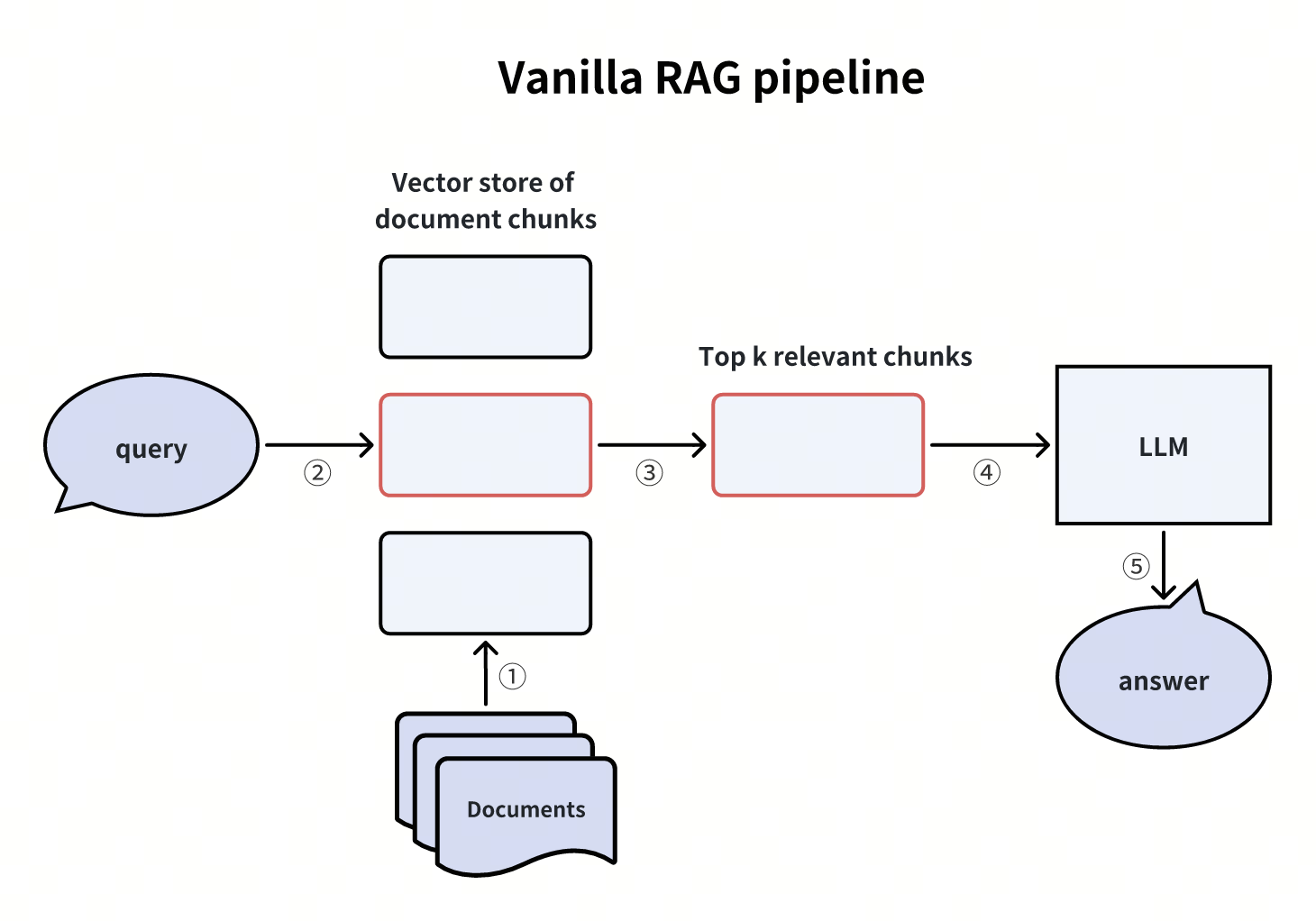 標準的なRAGパイプライン
Query: What is the hypothetical document embedding approach?
Match: hyde.png (score: 0.4756)
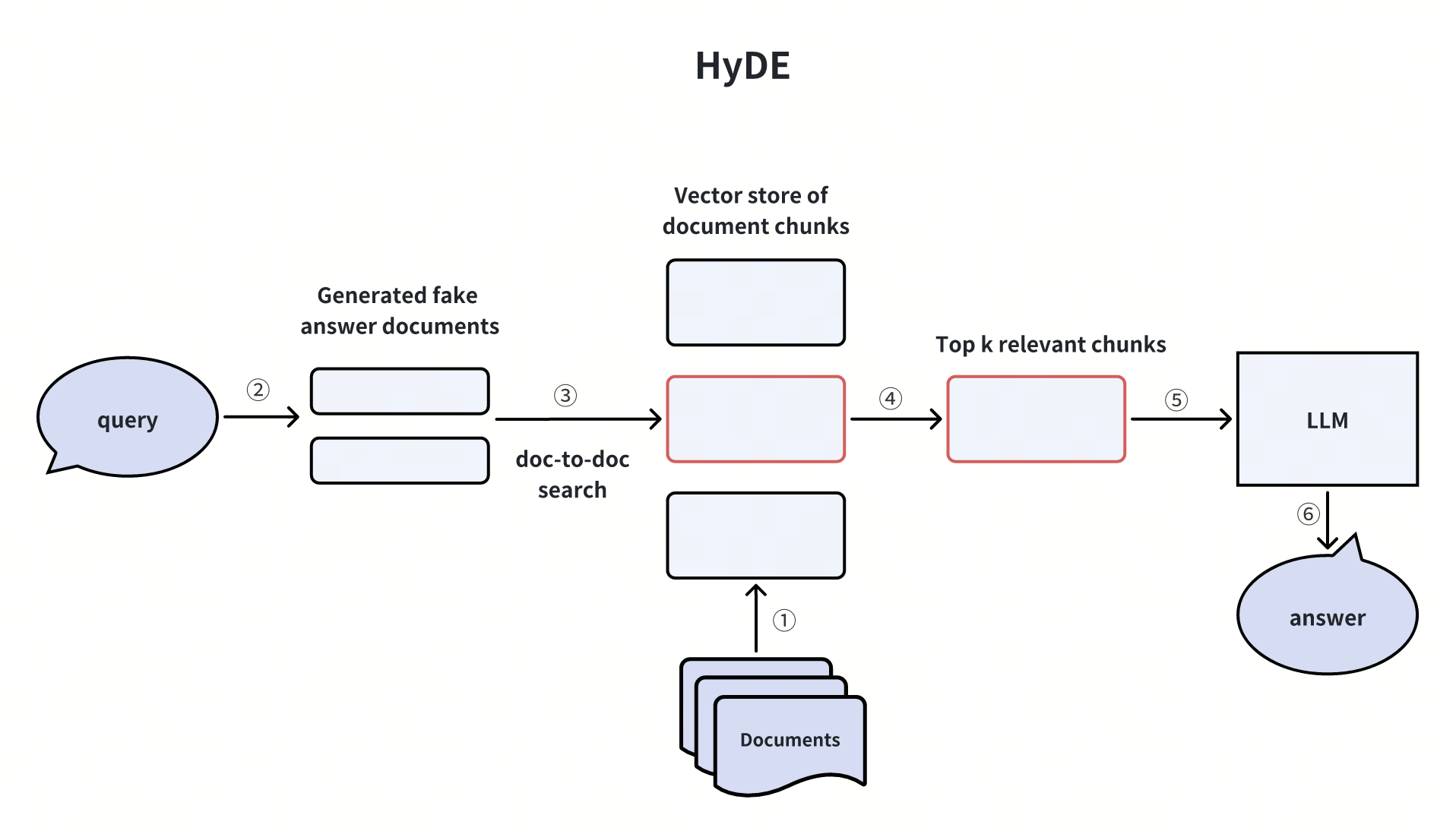 HyDE
HyDE
Query: How to combine hybrid search with reranking?
Match: hybrid_and_rerank.png (score: 0.5271)
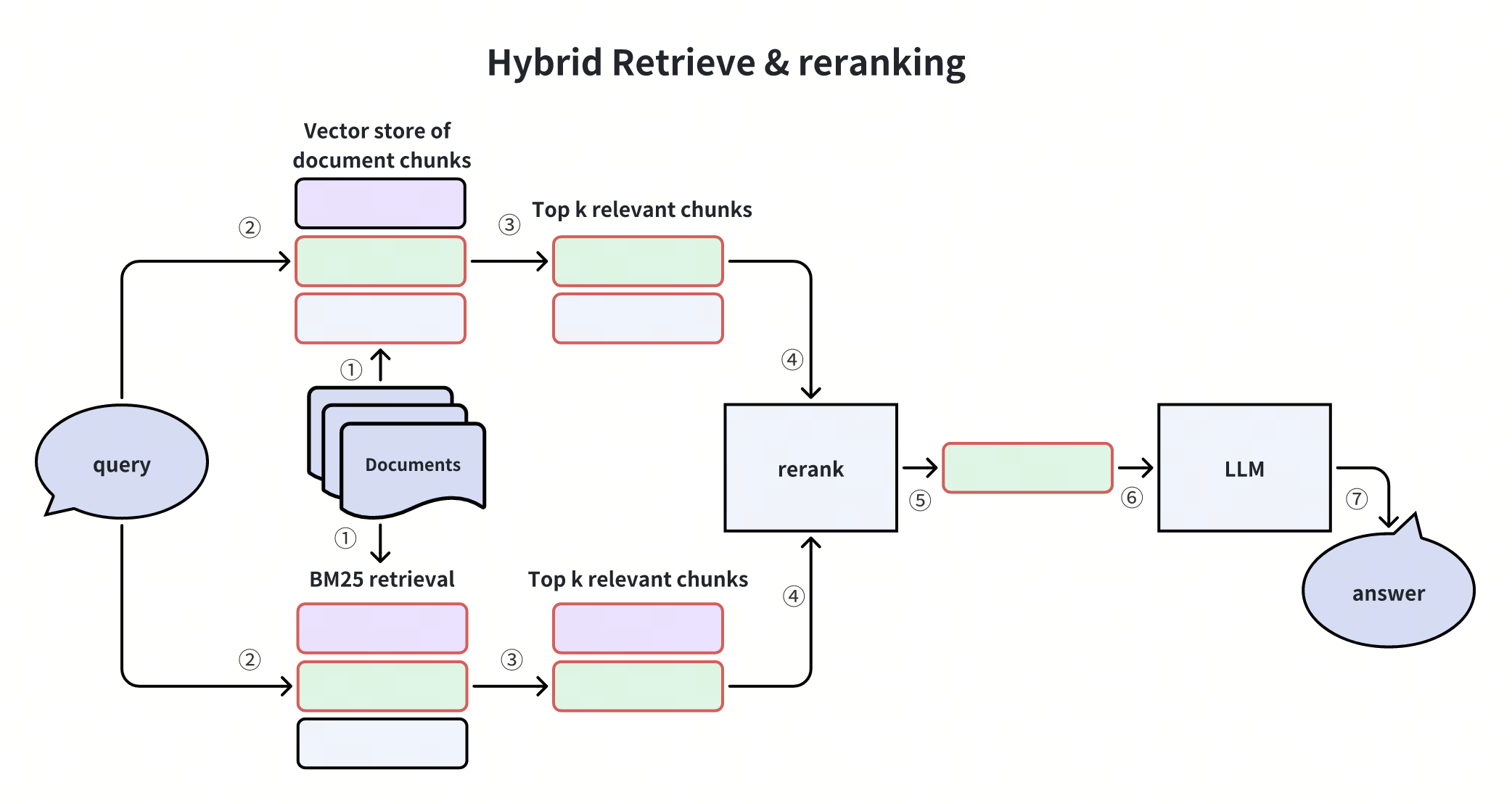 ハイブリッド検索および再ランク付け
素晴らしい!MilvusとGeminiを用いてRAGパイプラインの構築に成功し、テキストクエリを使用して関連性の高い画像を検索するクロスモーダル検索を実証しました。これらはすべて、gemini-embedding-2-preview の統一された埋め込み空間によって実現されています。
